Cloudera Flow Migration Tool Release Notes
Learn about the new features, known and fixed issues, limitations, and unsupported features in the latest release of the Cloudera Flow Migration Tool.
What's new
The Cloudera Flow Migration Tool helps you transition to NiFi 2 more efficiently by simplifying and accelerating the migration of flows from Cloudera Flow Management 2.x (powered by NiFi 1) to Cloudera Flow Management 4.x (powered by NiFi 2).
The latest version available for cloud migration scenarios is Cloudera Flow Migration Tool 5.3.4. It supports migrations from Cloudera Flow Management 2.2.9.700 and its hotfixes to 4.2.1.700 and its hotfixes, in compliance with the Apache NiFi 1.28.1-to-2.4.0 General Availability (GA) ruleset.
Improvements
Fixed an issue where the Migration Tool could report a Circular references in Parameter Contexts not allowed error when migrating process groups that use variables inherited through multiple levels of parent process groups.
Support Matrix
Before starting a migration with the Cloudera Flow Migration Tool, review the supported source and target version requirements to ensure a successful migration.
The following diagram provides an overview of the supported migration paths and the required Migration Tool versions for Cloudera Flow Management on cloud.
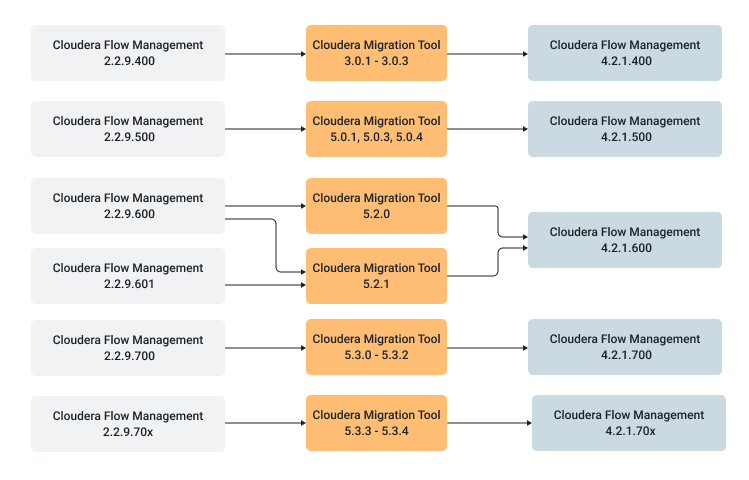
The following table lists the supported migration paths and the latest Cloudera Flow Migration Tool version available for each path. Find your current Cloudera Flow Management version in the Source version column to identify which Migration Tool version to use.
| Source Cloudera Flow Management version | Target Cloudera Flow Management version | Required Migration Tool version |
|---|---|---|
| 2.2.9.400 | 4.2.1.400 | 3.0.3 |
| 2.2.9.500 | 4.2.1.500 | 5.0.4 |
| 2.2.9.600 | 4.2.1.600 | 5.2.1 |
| 2.2.9.700 and hotfixes | 4.2.1.700 and hotfixes | 5.3.4 |
The migration process does not require the source or target Cloudera Flow Management instances to be running. Only the NAR files for the respective NiFi versions are required to complete the process.
System requirements
Before using the Cloudera Flow Migration Tool, ensure that your system meets the following requirements.
| Requirement | Details |
|---|---|
| Operating system | Linux, macOS |
| Java version | Java 21 |
| Disk space | At least 25 GB for NiFi distributions and working directories |
Download location
You can download the Cloudera Flow Migration Tool software artifacts from the Cloudera Archive.
- An active Cloudera subscription agreement
- A license key file
- The required authentication credentials (username and password)
Download the version of the tool that matches your requirements from the Cloudera Flow Migration Tool Repository.
| Cloudera Flow Migration Tool version | Source Cloudera Flow Management version | Target Cloudera Flow Management version | Cloudera Flow Migration Tool repository |
|---|---|---|---|
| 5.3.4 | 2.2.9.700x | 4.2.1.700x | Cloudera Flow Migration Tool 5.3.4 repository |
| 5.2.1 | 2.2.9.600 | 4.2.1.600 | Cloudera Flow Migration Tool 5.2.1 repository |
| 5.0.4 | 2.2.9.500 | 4.2.1.500 | Cloudera Flow Migration Tool 5.0.4 repository |
| 3.0.3 | 2.2.9.400 | 4.2.1.400 | Cloudera Flow Migration Tool 3.0.3 repository |
