How to disable weak security protocol SSLv2Hello for
Knox.
Depending on your cluster configuration and the security practices in your
organization, you might need to restrict the allowed versions of TLS/SSL used by Knox.
Older TLS/SSL versions, such as SSLv2Hello, might have vulnerabilities
or lack certain features.
Your environment must support TLS 1.2 before removing SSLv2Hello in
order to avoid compatibility issues.
-
In Cloudera Manager, select the Knox service.
-
Go to Configuration.
-
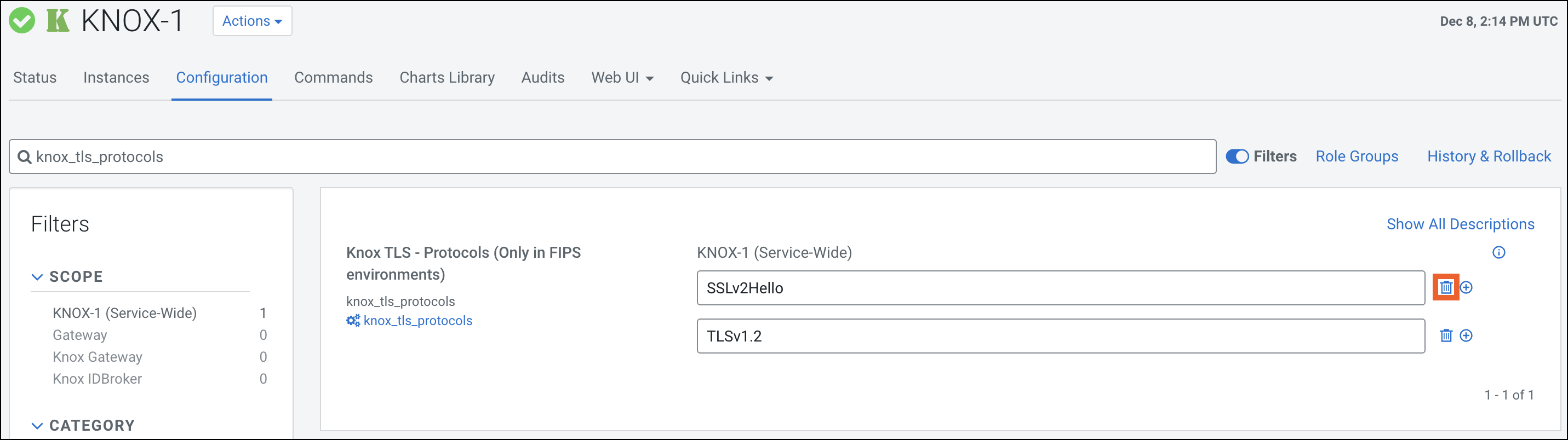
Find the Knox TLS - Protocols (Only in FIPS
environments) configuration property.
-
Click the Trash icon next to the
SSLv2Hello entry.
-
Click the Save Changes(CTRL+S) button.
-
Refresh the Knox instances configuration by clicking the Stale
Configuration: Refresh needed indicator and wait until the
refresh process completes.
-
Validate using the Knox homepage.