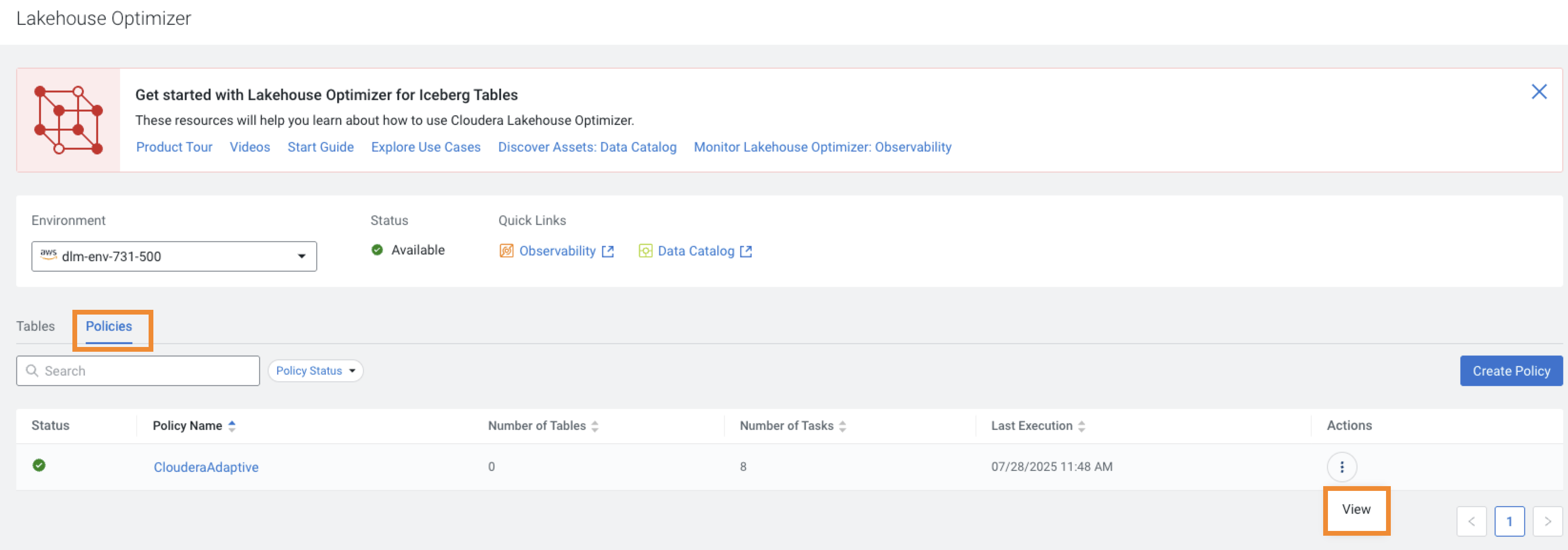
The Policies tab displays the list of existing policies for the
chosen environment. Search for a policy, or filter the policies based on the Policy
Status.
The following image displays the Policies tab on the Lakehouse
Optimize page:
When you open the Policies tab for the first time, before you create a
policy, the default policy named ClouderaAdaptive is displayed. Lakehouse
Optimizer uses the default policy as a template to create the policies.
The Policies tab displays the following details:
The current Status icon for the table maintenance activity of the tables
associated with the policy.
The Number of Tables that are associated with the policy.
The Number of Tasks or maintenance tasks that ran as a result of policy
evaluation on the associated tables.
The Last Execution or the last policy run timestamp.
The icon for
each policy displays the actions menu. Select the View action to see the
policy details on the View Policy page.
 icon for
each policy displays the actions menu. Select the View action to see the
policy details on the View Policy page.
icon for
each policy displays the actions menu. Select the View action to see the
policy details on the View Policy page.