Configure a resource-based service: HDFS
How to add an HDFS service.
-
On Service Manager > Resource Policies, click Add New Service (
 ) next to HDFS.
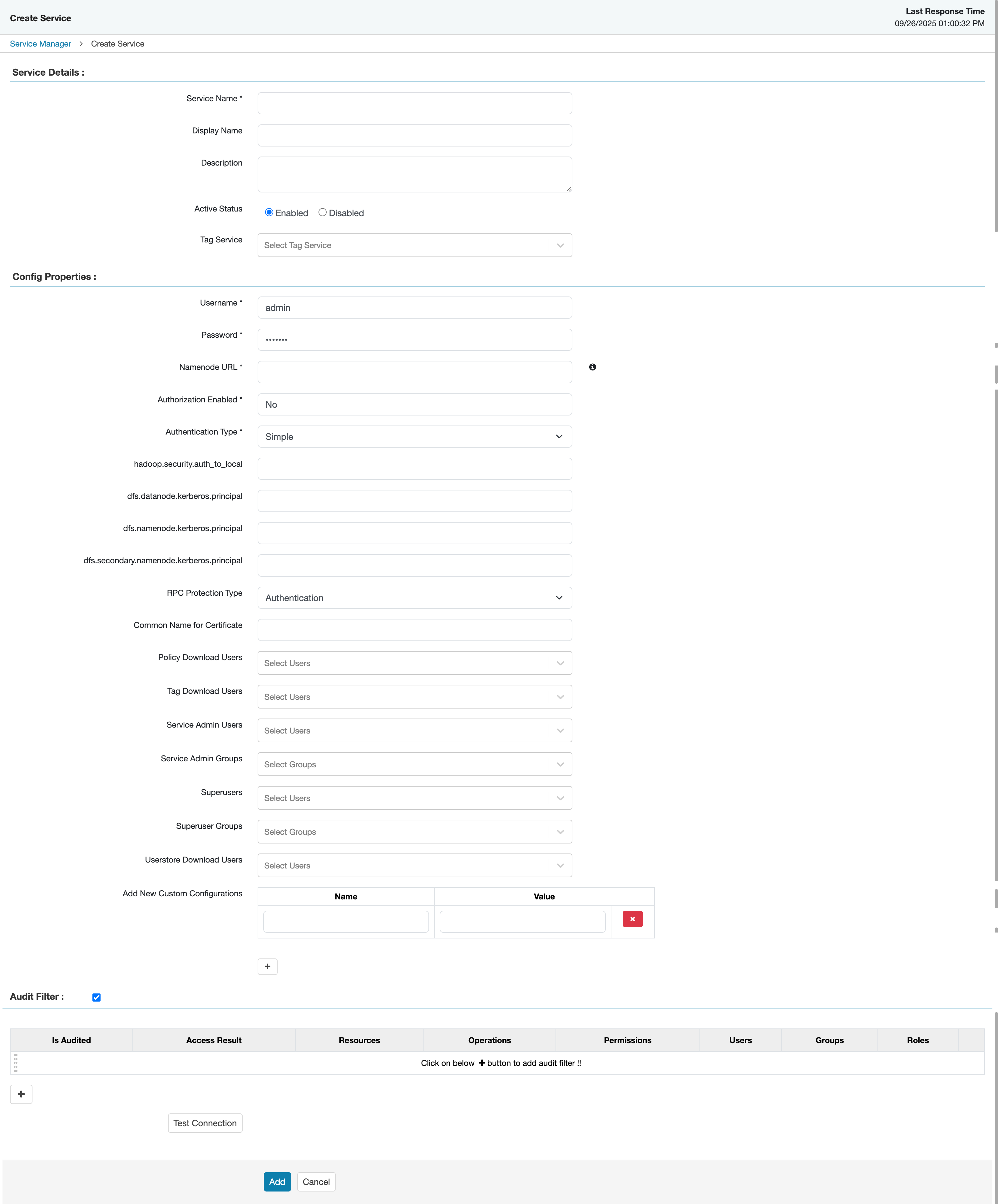
The Create Service page appears.
-
On Create Service, enter the following information:
Table 1. Service Details Field name
Description
Service Name
The name of the service; required when configuring agents.
Display Name The name which will appear on Service Manager. Description
A description of the service.
Active Status
Enabled or Disabled.
Tag Service Select a tag-based service to apply the service and its tag-based policies to HDFS. Table 2. Configuration Properties Field name
Description
Username
The end system username that can be used for connection.
Password
The password for the username entered above.
Namenode URL
hdfs://NAMENODE_FQDN:8020
The location of the Hadoop HDFS service, as noted in the hadoop configuration file core-site.xml OR (if this is a HA environment) the path for the primary NameNode.
This field was formerly named fs.defaultFS.
Authorization Enabled
Authorization involves restricting access to resources. If enabled, user need authorization credentials.
Authentication Type
The type of authorization in use, as noted in the hadoop configuration file core-site.xml; either
simpleorKerberos. (Required only if authorization is enabled).This field was formerly named hadoop.security.authorization.
hadoop.security.auth_to_local
Maps the login credential to a username with Hadoop; use the value noted in the hadoop configuration file, core-site.xml.
dfs.datanode.kerberos.principal
The principal associated with the datanode where the service resides, as noted in the hadoop configuration file hdfs-site.xml. (Required only if Kerberos authentication is enabled).
dfs.namenode.kerberos.principal
The principal associated with the NameNode where the service resides, as noted in the hadoop configuration file hdfs-site.xml. (Required only if Kerberos authentication is enabled).
dfs.secondary.namenode.kerberos.principal
The principal associated with the secondary NameNode where the service resides, as noted in the hadoop configuration file hdfs-site.xml. (Required only if Kerberos authentication is enabled).
RPC Protection Type
Only authorised user can view, use, and contribute to a dataset. A list of protection values for secured SASL connections. Values: Authentication, Integrity, Privacy
Common Name For Certificate
The name of the certificate.
This field is interchangeably named Common Name For Certificate and Ranger Plugin SSL CName in Create Service pages.
Policy Download Users Selected users can download policies in the service. Tag Download Users Selected users can download tags in the service. Service Admin Users Selected users can create/update/delete/read policies in the service. Service Admin Groups Users in the selected groups can create/update/delete/read policies in the service. Superusers The plugin grants all accesses on all resources to the selected users. Superuser Groups The plugin grants all accesses on all resources to users in the selected groups. Userstore Download Users Selected users can download user and group details. Add New Configurations
Add any other new configuration(s).
- Click Test Connection.
- Click Add.
