Architecture and how it works
The Disk Balancer works entirely within the local Datanode to securely shift data from heavily utilized disks to under-utilized ones without impacting cluster-wide replication or involving the Storage Container Manager (SCM).
Volume data density
Disk Balancer detects imbalance using a metric called Volume Data Density, which measures how far a disk's individual utilization deviates from the node's average utilization.
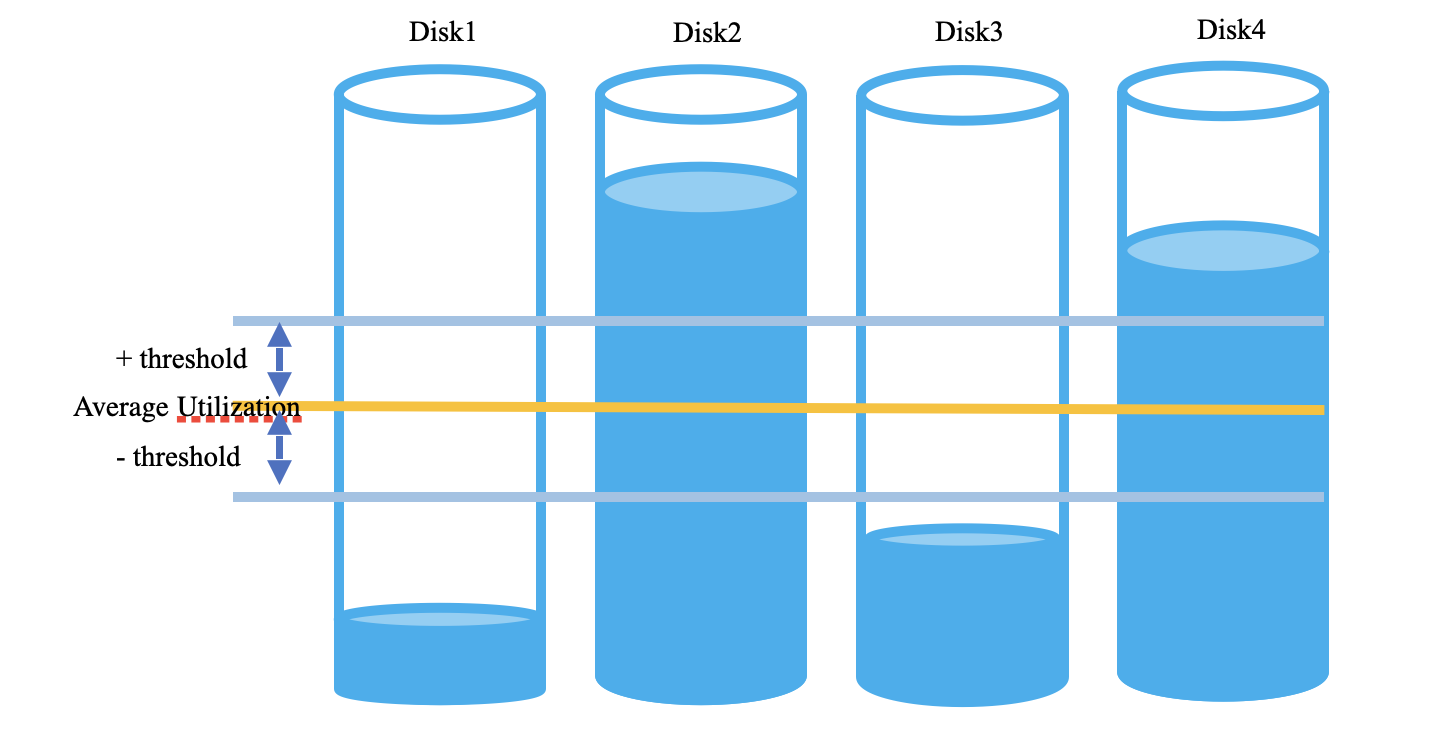
The metrics are calculated as follows:
- Average utilization = (Total capacity - Total free space) / Total capacity
- Volume utilization = (Disk capacity - Disk free space) / Disk capacity
- Volume Data Density = Volume utilization - average Utilization
A disk is marked as a candidate for balancing if its Volume Data Density exceeds a configurable threshold (default is 10.0%). The Disk Balancer then moves the containers from most utilised disk to the least utilised disk. Disk Balancer can be triggered manually by CLI commands.
Container move process
To ensure data is always consistent and production I/O isn't interrupted, Disk Balancer uses a strictly safe moving process:
- Select volumes: Identifies the most over-utilized volume as the source and the most under-utilized volume with sufficient space as the destination.
- Select containers: Picks eligible containers from the source volume. By default, only CLOSED and QUASI_CLOSED containers are eligible for moving.
- Copy and import: A temporary copy of the container is
created and imported onto the destination disk. The copy transitions into a
RECOVERINGstate and is imported as a new container. - Lazy deletion: After a successful move and metadata update, the original container is scheduled for lazy deletion (by default, 5 minutes later).
