Adjusting the expiration time of Cloudera Embedded Container Service cluster certificates
The RKE Kubernetes, Vault, and Cloudera Embedded Container Service webhook certificate expiration times are set to one year by default. To avoid certificate expiration errors, you may want to extend the expiration times.
- These steps describe how to adjust the expiration time of internal cluster certificates in an existing Cloudera Embedded Container Service cluster.
- For a new cluster, if the nodes have been added to Cloudera Manager
before creating the Cloudera Embedded Container Service cluster, you can
edit the
cluster_signing_durationconfiguration property in Cloudera Manager before creating the Cloudera Embedded Container Service cluster.
Adjusting the expiration time of the RKE Kubernetes cluster certificate
- In Cloudera Manager, select the ECS cluster, then click ECS.
- Click the Configuration tab, then use the Search box to locate the
cluster_signing_durationconfiguration property. - The
cluster_signing_durationconfiguration property sets the expiration time for the RKE Kubernetes, Vault, and ECS webhook certificates, and is set to 1 year (365 days) by default. In the example below, the certificate expiration has been reset to 5 years (1825 days):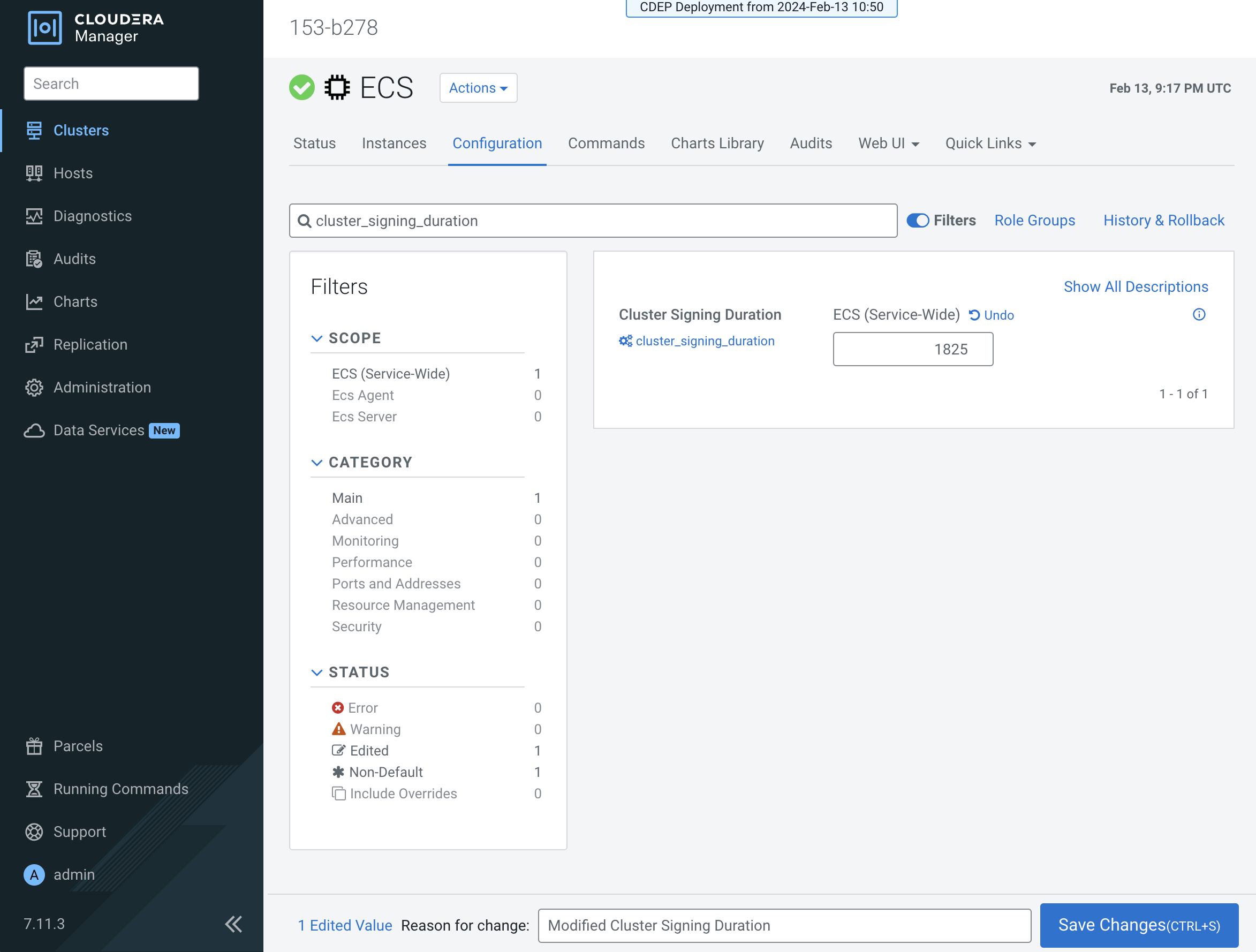
- Click Save Changes.
- On the ECS Cluster landing page, click Actions > Refresh Cluster.
- For versions:
- Upto 1.5.4 SP1after the Refresh is complete, click Actions > Rolling Restart.
- From 1.5.4 SP2 and later, after the Refresh is complete, click Actions > Restart.
- After the restart is complete, the certificate expiration time is reset to the new value. You can also use the CLI to verify the new certificate expiration setting.
Adjusting the expiration time of the Vault certificate
- In Cloudera Manager, select the ECS cluster, then click ECS.
- Click the Configuration tab, then use the Search box to locate the
cluster_signing_durationconfiguration property. - The the
cluster_signing_durationconfiguration property sets the expiration time for the RKE Kubernetes, Vault, and ECS webhook certificates, and is set to 1 year (365 days) by default. In the example below, the certificate expiration has been reset to 5 years (1825 days):
- Click Save Changes.
- Certificate rotation must be performed through the Cloudera Manager. For more information, see Rotating internal ECS certificates.
- You can use the CLI to verify the new certificate expiration setting:
root       49076   48970  2 16:49 ?        00:00:10 kube-controller-manager
--flex-volume-plugin-dir=/var/lib/kubelet/volumeplugins --terminated-pod-gc-threshold=1000 --permit-port-sharing=true
--allocate-node-cidrs=true --authentication-kubeconfig=/var/lib/rancher/rke2/server/cred/controller.kubeconfig
--authorization-kubeconfig=/var/lib/rancher/rke2/server/cred/controller.kubeconfig --bind-address=127.0.0.1
--cluster-cidr=10.42.0.0/16 --cluster-signing-duration=43800h
<snip!>
Adjusting the expiration time of the Cloudera Embedded Container Service webhook certificate
- In Cloudera Manager, select the ECS cluster, then click ECS.
- Click the Configuration tab, then use the Search box to locate the
cluster_signing_durationconfiguration property. - The the
cluster_signing_durationconfiguration property sets the expiration time for the RKE Kubernetes, Vault, and ECS webhook certificates, and is set to 1 year (365 days) by default. In the example below, the certificate expiration has been reset to 5 years (1825 days):
- Click Save Changes.
- Certificate rotation must be performed through the Cloudera Manager. For more information, see Rotating internal ECS certificates.
- Check for any pods in the Pending state whose status shows that they cannot tolerate
the
node-role.kubernetes.io/control-planetoleration. Restart those pods. - You can use the CLI to verify the new certificate expiration setting:
root       49076   48970  2 16:49 ?        00:00:10 kube-controller-manager
--flex-volume-plugin-dir=/var/lib/kubelet/volumeplugins --terminated-pod-gc-threshold=1000 --permit-port-sharing=true
--allocate-node-cidrs=true --authentication-kubeconfig=/var/lib/rancher/rke2/server/cred/controller.kubeconfig
--authorization-kubeconfig=/var/lib/rancher/rke2/server/cred/controller.kubeconfig --bind-address=127.0.0.1
--cluster-cidr=10.42.0.0/16 --cluster-signing-duration=43800h
<snip!>
