Scenario: Deployed state check frequency and timeout
Learn how you can control the frequency of checking the state of deployed operations and the timeout value for the deployed operations, and resolve issues.
- Scenario
- A subset of agents have to deal with other non-CEM applications that require significant percentage of network IO on those agents. This limits the bandwidth available for the subset of agents compared to other agents. As a result, file download time is doubled compared to the expected 20-30 seconds.
- Analysis
-
Assume the agents are healthy, but the operation itself is time consuming. EFM can send an operation to multiple agents, but because the agents spend more time executing the operation, the operation remains in deployed state longer. To manage this situation, you can use the following parameters:
efm.operation.monitoring.inDeployedStateTimeoutefm.operation.monitoring.inDeployedStateCheckFrequency
The following chart illustrates how these parameters affect the behavior: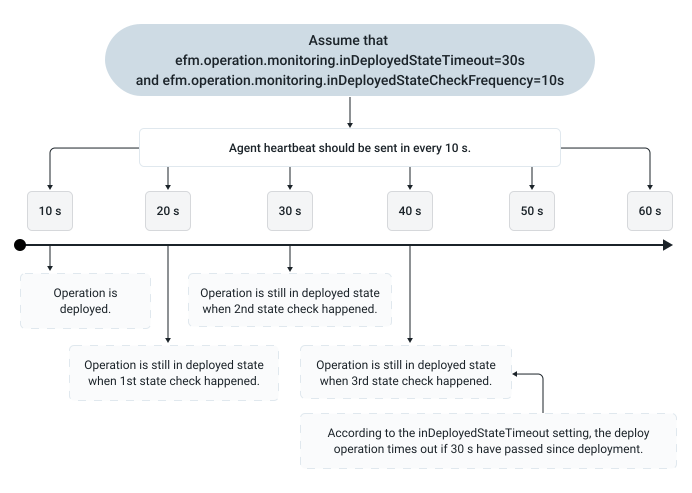
- Solution
-
In this case you set
inDeployedStateTimeout=70andinDeployedStateCheckFrequency=5s. So EFM allows enough time for long running file downloads and checks frequently enough to avoid wasting too much time.
