Cloudera Flow Migration Tool Release Notes
Learn about the new features, known issues, fixed issues, limitations, and unsupported features in the latest release of the Cloudera Flow Migration Tool.
What's new
The Cloudera Flow Migration Tool simplifies and accelerates the migration of flows from Cloudera Flow Management 2.x (powered by NiFi 1) to Cloudera Flow Management 4.x (powered by NiFi 2).
Cloudera Flow Migration Tool 5.1.2 supports flow migrations from Cloudera Flow Management 2.1.7.3000 or 2.1.7.4000 to 4.11.0.0, using the General Availability (GA) Apache NiFi 1.28.1-to-2.4.0 migration ruleset.
Key features
- Support for protected sensitive properties keys:
-
Cloudera Flow Migration Tool 5.1.2 can migrate versioned flows when the sensitive properties key is encrypted using the AES/GCM protection scheme. This enables the migration of flows configured with this additional security.
- Fixes for the pre-configured migration tool:
-
The migration tool includes pre-configured Cloudera Flow Management 2 and 4 libraries, allowing it to run without external dependencies. This release resolves all known issues with this configuration.
- Component migration fixes:
-
This release fixes issues when migrating processors that use CRON scheduling and Parameter Contexts populated by Parameter Providers.
- Support for inherited variables:
-
This release fixes the Circular references in Parameter Contexts not allowed error that occurred when migrating process groups using variables inherited through multiple levels of parent process groups.
Support Matrix
Before starting a migration with the Cloudera Flow Migration Tool, review the supported source and target version requirements to ensure a successful migration.
The following diagram provides a high-level overview of the supported migration paths and the required Migration Tool versions for Cloudera Flow Management on premises.
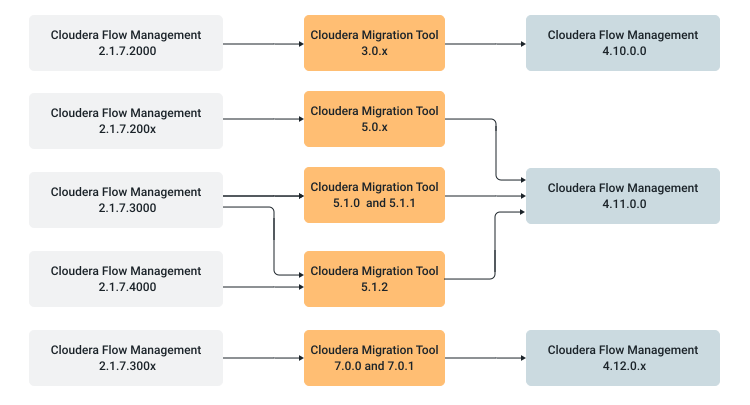
The table below provides detailed information about the supported migration paths and the latest Migration Tool versions for these paths.
| Source Cloudera Flow Management version | Target Cloudera Flow Management version | Required Migration Tool version |
|---|---|---|
| 2.1.7.2000 | 4.10.0.0 | 3.0.3 |
| 2.1.7.2000 + 2.1.7.2002 - 2007 | 4.11.0.0 | 5.0.4 |
| 2.1.7.3000 | 4.11.0.0 | 5.1.1 |
| 2.1.7.3000 + 2.1.7.4000 | 4.11.0.0 | 5.1.2 |
| 2.1.7.300x | 4.12.0.x | 7.0.2 |
The migration process does not require the source or target Cloudera Flow Management instances to be running. Only the NAR files for the respective NiFi versions are required to complete the process.
System requirements
Before using the Cloudera Flow Migration Tool, ensure that your system meets the following requirements.
| Requirement | Details |
|---|---|
| Operating system | Linux, macOS |
| Java version | Java 21 |
| Disk space | At least 25 GB for NiFi distributions and working directories |
Download location
You can download the Cloudera Flow Migration Tool software artifacts from the Cloudera Archive.
- An active Cloudera subscription agreement
- A license key file
- The required authentication credentials (username and password)
Download the version of the tool that matches your requirements. For the exact download URLs, see Cloudera Flow Migration Tool download links.
