Deployment architecture
Learn the architecture of typical Cloudera Streams Messaging Operator for Kubernetes deployments.
Cloudera Streams Messaging Operator for Kubernetes includes multiple installable components:
-
Strimzi – Deploys and manages Kafka and Kafka Connect clusters on Kubernetes.
-
Strimzi Drain Cleaner – Utility for safely moving Strimzi-managed Kafka Pods off Kubernetes nodes during maintenance or upgrades.
-
Cloudera Surveyor – A UI application for monitoring and managing Kafka clusters.
-
Schema Registry – Provides centralized schema storage and validation.
These components are largely independent and are installed with separate Helm charts. You can install any subset depending on your use case and operational objectives. For the complete operational experience, Cloudera recommends installing all components. Strimzi Drain Cleaner is installed with its own Helm chart but requires an existing Strimzi deployment. Cloudera strongly recommends installing it whenever you install Strimzi.
Strimzi
The following is the typical architecture of a Strimzi and Kafka deployment in Cloudera Streams Messaging Operator for Kubernetes.
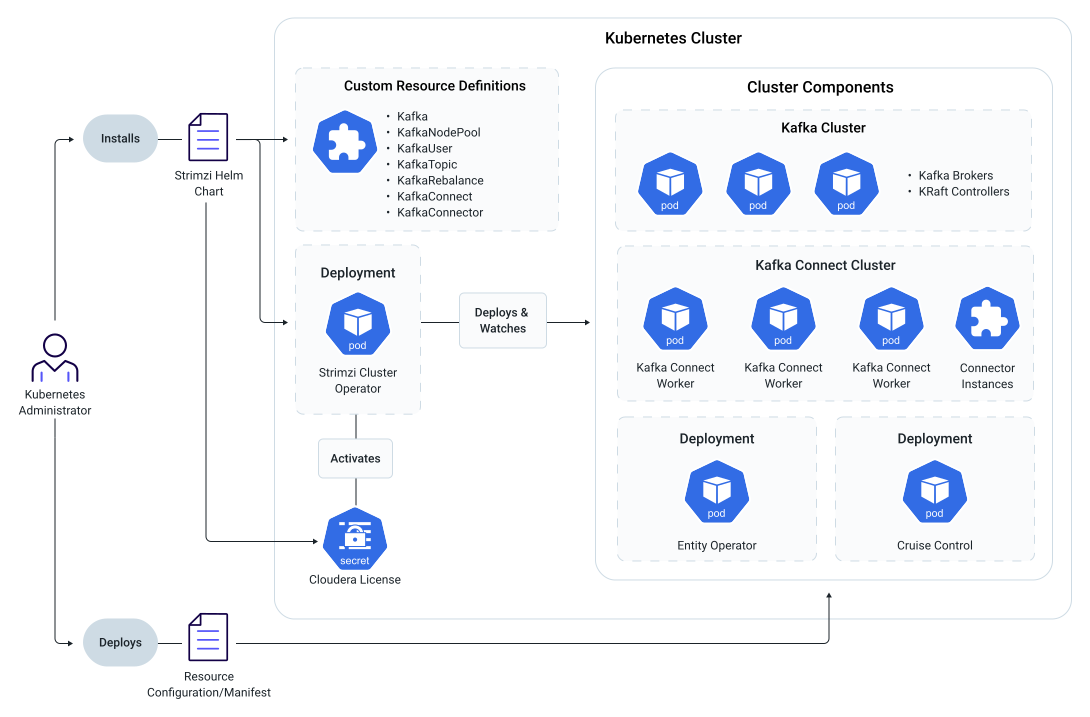
- Kafka – represents a Kafka cluster consisting of Kafka brokers, KRaft controllers, Cruise Control and Strimzi Entity Operators.
- KafkaNodePool – represents a group of Kafka brokers from the cluster that have the same configuration.
- KafkaTopic – represents a Kafka topic.
- KafkaUser – represents a user that is external to the Kafka cluster.
- KafkaRebalance – represents a broker rebalance action for the Kafka cluster.
- KafkaConnect – represents a Kafka Connect cluster consisting of one or more Kafka Connect workers.
- KafkaConnector – represents a Kafka Connect connector instance.
When installing the Helm chart, a Strimzi Cluster Operator Kubernetes Deployment is created with a Strimzi Cluster Operator Pod running within the deployment. This application is responsible for monitoring cluster components and reconciling these components when their configuration changes. During installation you are required to register a license, which activates the Strimzi Cluster Operator.
Following installation, you deploy various custom resources in the cluster like Kafka and KafkaNodePool resources. Based on the configuration in the resource, the Strimzi Cluster Operator deploys clusters of the components described by the resources.
Specifically, Kafka and KafkaNodePool resources will deploy Kafka clusters. Optionally, if configured, the Kafka resource also deploys the Strimzi Entity Operator and Cruise Control. The Strimzi Entity Operator is responsible for managing other resources inside the particular Kafka cluster (topics, users, and so on), Cruise Control is used for rebalancing Kafka.
KafkaConnect and KafkaConnector resources are used to deploy Kafka Connect clusters and instances of Kafka Connect connectors.
Strimzi Drain Cleaner
The following is the typical architecture of a Strimzi Drain Cleaner deployment in Cloudera Streams Messaging Operator for Kubernetes.
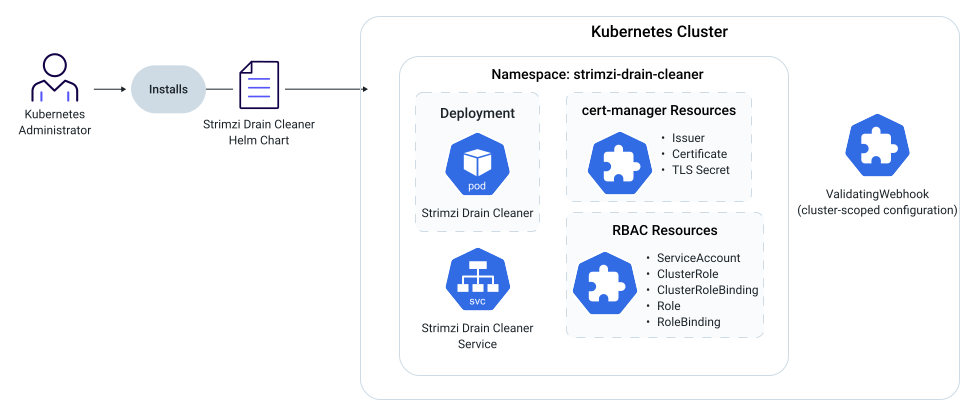
Strimzi Drain Cleaner is installed with a Helm chart. The Helm chart creates a Strimzi Drain Cleaner Deployment, Service, ValidatingWebhookConfiguration, and RBAC resources. With default values, cert-manager Certificate and Issuer resources are created as well. Kubernetes creates the associated Strimzi Drain Cleaner Pods from the Deployment; the replica count defaults to two for high availability. The ValidatingWebhookConfiguration is a cluster-scoped resource and is not part of the strimzi-drain-cleaner namespace. Install only one Strimzi Drain Cleaner Helm release per Kubernetes cluster.
When a Kafka broker or KRaft controller Pod is evicted from a node, the
validating admission webhook intercepts the eviction request, denies it, adds the
strimzi.io/manual-rolling-update annotation to the Pod, and
the Strimzi Cluster Operator performs a controlled rolling update. Strimzi Drain Cleaner acts on
Kafka broker and controller Pods, not other Strimzi workloads such as Kafka
Connect. After installation, Strimzi Drain Cleaner runs continuously in the background and
requires no day-to-day operator action.
Cloudera Surveyor
The following is the typical architecture of a Cloudera Surveyor deployment in Cloudera Streams Messaging Operator for Kubernetes.
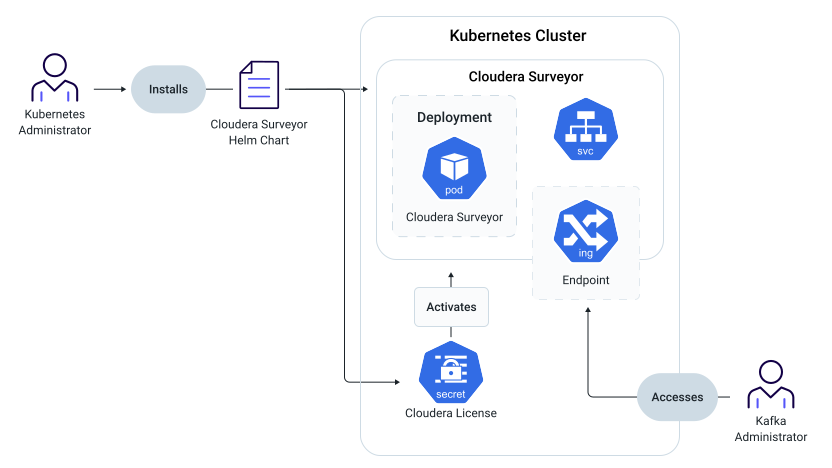
Cloudera Surveyor is installed with a Helm chart. The Helm chart creates a Cloudera Surveyor Deployment and Service. Kubernetes creates the associated Cloudera Surveyor Pods as a result of the Deployment. The replica count for the Deployment is set to two by default, resulting in the creation of two Pods for high availability. Optionally, an Ingress is deployed as well if configured. Users access the Cloudera Surveyor UI through the Ingress and Service.
Schema Registry
The following is the typical architecture of a Schema Registry deployment in Cloudera Streams Messaging Operator for Kubernetes.
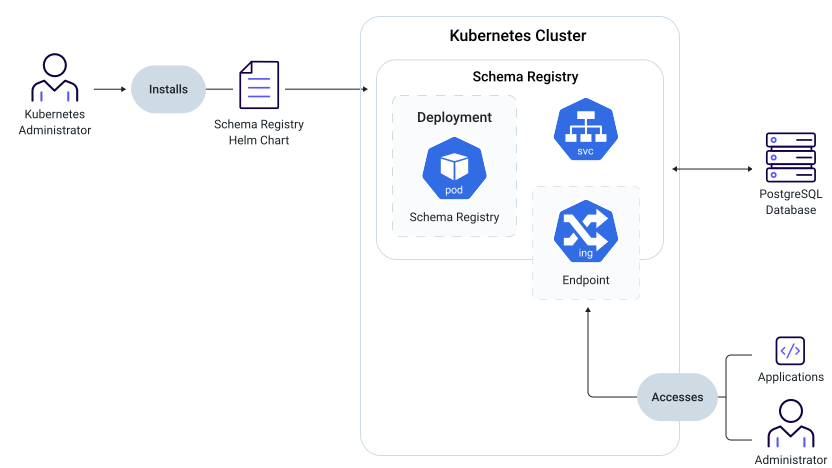
Schema Registry is installed with a Helm chart. The Helm chart creates a Schema Registry Deployment and Service. Kubernetes creates the associated Schema Registry Pods as a result of the Deployment. The replica count for the Deployment is set to two by default, resulting in the creation of two Pods for high availability. Optionally, an Ingress is deployed as well if configured.
Administrators and applications can access Schema Registry's UI and REST API through the Ingress and the Service.
Schema Registry uses a PostgreSQL database to persistently store schema definitions and metadata. For testing and evaluation purposes, an in-memory database option is available, but it is not recommended for production use as all schemas will be lost when Pods restart.
