Brokers
Kafka broker status, disk usage, leader and replica counts, and configuration properties are monitored and edited from the Brokers page in Cloudera Surveyor.
Brokers page
The Brokers page provides detailed information about all brokers within a selected cluster. Monitor broker health, resource usage, and active alerts. Filter and sort brokers by status, ID, disk usage, or alert severity to quickly identify brokers requiring attention.
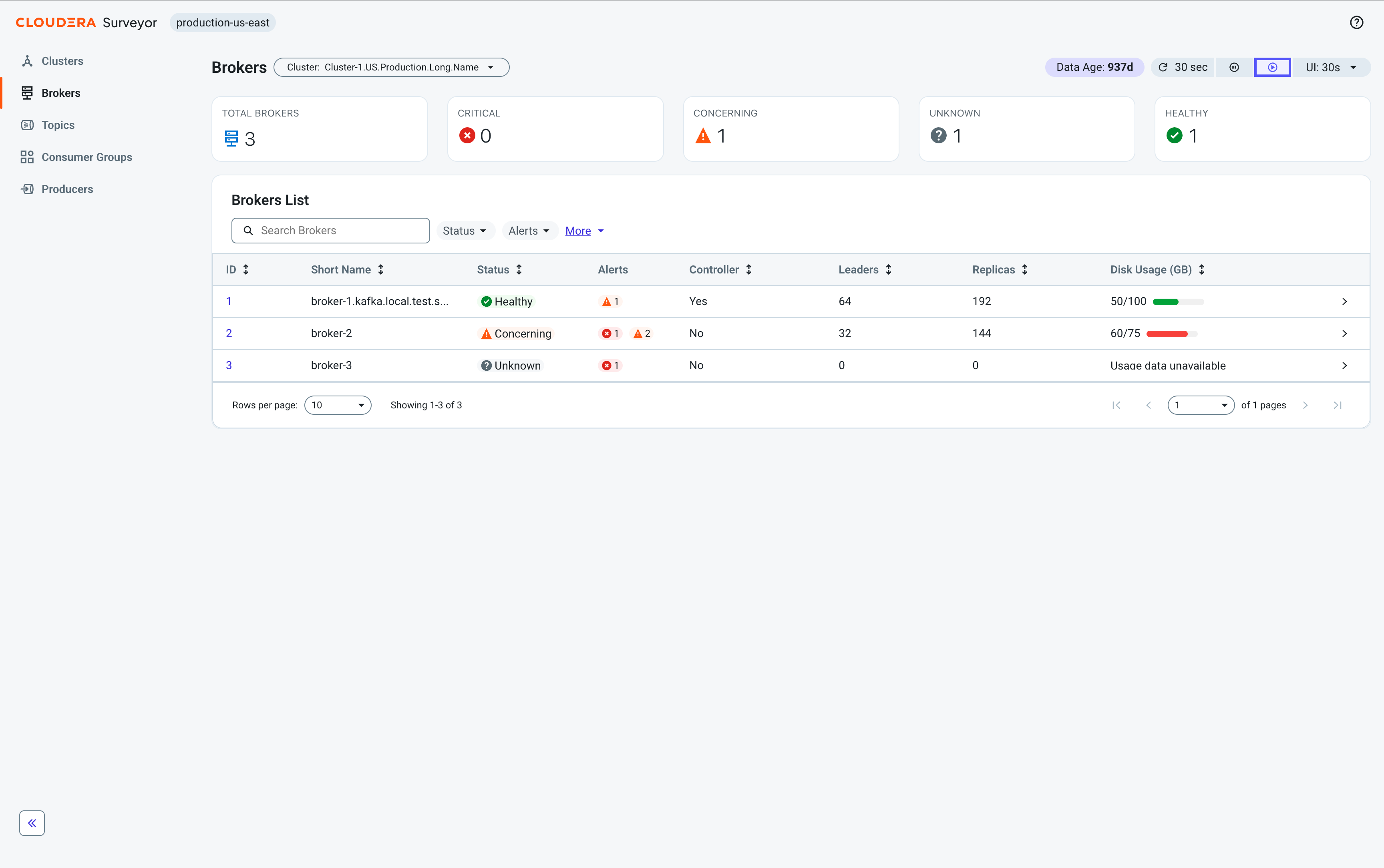
At the top of the page, health summary tiles display the total number of brokers categorized by status, providing an at-a-glance view of the overall health distribution across all brokers in the selected cluster.
Beneath the tiles, a table displays the following essential broker metrics for quick health assessment:
-
ID – A unique identifier for the broker. Click to open the Broker Details page.
-
Short Name – A shortened broker hostname for easier identification. Calculated by removing the longest common suffix from broker hostnames, or using
hostname:portwhen hostnames are identical. -
Status – The overall health status of the broker.
-
Alerts – A summary of alert counts by severity.
-
Controller – An indication of whether this broker is the cluster controller. This column is only displayed for ZooKeeper-based clusters.
-
Leaders – The number of partition leaders hosted on the broker.
-
Replicas – The number of partition replicas hosted on the broker.
-
Disk Usage (GB) – The total disk space used across all log directories.
Click any broker row to open the Entity Details drawer for quick access to all broker attributes. Click the broker ID to go to the Broker Details page.
Broker Details page
The Broker Details page provides in-depth information about an individual broker's status and health. At the top of the page, health summary tiles display the broker's overall status and key metrics including disk usage, replica count, and leader count.
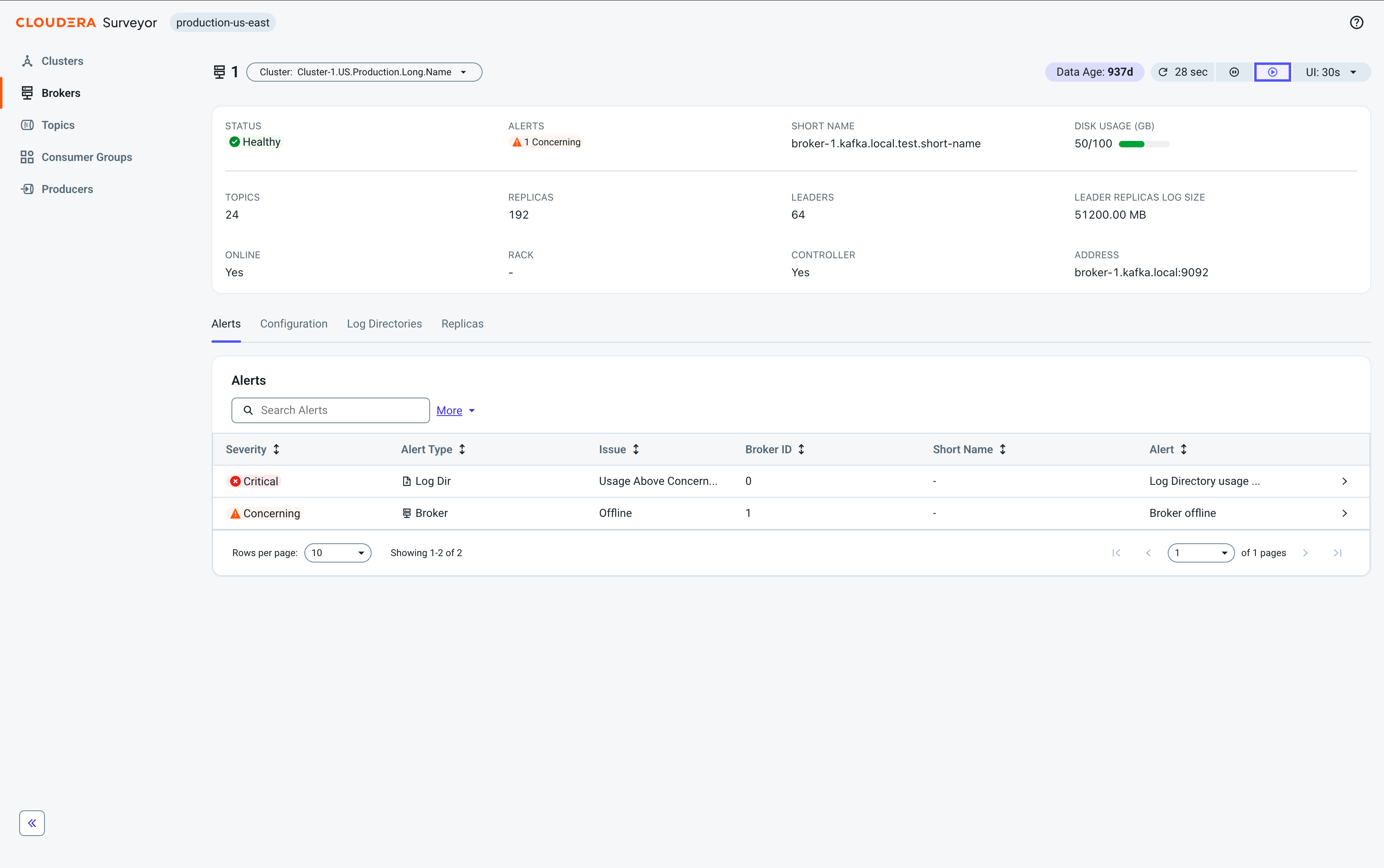
The page organizes broker information through the following tabs:
-
Alerts – View and monitor all alerts affecting the broker.
-
Configuration – View and edit broker configuration properties.
-
Log Directories – Monitor log directory status and disk usage.
-
Replicas – View all partition replicas hosted on this broker.
Editing broker properties
Edit broker properties in Cloudera Surveyor using the  Edit Properties
option on the Configuration tab of the Broker Details pages. This option provides comprehensive
control over broker settings.
Edit Properties
option on the Configuration tab of the Broker Details pages. This option provides comprehensive
control over broker settings.
Broker configuration properties control Kafka broker behavior and settings. In Cloudera Surveyor, you modify these properties using the  Brokers > Broker Details > Configuration >
Edit properties option, which opens the Edit Properties modal. The
modal displays all broker configuration properties retrieved from Kafka and allows you to
bulk edit with a single operation. Modified properties are marked with indicators, and
changes are staged for review before being applied. If you navigate away with unsaved
changes, warnings are displayed and your edits are automatically preserved.
Brokers > Broker Details > Configuration >
Edit properties option, which opens the Edit Properties modal. The
modal displays all broker configuration properties retrieved from Kafka and allows you to
bulk edit with a single operation. Modified properties are marked with indicators, and
changes are staged for review before being applied. If you navigate away with unsaved
changes, warnings are displayed and your edits are automatically preserved.
The property list includes both static and dynamic Kafka properties. However, you can only successfully modify dynamic properties.
Whether a property is dynamic or static is indicated by the Read Only attribute. Static properties are marked as Read Only: yes, while dynamic properties are Read Only: no. When you attempt to modify a static property and apply changes, Kafka rejects the modification. This is because static properties are fundamental broker settings that require a broker restart to take effect. Because Cloudera Surveyor does not manage the lifecycle of clusters and cannot restart brokers, you cannot change these properties through the UI.
- You must have the necessary permissions to modify broker configurations in your Kafka
cluster. The required Kafka ACL is
ALTER_CONFIGSon theBROKERresource. - Broker configuration editing must be enabled for the target cluster. If the Edit Properties button is greyed out, editing is disabled for this cluster through Cloudera Surveyor configuration. For more information, see Disabling broker configuration editing.
-
In Cloudera Surveyor, click
Brokers.
-
Click Edit Properties.
-
Review your changes and click
 Apply
Changes.
Properties that are modified are marked with an indicator pill. You can also choose to discard your changes by clicking
Apply
Changes.
Properties that are modified are marked with an indicator pill. You can also choose to discard your changes by clicking Discard
Changes.
Discard
Changes.
