Apache Airflow scaling and tuning considerations
You must consider certain limitations related to the deployment architecture and guidelines for scaling and tuning of the deployment while creating or running Airflow jobs (DAGs).
Cloudera Data Engineering deployment architecture
If you use Airflow to schedule multi-step pipelines, develop multi-step pipelines, or both, you must consider deployment limitations to scale your environment.
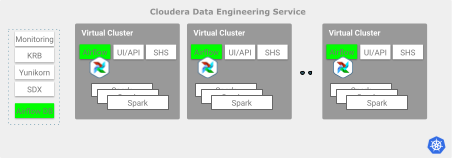
Consider the following guidelines to decide when to scale horizontally, given the total number of loaded DAGs, the number of concurrent tasks, or both:
Cloudera Data Engineering service guidelines
The number of Airflow jobs that can run at the same time is limited by the number of parallel tasks that are triggered by the associated DAGs. The number of tasks can reach up to 250-300 when running in parallel per Cloudera Data Engineering service.
Cloudera recommends creating more Cloudera Data Engineering services to increase the possible number of concurrent Airflow tasks beyond the limits.
Virtual Cluster guidelines
Airflow Task Concurrency
- Each Virtual Cluster has a maximum parallel task execution limit of 250. While thousands of DAGs can be submitted, the Airflow scheduler places them in a queue, and only 250 tasks are allowed to run in parallel across the Virtual Cluster at any given time.
- The number of concurrently running Airflow task pods is limited by the Virtual Cluster
aggregate resource quota. Cloudera Data Engineering keeps the tasks in queue until
the existing pods finish and free up CPU and memory. This limit is often the effective
ceiling, even if the limit is below the 250-task platform limit. The default Airflow worker
pod has the following resource request limits:
- CPU requests = 1
- CPU limits = No limit
- Memory requests = 2 Gi
- Memory limits = 2 Gi
For more information, see Creating Airflow jobs using Cloudera Data Engineering.
Strategies for Scaling Airflow
- Vertical Scaling (Reaching the Platform Limit) – This
strategy involves increasing the
GuaranteedandMaximumCPU or memory quotas for a single Virtual Cluster. A Virtual Cluster is often resource-bound. Vertical scaling provides the necessary resources to run more concurrent tasks, allowing you to scale up to the maximum limit. - Horizontal Scaling (Beyond the Platform Limit) – Once a single Virtual Cluster has enough resources to hit the maximum limit, it becomes platform-limited. In this case, scaling the total concurrency further is only possible by distributing Airflow DAGs across multiple, separate Virtual Clusters.
