Configuring resource management
If you are experiencing memory issues and notice queries failing, it is recommended that you increase the allocated query memory for the Trino Coordinator and Worker.
-
Go to the Virtual Warehouses tab, locate the Trino Virtual
Warehouse and click
 > Edit.
The Trino Virtual Warehouse Details page is displayed.
> Edit.
The Trino Virtual Warehouse Details page is displayed. -
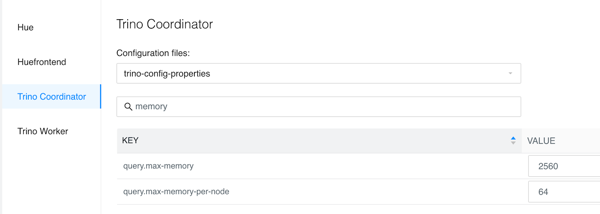
Search for the following properties and modify the values as recommended:
query.max-memory— Maximum amount of user memory that can be used by a query across the entire cluster.Recommended value:
query.max-memory-per-node*number of worker nodes. For example, for 40 nodes, the value is 2560 GB.query.max-memory-per-node— Maximum amount of user memory that can be used by a query on a worker node.Recommended value: 64 GB