cm_trino service user impersonation behavior
The Ranger Trino authorization service (cm_trino) is configured with a
default security posture that is too permissive. Learn how you can review and reinforce these
settings to prevent unauthorized user impersonation.
By default, the Ranger configuration parameter, ranger.default.policy.groups
is populated with a specific administrative group (_c_ranger_admins_….). As a
result, the default Ranger policy, "all - trinouser" allows all users within this administrative
group to impersonate any other user.
In Production environments, it is recommended that you perform the following recommendations to avoid a relaxed security posture and restrict user impersonation:
- Service-level impersonation
- Only specific technical service users (typically prefixed with
srv_) require the ability to act on behalf of any user. You can modify the "all - trinouser" Ranger policy to include only these specific users or groups. - User self-impersonation
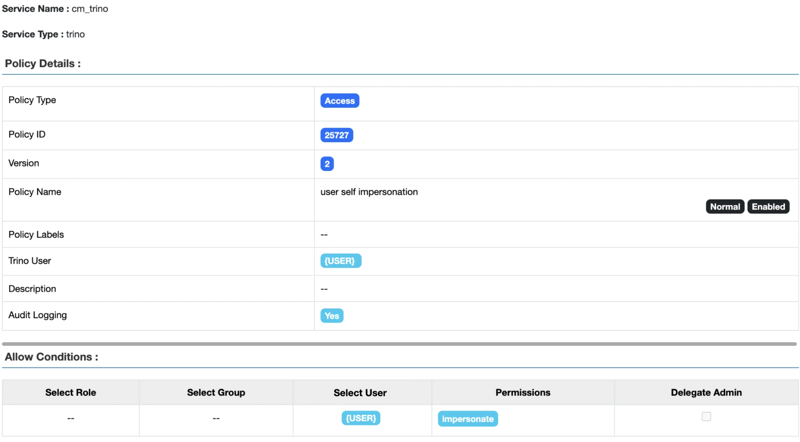
- Trino requires an explicit policy to allow an authenticated user to act on their own behalf.
To ensure a secure posture, you can create a self-impersonation policy in the Ranger Trino
service.
Under this policy, you must set the Trino User resource specifically to "{USER}" rather than using the wildcard (*). This is the key difference between a secure setup and the permissive "all - trinouser" policy. Additionally, under the Allow Conditions pane, set the Select User to "{USER}" and grant impersonate permissions. This configuration ensures that each user is authorized to impersonate only themselves and cannot act on behalf of other users in the cluster.