Existing security groups
- used for gateway nodes
- used for all other nodes
Review the following guidelines prior to adding security group rules. These describe all the inbound ports that need to be open and provides information on what to enter as a source range.
Gateway nodes security group
| Protocol | Port Range | Source | Description |
|---|---|---|---|
|
TCP |
22 |
Your CDR. |
This is an optional port for end-user SSH access to cluster hosts. You should open it to your organization’s CIDR. |
|
TCP |
443 |
Your CIDR and CDP CIDR. |
This port is used to access the Data Hub cluster UIs via the Knox gateway. You must open this port to your organization’s CIDR in order to access cluster UIs. When the CCM is enabled, you only need to set this to your CIDR. |
|
TCP |
9443 |
This port is used by CDP to maintain management control of clusters and data lakes. By default, when CDP creates the security groups automatically, it opens this port to the correct IP. When CCM is enabled, this port is not needed. |
|
|
TC, UDP |
0-65535 |
Your internal VPC CIDR (for example, 10.10.0.0/16). |
This is required for internal communication within the VPC. |
|
ICMP |
N/A |
Your internal VPC CIDR (for example, 10.10.0.0/16). |
This is required for internal communication within the VPC. |
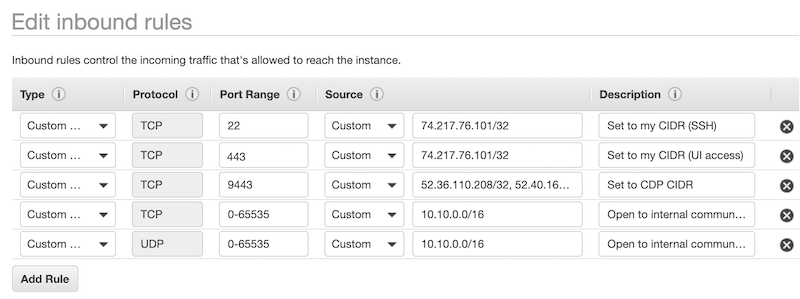
Example rules provided in the VPC console on AWS:
Default nodes security group
| Protocol | Port Range | Source | Description |
|---|---|---|---|
|
TCP |
22 |
Your CIDR. |
This is an optional port for end-user SSH access to the hosts. You should open it to your organization’s CIDR. |
|
TCP |
9443 |
This port is used by CDP to maintain management control of clusters. By default, when CDP creates the security groups automatically, it opens this port to the correct IP. When the CCM is enabled, this port is not needed. |
|
|
TCP, UDP |
0-65535 |
Your VPC CIDR (for example, 10.10.0.0/16). |
This is required for internal communication within the VPC. TCP port 5432 is used for communication with the attached database. |
|
ICMP |
N/A |
Your internal VPC CIDR (for example, 10.10.0.0/16). |
This is required for internal communication within the VPC. |
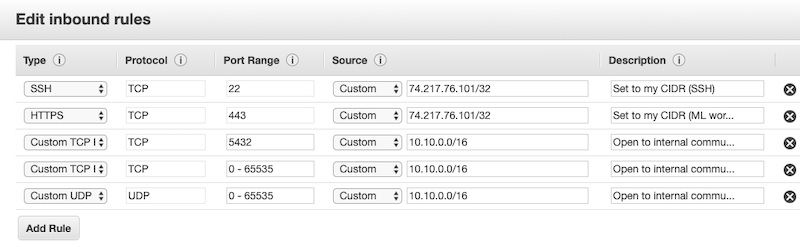
Example rules provided in the VPC console on AWS:
Go to on AWS to create security groups and edit their rules.
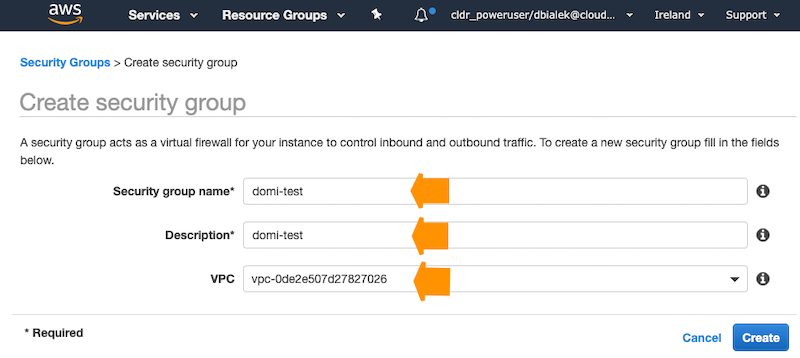
To create a security group, click Create security group and provide the following:
You need to create two security groups: Knox and Default (you will see this terminology in the Cloudera Management Console UI and CLI, so if you decide to choose different names, make sure that you can distinguish between the two security groups).
Use the guidelines and examples provided above when editing rules.
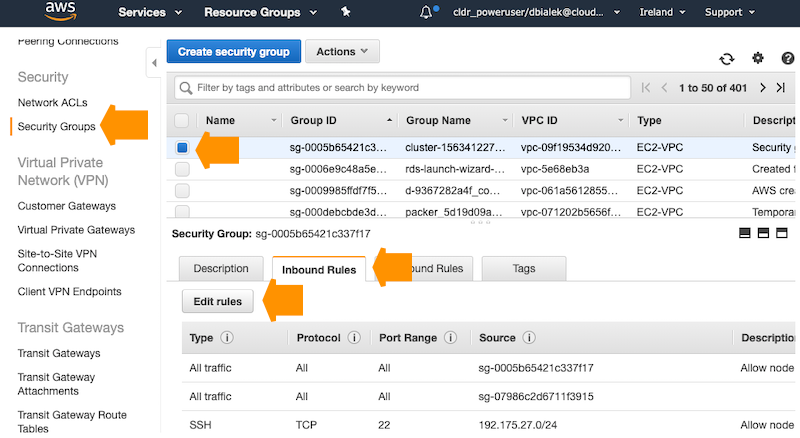
Select the security group and click to edit security group rules: