To enhance the functionality of agents within a workflow, MCP servers can be
incorporated during the creation or modification process.
-
In the Cloudera
console, click the Cloudera AI tile. The Cloudera AI Workbenches page is
displayed.
-
Click on the name of the workbench. The workbench Home
page is displayed.
-
In the left navigation pane, click AI Studios.
-
Click the Open button on the Agent
Studio tile. The Agent Studio window is
displayed.
-
Go to Tools Catalog in the Agent
Studio window.
-
Go to the MCP Servers tab.
-
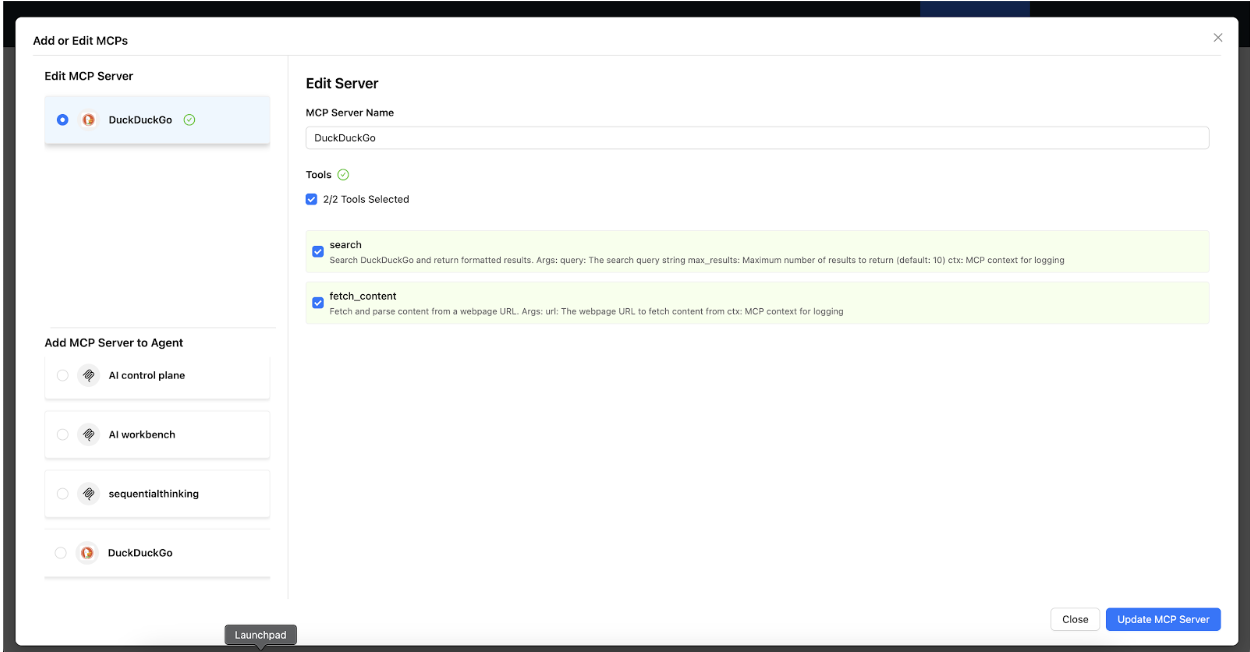
Select the MCP server, from your registered servers.
-
Select the tools, to which the agent must have access to.
-
Provide actual values for environment variables, if required, to configure the
environment.
-
Click Update MCP Server.
Figure 1. Edit Server modal window with two selected tools
Agents gain access to the chosen MCP tools after the
addition. The agent can now perform the following actions:
- Use MCP tools in their decision-making
process.
- Access external data sources through the
tools-
- Perform actions in external
systems-
