Authenticating Cloudera AI Inference service with Knox API keys
To enable long-lived connectivity to Cloudera AI Inference service model endpoints using Knox API keys, you must manually configure the Knox service within your Data Lake.
- The Knox API key feature is supported only on Cloudera Runtime versions 7.1.9 SP2 and 7.3.2.
- You must have administrator access to Cloudera Manager.
-
Access Cloudera Manager:
- Log in to the Cloudera Management Console.
- Navigate to Environments, and select the environment where your Cloudera AI Inference service is installed.
- In the Data Lake tab under the Services section, click the Cloudera Manager UI link to open Cloudera Manager.
-
Configure the Knox Gateway Default Group property.
-
In the search box, search for conf/cdp-resources.xml.
Figure 1. Adding the pre-authentication property in Knox 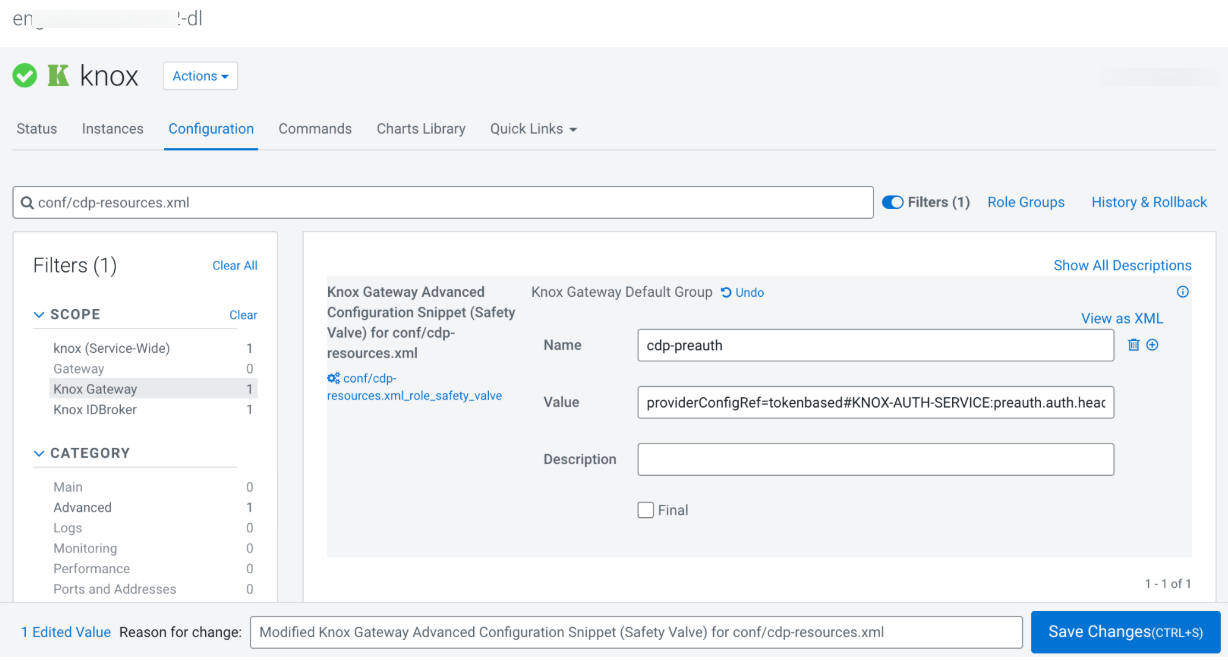
-
In the search box, search for conf/cdp-resources.xml.
- Refresh Knox Stale Configs on Cloudera Manager.
- Check the values, and click Refresh.
- To verify the setup, log in to the Knox Admin UI and confirm that the topology renders successfully without errors.
