Configuring Model Hub visibility
You can control which models appear in the Cloudera AI Model Hub for your organization. By default, the Model Hub displays the complete catalog of models from all supported providers. Configuring model visibility allows you to restrict the catalog to only business-approved models, ensuring your tenant meets internal governance, compliance, and security standards. Changes made here affect all non-admin users across the workspace.
Default behavior during upgrades and new model additions
- Default: By default, all models are enabled and visible.
- Upgrades: If an administrator previously disabled specific models in a prior release, those models remain disabled after upgrading until an admin explicitly re-enables them.
- New Models: Any newly introduced model added in a release is enabled by default upon deployment.
Before configuring model visibility, you must ensure you have the ML Admin role.
-
Click the Configure Models icon.
The Configure Models modal opens, displaying a table of all available catalog models.
Figure 1. Configure Model Hub visibility 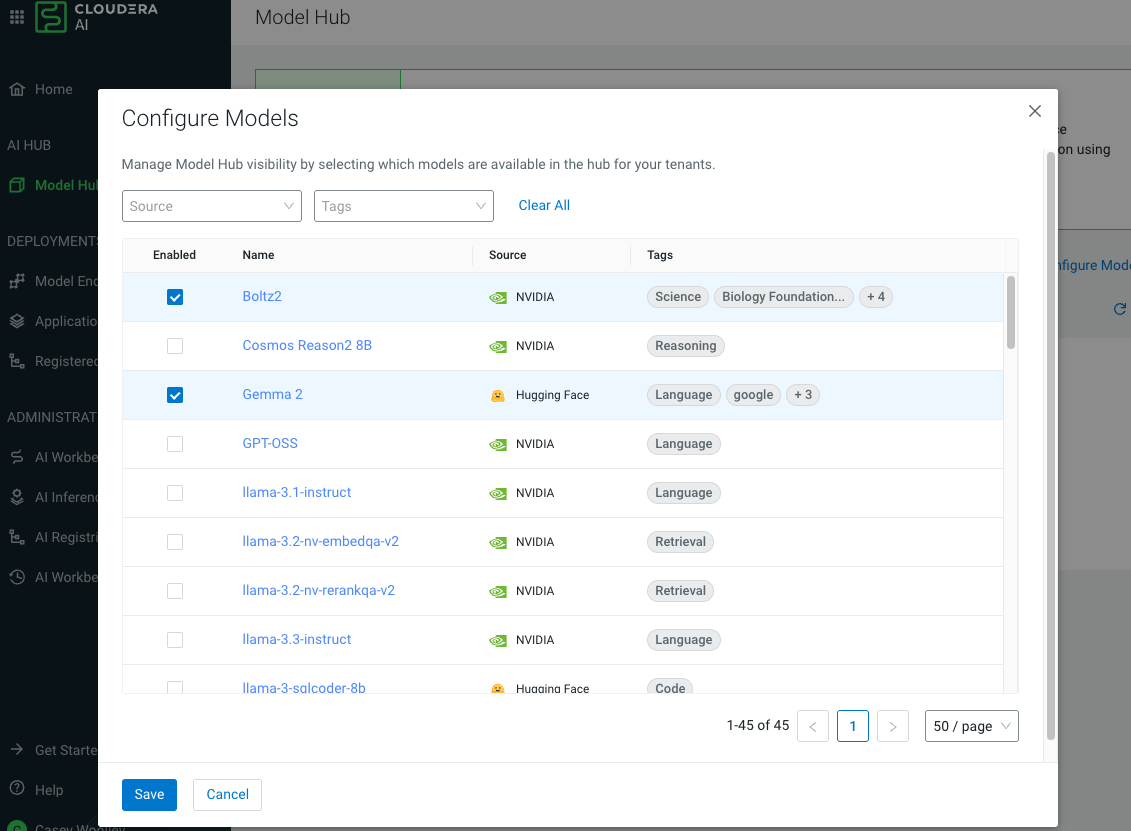
- Non-admin users in your tenant will see only the models enabled in this configuration.
- The visibility settings persist across user sessions and page refreshes.
- You can reopen the Configure Models window at any time to modify or update the approved model list.
