Data Recovery Service (DRS) prerequisites
Before you proceed further, you must review and note the required prerequisites.
- The cluster configurations for both the primary and secondary clusters must be the same.
- You must link your S3 storage to the primary and secondary clusters. Navigate to
Cloudera Management Console → Administration
→ Backup and Restore.
On the Backup and Restore Settings page, click Add New Location to add the S3 storage details for the location name, S3 Endpoint URL, External Bucket Name, Region Code, Access Key, Secret Key, upload the CA Certificate, and you have the option to enable the default location to the new backup settings. Click Test Connection to verify the connectivity between both the primary and secondary clusters. And later save the changes.
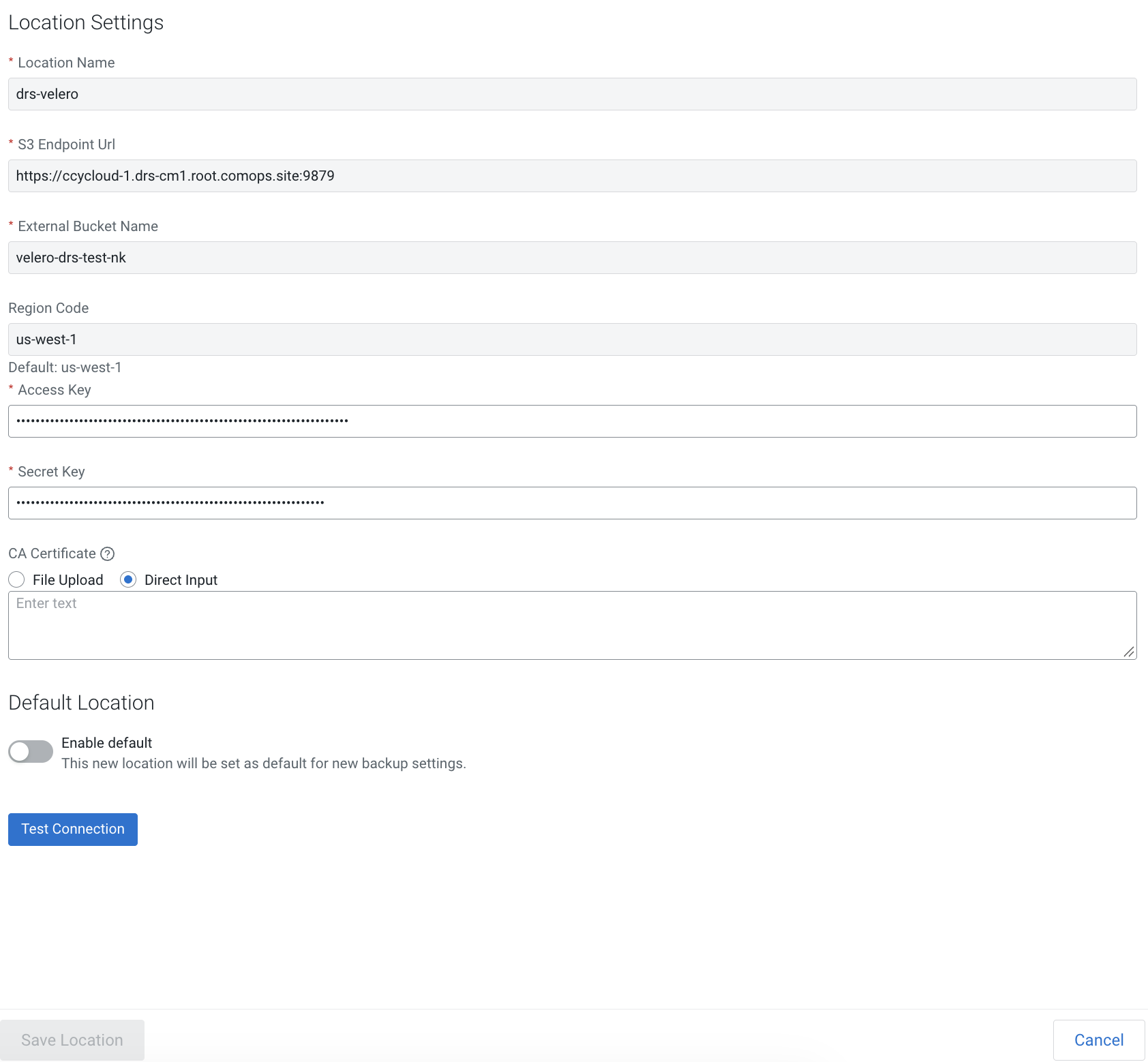
- Secondary cluster configurations must be the same as the primary cluster. For example:
- Container UID
- Network CIDR range
- IP range or subnet
- If the Node tainting feature was enabled in the primary cluster, then the same/similar configurations must be enabled in the secondary cluster as well.
- Environment mapping consistency: When restoring data / contents from the primary cluster to secondary cluster, the environments are automatically rewired as part of the restore process, with an option to override the default destination, if needed. You must map all environments to the new secondary base clusters when base clusters change (when environments in the secondary cluster are configured to use a different base cluster, possibly a secondary base cluster)). Inconsistent environment mapping could cause restore operations to fail.
- Storage requirements: Cloudera recommends that you retain at least 30–40% of each node's Longhorn capacity as a free storage. Backups temporarily provision a CSI snapshot and a full-size, replicated Persistent Volume Claim (PVC) per volume, which are released after the data is copied over to the external S3 location.
- Any settings or configurations changes performed outside of the Cloudera Management Console to enable SAML needs to be reviewed after a secondary restore. References of ‘primary control plane’ in such external configurations should be changed to ‘secondary control plane’ after secondary cluster restore is successful. Failure to perform these steps can cause auth/login issues.
- Users must revert to the old external DRS settings that was supported using Longhorn’s BackupTarget feature. These settings can negatively impact the new DRS solution by consuming higher storage/resources/network and might cause backup process to take a long time to complete or fail.
