The Cloudera Data Lineage security architecture ensures secure
metadata extraction, storage, and transmission using advanced encryption methods.
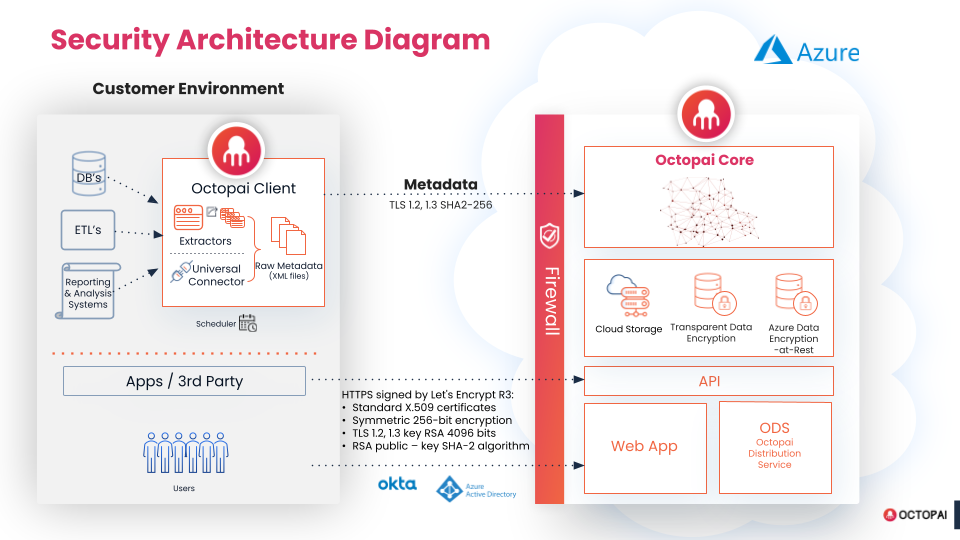
Figure 1. Cloudera Data Lineage security architecture
The Cloudera Data Lineage security architecture consists of the following components:
Metadata extractions
Cloudera Data Lineage sends to the customer a client called the
Extractor to be installed on its private VM or Local Server. The configuration of this
Client creates a Batch file for each source system, such as SQL server or SSIS, which is
scheduled to run automatically on a regular basis using an automation scheduler, for
example Control-M, UC-4, or Job of SQL server. The Extractor creates a readable metadata
file in XML format for each source system.
Encrypted Customer Portal
The readable metadata files
are uploaded to the secure Customer Portal. The Customer Portal is managed by Cloudera Data Lineage. Cloudera Data Lineage is
triggered by the Customer Portal when new metadata files arrive and they are uploaded to
the dedicated Azure environment of the customer. After the upload, the metadata files
are deleted from the Customer Portal and the Azure VM Server.
Azure VM Server
Azure Server
A dedicated Environment is created for the customer in the Cloudera Data Lineage tenancy on the Azure Cloud Services. The Cloudera Data Lineage Environment uses the Azure Storage account,
the Managed Disk by Microsoft, and includes a dedicated database.
Encryption
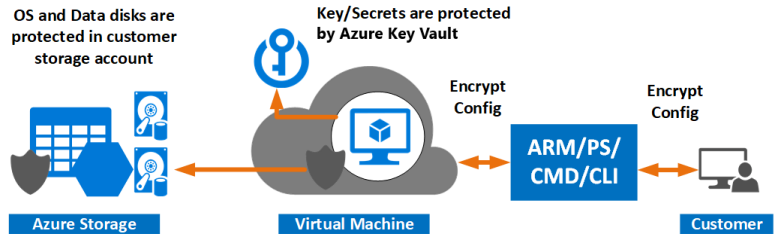
All the volumes on Azure are encrypted with the Azure Data
Encryption-at-Rest (Encryption Key owned by Microsoft). The SQL Server DB is
encrypted through the Transparent Data Encryption (Microsoft TDE). All the disks on
Windows are encrypted according to FIPS 140-2.Figure 2. Azure Data EncryptionThe Cloudera Data Lineage application stores and protects
the metadata using the Azure Disk Encryption, which uses the Windows BitLocker
technology and Linux DM-Crypt to protect both operating system disks and data disks
with full volume encryption. Encryption keys and secrets are protected and managed
in the Azure Key Vault.
Customer’s Users
Secure login using the Azure AD or Okta Connect. Connecting to
the customer Active Directory using the B2B collaboration is optional. No
segregation exists of the metadata seen by users that share the same customer
instance in Cloudera Data Lineage, however they can be
differentiated through separate Cloudera Data Lineage instances
for the customer.
Secure data-in-transit connection
Data-in-transit is
encrypted with HTTPS signed by the following DigiCert: