Enhancing Data Connectivity: Cloudera Octopai Universal Connector for Reporting Tools Guide
The Cloudera Octopai Universal Connector for Reporting Tools enables seamless integration of metadata from diverse systems, providing a comprehensive view of your data ecosystem.
The Cloudera Octopai Platform is dedicated to serving data teams who demand expansive analysis and visualization tools. As an enhancement to our current offerings, we've developed a Universal Connector for Reporting Tools that allows the integration of metadata from a diverse range of systems. This comprehensive integration brings about a more complete view of your data ecosystem with thorough data lineage, discovery, and an all-inclusive data catalog.
The connector allows for the integration of metadata from various types of systems into the Cloudera Octopai platform, thus offering a complete view of your data ecosystem, including full data lineage, discovery, and a comprehensive data catalog. This new connector adds to the capabilities of Cloudera Octopai, with native connectors provided for popular tools like Tableau, Power BI, Cognos, MicroStrategy, Qlik, Looker, SSRS, and more.
This guide will walk you through the steps to successfully utilize this enhancement, breaking down the necessary CSV input structure, detailed SQL queries for populating your database, and the overall workflow of the Universal Connector for Reporting Tools.
How it is done
Use the Cloudera Octopai templates to ingest your metadata into the platform. The rest is fully automated.
What Cloudera Octopai offers
This metadata, along with the metadata automatically ingested from out-of-the-box supported systems, is analyzed using machine learning. In turn Cloudera Octopai provides you with end-to-end column-level lineage, inner system lineage, cross-system lineage, data discovery, and a data catalog of your entire data landscape accessible to all data users in the organization.
The benefits
- No blind spots – perform changes with confidence.
- Get a clear picture of data transformations.
- Increase visibility of the organization's complete data ecosystem.
- Future-proof your expanding data landscape by providing access to unlimited data systems.
- Add links to our out-of-the-box technologies.
How to use the template file
- Download the template file: Universal Connector Reports
- Fill in the required fields in the template file using the information provided in the table below.
| Column Name | Description | Required |
|---|---|---|
| MODEL_NAME | The name of the model. This could be the name of the package in Cognos, the RPD name in OBIEE, or the Universe name in Business Object. | Yes |
| REPORT_PATH | The unique path of the report, per ConnectionID. | Yes |
| REPORT_NAME | The name of the report. | Yes |
| SOURCE_PROVIDER | The type of DB that the report connects to. | Yes |
| SOURCE_SERVER | The server name of the source object. | No |
| SOURCE_DB | The database name of the source object. | Yes |
| SOURCE_SCHEMA | The schema name of the source object. | Yes |
| SOURCE_OBJECT_TYPE | The type of source object, such as Table, View, or Stored Procedure (SP). | Yes |
| SOURCE_COLUMN | The column name in the source object. | Yes |
| SOURCE_TABLE | The table name in the source object. | Yes |
| SOURCE_DATA_TYPE | The data type of the column. | No |
| SOURCE_PRECISION | The precision of the column. | No |
| SOURCE_SCALE | The scale of the column. | No |
| TARGET_LAYER_NAME | The name of the component in the report, such as a table, cross-tab, chart, etc. | Yes |
| TARGET_SERVER | The server name of the target object. | No |
| TARGET_DB | The database name of the target object. | No |
| TARGET_SCHEMA | The schema name of the target object. | No |
| TARGET_OBJECT_TYPE | The type of target object, for example, Presentation. Default = 'PresentationTable'. | Yes |
| TARGET_TABLE | The table name in the target object. | No |
| TARGET_COLUMN | The column name in the target object. | Yes |
| TARGET_DATA_TYPE | The data type of the column. | No |
| TARGET_PRECISION | The precision of the column. | No |
| TARGET_SCALE | The scale of the column. | No |
| EXPRESSION | The formula or transformation between the source column and target column. | No |
| LINK_TYPE | Data Flow or Impact Analysis. Default = Data Flow. | No |
| LINK_DESCRIPTION | Documentation about the link. Default = Null. | No |
| UPDATED_DATE | The timestamp when a row was inserted. This field is automatically populated. | Yes |
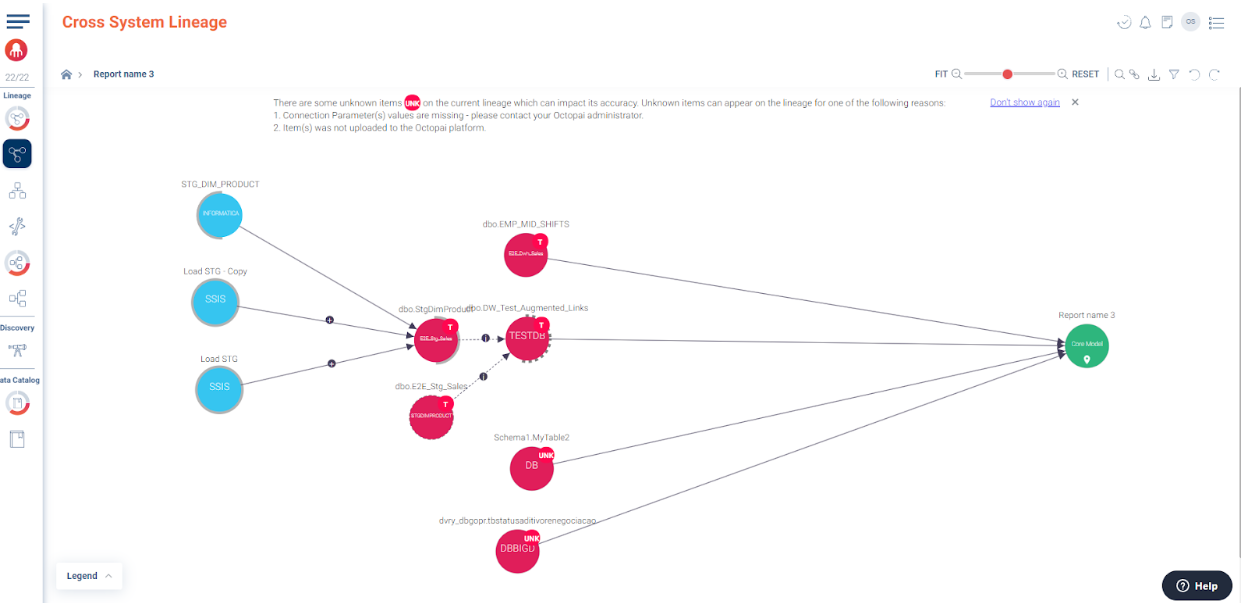
Example of a report cross-system lineage created as part of an upload of the Universal Connector:
How to set up the Universal Connector
For step-by-step setup instructions, see Universal Connector.
