Enhancing Data Connectivity: Cloudera Octopai Universal Connector for Databases & ETLs Tools Guide
The Cloudera Octopai Universal Connector for Databases & ETLs Tools integrate metadata from diverse systems into the Data Intelligence Platform, enabling lineage, data discovery, and full visibility of your data ecosystem.
As data demands evolve, data teams continuously seek a better understanding of their data ecosystem. The need for analysis and visualization of additional systems is growing. As a result, Cloudera Octopai is consistently expanding its extensive coverage of out-of-the-box supported technologies in our Data Intelligence Platform.
However, as your needs progress, it is crucial to provide an overview of the complete data landscape with various systems and data flows.
New data systems often lack automation support, and many organizations rely on custom-built data processes. A lineage tool must cover these processes to deliver a complete and accurate picture.
Therefore, Cloudera Octopai has developed the Universal Connector, empowering you to add your metadata from these types of systems into Cloudera Octopai’s Data Intelligence platform to get the full picture - complete lineage, data discovery and a data catalog.
You get unlimited ingestion capabilities to enrich the platform with additional lineage, allowing you to add the final piece of the puzzle and get full visibility of your data ecosystem.
This flexibility allows you to adapt quickly to your changing data landscape, and consistently get a complete view regardless of what data systems you’re using.
How it is done
Use the Cloudera Octopai templates below to ingest your metadata into the platform. The rest is fully automated.
What Cloudera Octopai offers
This metadata, along with the metadata automatically ingested from out-of-the-box supported systems, is analyzed using machine learning. In turn Cloudera Octopai provides you with end-to-end column-level lineage, inner system lineage, cross system lineage, data discovery and a data catalog of your entire data landscape accessible to all data users in the organization.
The benefits:
- No blind spots – perform changes with confidence.
- Get a clear picture of data transformations.
- Increase visibility of the organization's complete data ecosystem.
- Future-proof your expanding data landscape by providing access to unlimited data systems.
- Add links to our out-of-the-box technologies.
How to use the template files
- Download the template files:
- Fill in the required fields in the template files using the information provided in the tables below, see Universal Connector Links and Universal Connector Objects.
Universal Connector Links
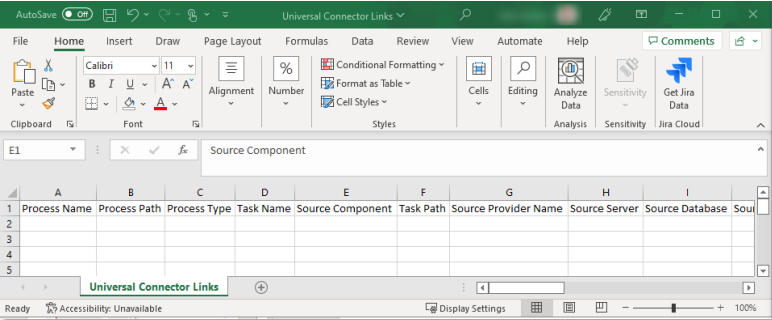
| Column Name | Description | Required |
|---|---|---|
| Process Name | Name of the process that wraps the task, for example “Workflow” in Informatica or “Package” in SSIS | No |
| Process Path | Path of the process – for example, the path where the SSIS package is stored, including the package name and suffix (aaa\bbb\ccc\Package Name.dtsx). | No |
| Process Type | The type of process – job, map, package, and so forth. | Yes |
| Process Description | Short process description to be identified clearly in the lineages. | No |
| Task Name | The task name – the atomic unit that holds the data flow within the process. | Yes |
| Task Path | The path of the task – the location of the atomic unit that runs the process (for example, aaa\bbb\ccc\Package Name\container\Task Name). | No |
| Source Component | Name of the logic component in the ETL tool. Example: for Informatica, the name of the aggregator in the map. When there is no component, enter the table name. | No |
| Source Provider Name | Provider of source object (for example, Oracle, SQL Server). | No |
| Source Server | Server name of the source object. | No |
| Source Database | Database name of the source object. | Yes |
| Source Schema | Schema name of the source object. | Yes |
| Source Object | Name of the source object. | Yes |
| Source Column | Column name in the source object. | Yes |
| Source Data Type | Data type of the column. | No |
| Source Precision | Precision of the column. | No |
| Source Scale | Scale of the column. | No |
| Source Object Type | Type of object – table, view, file. | Yes |
| Target Provider Name | Provider of target object (for example, Oracle, SQL Server). | No |
| Target Component | Name of the logic component in the ETL tool. Example: for Informatica, the name of the aggregator in the map. When there is no component, enter the table name. | No |
| Target Server | Server name of the target object. | No |
| Target Database | Database name of the target object. | Yes |
| Target Schema | Schema name of the target object. | Yes |
| Target Object | Name of the target object. | Yes |
| Target Column | Column name in the target object. | Yes |
| Target Data Type | Data type of the column. | No |
| Target Precision | Precision of the column. | No |
| Target Scale | Scale of the column. | No |
| Target Object Type | Type of object – table, view, file. | Yes |
| Expression | Formula or transformation between source column and target column. | No |
| Link Type | DataFlow or ImpactAnalysis. | No (default = DataFlow) |
| Link Description | Documentation about the link. | No (default = empty string) |
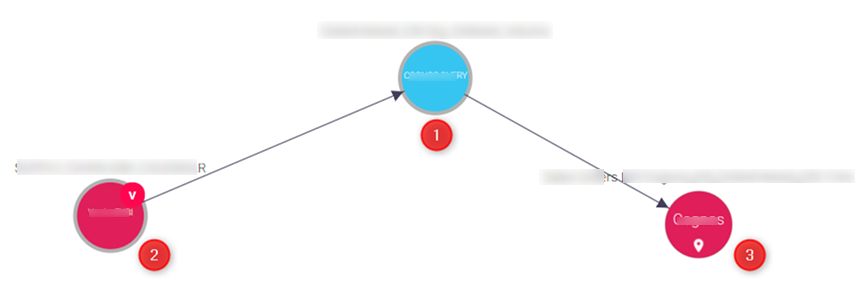
Example for ETL process on cross lineage
The Universal Connector links the source and the target for the task name as the main object.

Universal Connector Objects
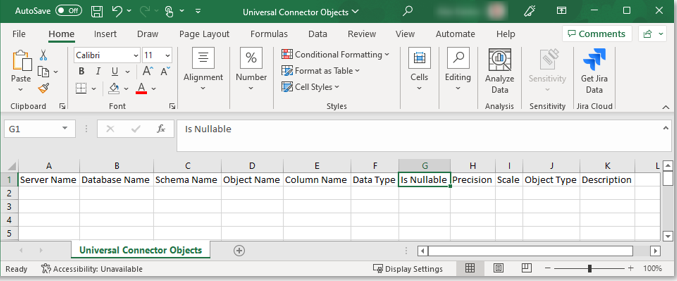
| Column Name | Description | Required |
|---|---|---|
| Provider Name | Provider of object – for example, Oracle, SQL Server. | No |
| Server Name | Server name of the object. | No |
| Database Name | Database name of the object. | Yes |
| Schema Name | Schema name of the object. | Yes |
| Object Name | Name of the source object. | Yes |
| Object Description | Documentation about the object. | No (default = empty string) |
| Column Name | Column name in the source object. | Yes |
| Column Description | Short column description. | No (default = empty string) |
| Data Type | Data type of the column. | No |
| Is Nullable | Indicates whether the column accepts null values. | No |
| Precision | Precision of the column. | No |
| Scale | Scale of the column. | No |
| Object Type | Type of object – table, view, file, and so on. | Yes |
How to set up the Universal Connector
For step-by-step setup instructions, see Universal Connector.
