Cloudera Data Lineage Connector for Apache NiFi
Learn how the Cloudera Data Lineage (formerly Octopai) connector for Apache NiFi enables visibility into data movement across systems by capturing and visualizing lineage derived from NiFi flows.
Overview
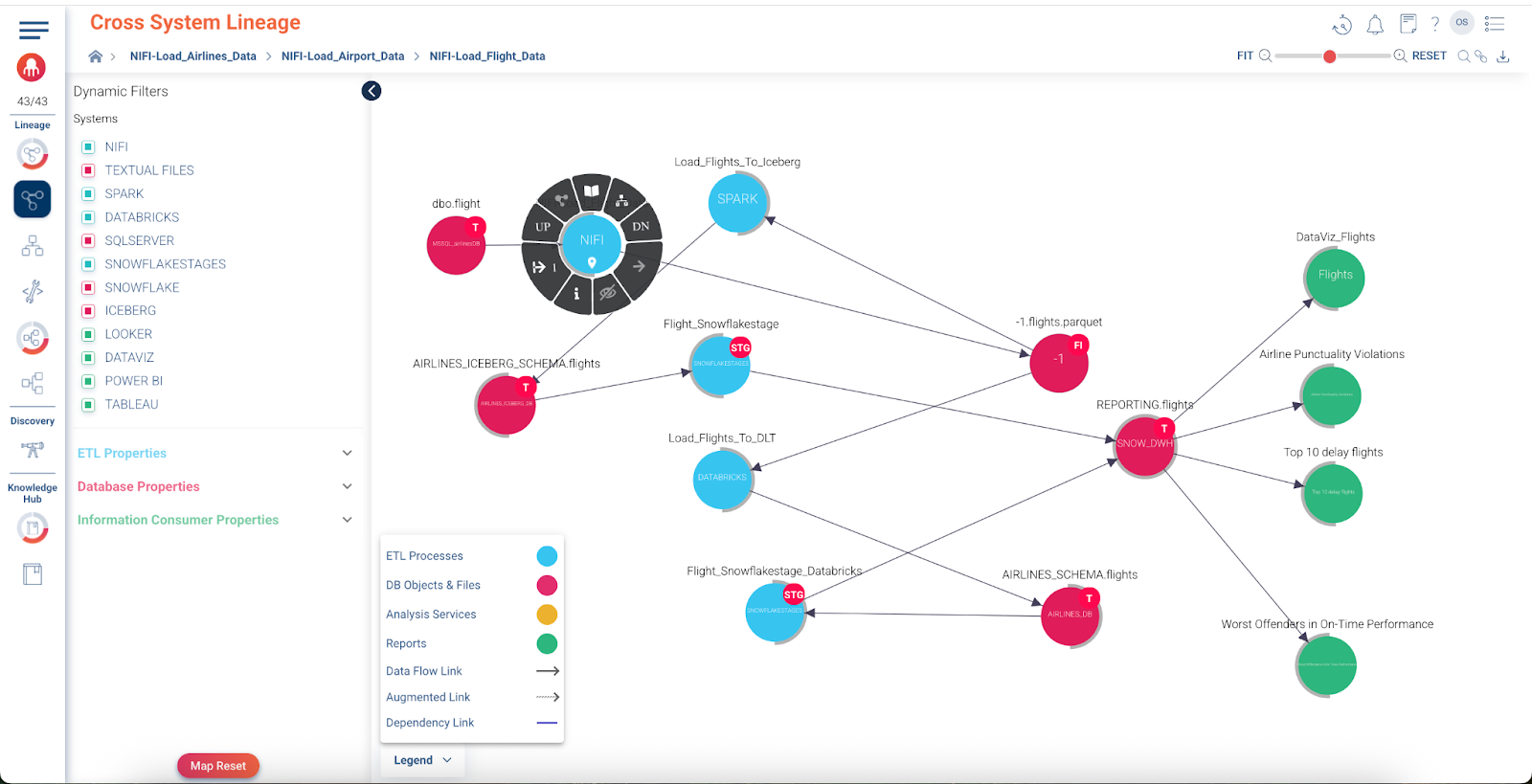
Apache NiFi is a core orchestration platform in modern data architectures, responsible for ingesting, routing, transforming, and delivering data across heterogeneous environments. The Cloudera Data Lineage connector for Apache NiFi extracts metadata from NiFi flows and constructs lineage that exposes how data moves between systems, technologies, and platforms.
The connector enables the following capabilities:
- Building cross-system, inner system and end-to-end column lineage for NiFi flows.
- Populating the Knowledge Hub assets automatically and enabling users to discover NiFi assets.
- Enabling governance, impact analysis, and operational visibility across enterprise data pipelines.
Why Apache NiFi data lineage matters
NiFi often serves as the integration layer that connects files, databases, object stores, streaming platforms, and cloud services. Understanding these flows is critical for several reasons.
- Visibility into data movement
- NiFi connects diverse sources and targets. Lineage reveals how data enters, moves through, and exits the platform.
- Cross-system complexity
- NiFi commonly bridges legacy, hybrid, and cloud environments. Cross-system lineage enables teams to track data as it moves across technologies and organizational boundaries.
- Operational insight
- Understanding dependencies between systems helps teams troubleshoot failures, assess the impact of change, and reduce risk during migrations or platform modernization initiatives.
Supported NiFi versions
The connector is compatible with Apache NiFi versions 1.2.8 through 2.7.2.
Using supported versions ensures consistent metadata extraction, stable API behavior, and reliable lineage generation.
Lineage model overview
The connector builds lineage in layers, starting with operational flow relationships and extending to system-level source and target context.
Processor-level operational lineage (opsLink)
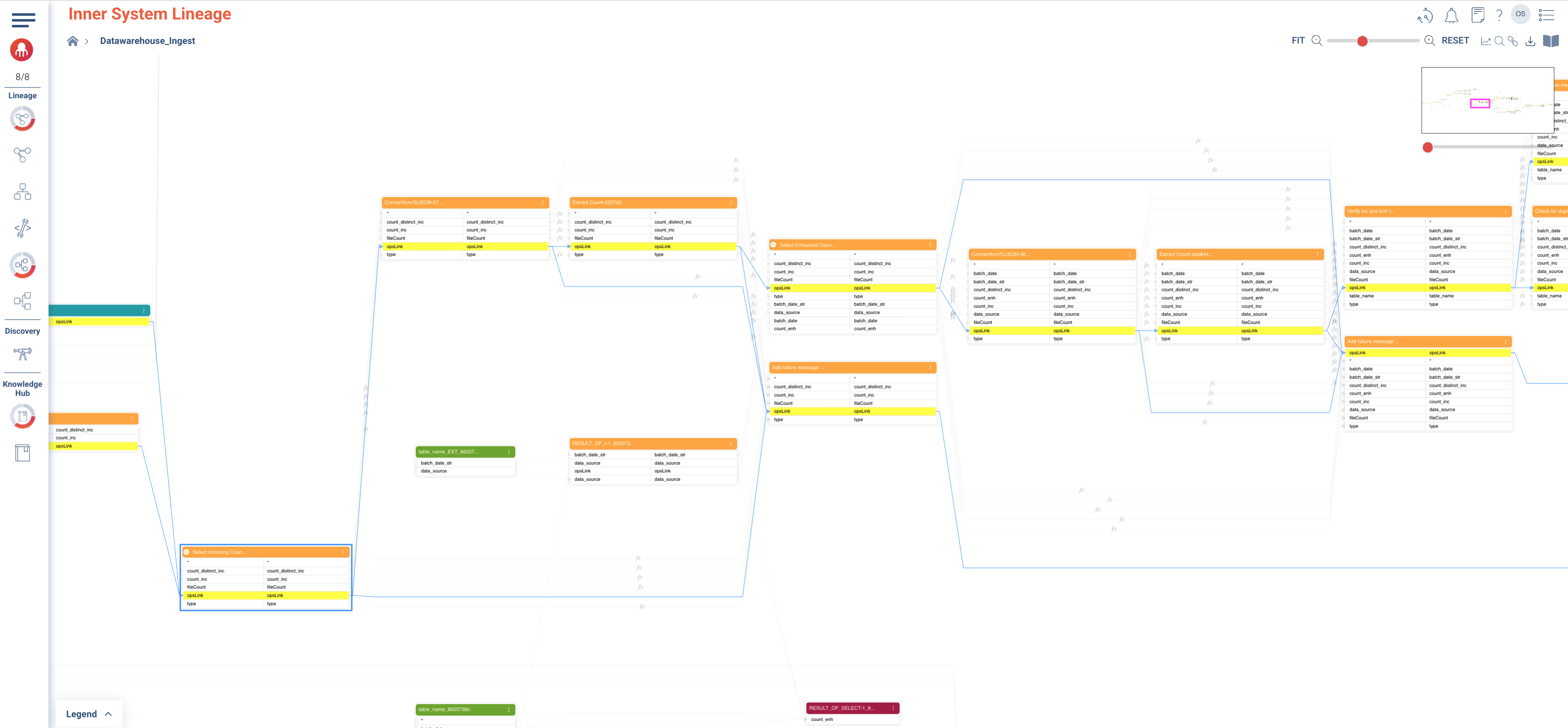
The foundation of NiFi lineage is the processor-level operational link, referred to as an opsLink.
An opsLink represents a direct execution relationship between two NiFi components:
- A source processor and a target processor connected by a NiFi connection.
- InputPorts and OutputPorts are treated as processors for lineage purposes.
opsLinks are derived by parsing the ProcessorGroup configuration JSON and capturing:
- Processors, InputPorts, and OutputPorts.
- Connections between components.
- Associated source or target context when available, such as database, table, topic, bucket, or file location.
This processor-level lineage forms the operational flow graph of a NiFi ProcessGroup and serves as the backbone for cross-system lineage views.
Nested ProcessGroups behavior
When a ProcessorGroup contains other nested ProcessorGroups, inner lineage is scoped strictly to the selected ProcessorGroup:
- Only processors, InputPorts, and OutputPorts that belong directly to the current ProcessorGroup are displayed in the inner lineage view.
- Nested ProcessorGroups are not expanded or traversed as part of inner lineage.
When one ProcessorGroup is connected to another ProcessorGroup:
- The relationship between ProcessorGroups is not shown in inner lineage.
- These relationships are visualized only in end-to-end lineage or cross-system lineage views.
This separation ensures that inner lineage remains focused on execution flow within a single ProcessGroup, while cross-group dependencies are handled at higher-level lineage views.
Supported NiFi components
The connector supports a broad set of NiFi processors for lineage extraction.
For each supported processor, the documentation lists:
- Component Type (FQCN)
- NiFiProcessorType
| Component Type (FQCN) | NiFiProcessorType |
|---|---|
| org.apache.nifi.processors.standard.QueryDatabaseTable | QueryDatabaseTable |
| org.apache.nifi.processors.kafka.pubsub.ConsumeKafka_1_0 | ConsumeKafka |
| org.apache.nifi.kafka.processors.ConsumeKafka | ConsumeKafka |
| org.apache.nifi.processors.kafka.pubsub.ConsumeKafkaRecord_2_6 | ConsumeKafkaRecord |
| org.apache.nifi.processors.kafka.pubsub.PublishKafka_1_0 | PublishKafka |
| org.apache.nifi.processors.kafka.pubsub.PublishKafka_2_0 | PublishKafka |
| org.apache.nifi.processors.kafka.pubsub.PublishKafka_2_6 | PublishKafka |
| org.apache.nifi.processors.kafka.pubsub.PublishKafkaRecord_2_0 | PublishKafkaRecord |
| org.apache.nifi.processors.kafka.pubsub.PublishKafkaRecord_2_6 | PublishKafkaRecord |
| org.apache.nifi.processors.kudu.PutKudu | PutKudu |
| org.apache.nifi.processors.standard.FlattenJson | FlattenJson |
| org.apache.nifi.processors.attributes.UpdateAttribute | UpdateAttribute |
| org.apache.nifi.processors.aws.s3.PutS3Object | PutS3Object |
| org.apache.nifi.processors.standard.PutSQL | PutSQL |
| org.apache.nifi.processors.standard.RouteOnAttribute | RouteOnAttribute |
| org.apache.nifi.processors.standard.RouteOnContent | RouteOnContent |
| org.apache.nifi.processors.aws.s3.ListS3 | ListS3 |
| org.apache.nifi.processors.standard.ExecuteStreamCommand | ExecuteStreamCommand |
| org.apache.nifi.processors.standard.ReplaceText | ReplaceText |
| org.apache.nifi.processors.hadoop.DeleteHDFS | DeleteHDFS |
| org.apache.nifi.processors.standard.GenerateFlowFile | GenerateFlowFile |
| org.apache.nifi.processors.aws.s3.FetchS3Object | FetchS3Object |
| org.apache.nifi.processors.parquet.PutParquet | PutParquet |
| org.apache.nifi.processors.standard.InvokeHTTP | InvokeHTTP |
| org.apache.nifi.processors.standard.GenerateTableFetch | GenerateTableFetch |
| org.apache.nifi.processors.standard.ConvertRecord | ConvertRecord |
| org.apache.nifi.processors.hadoop.FetchHDFS | FetchHDFS |
| org.apache.nifi.processors.standard.EvaluateJsonPath | EvaluateJsonPath |
| org.apache.nifi.csv.CSVReader | CSVReader |
| org.apache.nifi.processors.standard.AttributesToJSON | AttributesToJSON |
| org.apache.nifi.processors.standard.ExecuteSQL | ExecuteSQL |
| org.apache.nifi.processors.standard.ExecuteScript | ExecuteScript |
| org.apache.nifi.processors.script.ExecuteScript | ExecuteScript |
| org.apache.nifi.processors.standard.LogMessage | LogMessage |
| org.apache.nifi.processors.standard.ExecuteSQLRecord | ExecuteSQLRecord |
| org.apache.nifi.processors.hive.PutHive3QL | PutHive3QL |
| org.apache.nifi.processors.office.ConvertExcelToCSVProcessor | ConvertExcelToCSVProcessor |
| org.apache.nifi.processors.cdp.objectstore.PutCDPObjectStore | PutCDPObjectStore |
| org.apache.nifi.processors.cdp.objectstore.DeleteCDPObjectStore | DeleteCDPObjectStore |
| org.apache.nifi.csv.CSVRecordSetWriter | CSVRecordSetWriter |
| org.apache.nifi.processors.standard.MergeContent | MergeContent |
| org.apache.nifi.processors.standard.QueryRecord | QueryRecord |
| org.apache.nifi.processors.standard.ExtractText | ExtractText |
| org.apache.nifi.dbcp.DBCPConnectionPool | DBCPConnectionPool |
| org.apache.nifi.processors.standard.DistributeLoad | DistributeLoad |
| org.apache.nifi.processors.standard.SplitJson | SplitJson |
| org.apache.nifi.processors.standard.JoltTransformJSON | JoltTransformJSON |
| org.apache.nifi.processors.standard.JoltTransformRecord | JoltTransformRecord |
| org.apache.nifi.processors.mongodb.GetMongo | GetMongo |
| org.apache.nifi.processors.mongodb.PutMongo | PutMongo |
| org.apache.nifi.processors.hive.SelectHive3QL | SelectHive3QL |
| org.apache.nifi.processors.standard.SplitText | SplitText |
| org.apache.nifi.processors.standard.FetchSFTP | FetchSFTP |
| org.apache.nifi.processors.avro.ConvertAvroToJSON | ConvertAvroToJSON |
| org.apache.nifi.processors.standard.UpdateRecord | UpdateRecord |
| org.apache.nifi.processors.parquet.ConvertAvroToParquet | ConvertAvroToParquet |
| org.apache.nifi.processors.enrich.JoinEnrichment | JoinEnrichment |
| org.apache.nifi.processors.enrich.ForkEnrichment | ForkEnrichment |
| org.apache.nifi.processors.standard.MergeRecord | MergeRecord |
| org.apache.nifi.processors.standard.InferAvroSchema | InferAvroSchema |
| org.apache.nifi.processors.kite.InferAvroSchema | InferAvroSchema |
| org.apache.nifi.processors.aws.s3.DeleteS3Object | DeleteS3Object |
| org.apache.nifi.processors.standard.SplitRecord | SplitRecord |
| org.apache.nifi.processors.standard.ConvertJSONToAvro | ConvertJSONToAvro |
| org.apache.nifi.processors.standard.PutSFTP | PutSFTP |
| org.apache.nifi.processors.hadoop.PutHDFS | PutHDFS |
| org.apache.nifi.processors.standard.PutDatabaseRecord | PutDatabaseRecord |
| org.apache.nifi.processors.standard.ConvertJSONToSQL | ConvertJSONToSQL |
| org.apache.nifi.processors.iceberg.PutIceberg | PutIceberg |
| org.apache.nifi.processors.standard.PutFile | PutFile |
| com.demoulas.nifi.processors.GetSFTPFileInfo | GetSFTPFileInfo |
| com.demoulas.nifi.processors.MoveSFTP | MoveSFTP |
| org.apache.nifi.processors.standard.CompressContent | CompressContent |
| org.apache.nifi.processors.standard.GetSFTP | GetSFTP |
| org.apache.nifi.processors.standard.Notify | Notify |
| org.apache.nifi.processors.standard.RetryFlowFile | RetryFlowFile |
| org.apache.nifi.processors.standard.Wait | Wait |
Knox configuration
The connector supports environments where NiFi is deployed behind an Apache Knox Gateway.
When you configure connectivity through Knox, use the correct topology and endpoint.
Knox topology behavior
With Knox service auto-discovery enabled, two NiFi-related endpoints may appear:
| Topology | Endpoint | Description |
|---|---|---|
cdp-proxy |
/nifi-app/nifi |
NiFi UI (browser access) |
cdp-proxy-api |
/nifi |
NiFi API (programmatic access) |
Required configuration for Cloudera Data Lineage
Cloudera Data Lineage metadata extraction requires the following Knox path:
- Topology:
cdp-proxy - Endpoint:
/nifi
Use Knox Proxy disabled (default)
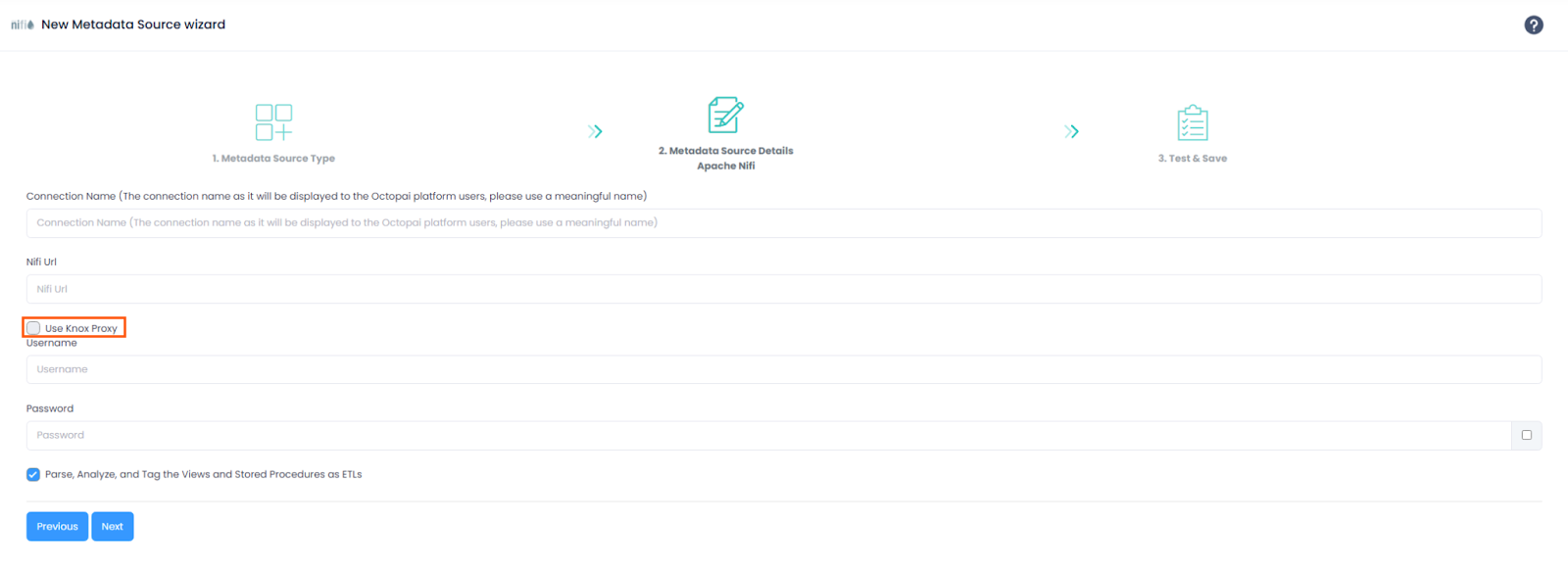
If Use Knox Proxy is unchecked in the New Metadata Source wizard:
- Authentication uses NiFi native token-based authentication.
- The extractor sends credentials to the NiFi API endpoint:
POST /nifi-api/access/token - NiFi returns a JWT bearer token.
- Subsequent API requests use the token in the Authorization header.
- A direct connection to NiFi is used; standard NiFi API endpoint configuration applies.
Use Knox Proxy enabled
If Use Knox Proxy is checked in the New Metadata Source wizard:
- Authentication uses HTTP Basic Authentication through Knox.
- Credentials are sent with each request in the Authorization header.
- Knox validates credentials and forwards authenticated requests to NiFi.
- No token exchange is performed.
When to use Knox Proxy
Use Knox Proxy when:
- NiFi is accessed through an Apache Knox Gateway.
- Authentication is centrally managed by Knox.
- The NiFi API is exposed through a Knox proxy URL.
Do not use Knox Proxy when:
- Connecting directly to NiFi without a gateway.
- Using NiFi native authentication.
- The NiFi URL points directly to the NiFi server.
Limitations
The following limitations apply:
- Dynamic parameters embedded inside table names or query identifiers, such as
${db.table.fullname}, are not resolved. - Site-to-site connections are not currently supported.
Installation and setup
Installation and enablement are performed as part of Cloudera environment configuration.
For assistance with configuration or enablement, contact your Cloudera representative or Cloudera Data Lineage Support.
Roadmap direction
The connector will continue to evolve with enhancements including:
- Expanded processor coverage.
