Cloudera Octopai Connector for Apache Spark — Installation and Setup Guide
Learn how to install and configure the Cloudera Octopai Connector for Apache Spark, based on Spline technology, to enable automated metadata extraction and lineage tracking.
In Kerberos-secured environments, lineage capture relies on WebHDFS delegation tokens acquired by the Cloudera Octopai Client running on Windows. Kerberos authentication and delegation token acquisition occur within a Linux environment running on Windows Subsystem for Linux (WSL). This Linux layer is required because the Hadoop and WebHDFS security tools necessary for delegation tokens are available only in Linux.
The Cloudera Octopai Client, running on Windows, orchestrates the process but relies on Linux (through WSL) to authenticate with the Kerberos KDC and securely access HDFS.
Prerequisites
Before starting the installation, ensure the following:
- Spark must be included in your Cloudera Octopai license.
- A running Spark Cluster (Spark 2.x or 3.x).
- Access to HDFS for storing lineage files generated by the Spline agent.
- Cloudera Manager or similar access to configure Spark cluster properties.
- Access permissions to upload
jarfiles to HDFS and edit Spark configuration files, such asspark-defaults.conf. - Cloudera Manager or similar administrative access to configure Spark cluster properties.
Additional prerequisites for Kerberos-secured environments only
Kerberos-secured Spark clusters require additional client-side setup to enable secure HDFS access.
Windows Requirements (Cloudera Octopai Client)
- A Windows host for running the Cloudera Octopai Client service. This host acts as the control plane for lineage ingestion.
- MIT Kerberos for Windows installed, version 4.1 or later. This provides Windows-side Kerberos tooling and ticket validation.
- A Kerberos configuration file (
krb5.ini) provided by the customer. This file defines realms, KDCs, and domain mappings. - A Spark service principal keytab stored securely on the Windows host. This keytab is used to authenticate non-interactively against the Kerberos KDC.
- Network access from the Windows host to the following:
- Port 88 (TCP and UDP) for Kerberos KDC access.
- Port 749 (TCP) for Kerberos Admin Server access.
- The WebHDFS endpoint on the configured port (for example, port 20101).
Linux Requirements (WSL Ubuntu)
- A Linux environment is mandatory for Kerberos-secured Spark clusters.
- WSL enabled, with Ubuntu installed. This Linux environment runs alongside Windows and is used exclusively for authentication and token handling.
- Kerberos utilities installed inside Ubuntu, including:
krb5-usercurljq
- A Linux Kerberos configuration file located at
/etc/krb5.conf. This file is copied from thekrb5.inifile on Windows to ensure consistent realm configuration. - Ability to run Kerberos commands such as
kinitandklistinside the Linux environment. These commands are used to authenticate, validate tickets, and troubleshoot authentication issues. - Linux is required because Hadoop WebHDFS delegation tokens cannot be generated using Windows-native tooling. The Linux Kerberos and Hadoop security stack is required to securely acquire and manage these tokens.
What is Supported
- Lineage based on the Spline agent: Lineage capture is based on what Spline is capable of parsing from Spark SQL execution plans.
- Running jobs only: Only currently running or newly executed jobs are captured for lineage.
- Persistent actions only: Actions that involve reading from or writing to persistent storage (such as tables or files) are captured.
- Cluster configuration: Spark cluster must be configured to include
Spline-specific properties in
spark-defaults.conf. - Explicit Application Name: For job names to appear, jobs must define the
application name explicitly:
spark = SparkSession.builder \ .appName("Spark UDF Example") \ .getOrCreate() - Deployment inside Customer Environment: Spark clusters must be deployed and managed by the customer.
- Authentication modes: Non-secured Spark clusters, using standard HDFS authentication, are supported without additional setup. Kerberos-secured Spark clusters are supported using WebHDFS delegation tokens acquired by the Cloudera Octopai Client through Linux running on WSL.
Limitations
- Lineage for Successfully Completed Jobs Only: Lineage is captured only for Spark jobs that complete successfully.
- Persistent Storage Only: Only persistent read/write actions to tables or file systems are captured. In-memory DataFrame operations that are not written to storage are not captured.
- Explicit Job Naming Required: If no job name is explicitly set in the Spark code, the lineage record will not include a meaningful job name.
- Kerberos Authentication Scope:
- Kerberos authentication is supported through delegation tokens.
- Direct Kerberos authentication inside Spark executors is not supported.
- Keytabs and Kerberos credentials are not deployed into Spark containers.
- Limited Parsing Scope: Only operations that Spline supports and can parse from the Spark SQL execution plan are included in lineage.
- Streaming Jobs Not Supported: Spark Structured Streaming (e.g., Kafka read/write) is not captured.
- Partial Code Execution: Only the parts of the code that are executed (e.g., code within true condition branches) will produce lineage.
- UDFs: User-Defined Functions (UDFs) are not parsed. Their usage appears in the plan, but the internal logic is not captured.
Important Usage Note
-
Configure Spark Defaults
Add the following properties to your Spark cluster configuration (spark-defaults.conf) through Cloudera Manager or equivalent:
spark.jars=hdfs:///tmp/spark-3.5-spline-agent-bundle_2.12-2.2.1.jar
                        spark.sql.queryExecutionListeners=za.co.absa.spline.harvester.listener.SplineQueryExecutionListener
                        spark.spline.mode=ENABLED
                        spark.spline.lineageDispatcher=hdfs
                        spark.spline.lineageDispatcher.hdfs.className=za.co.absa.spline.harvester.dispatcher.HDFSLineageDispatcher
                        spark.spline.lineageDispatcher.hdfs.directory=hdfs:///tmp/spline
                        spark.driver.memory=4g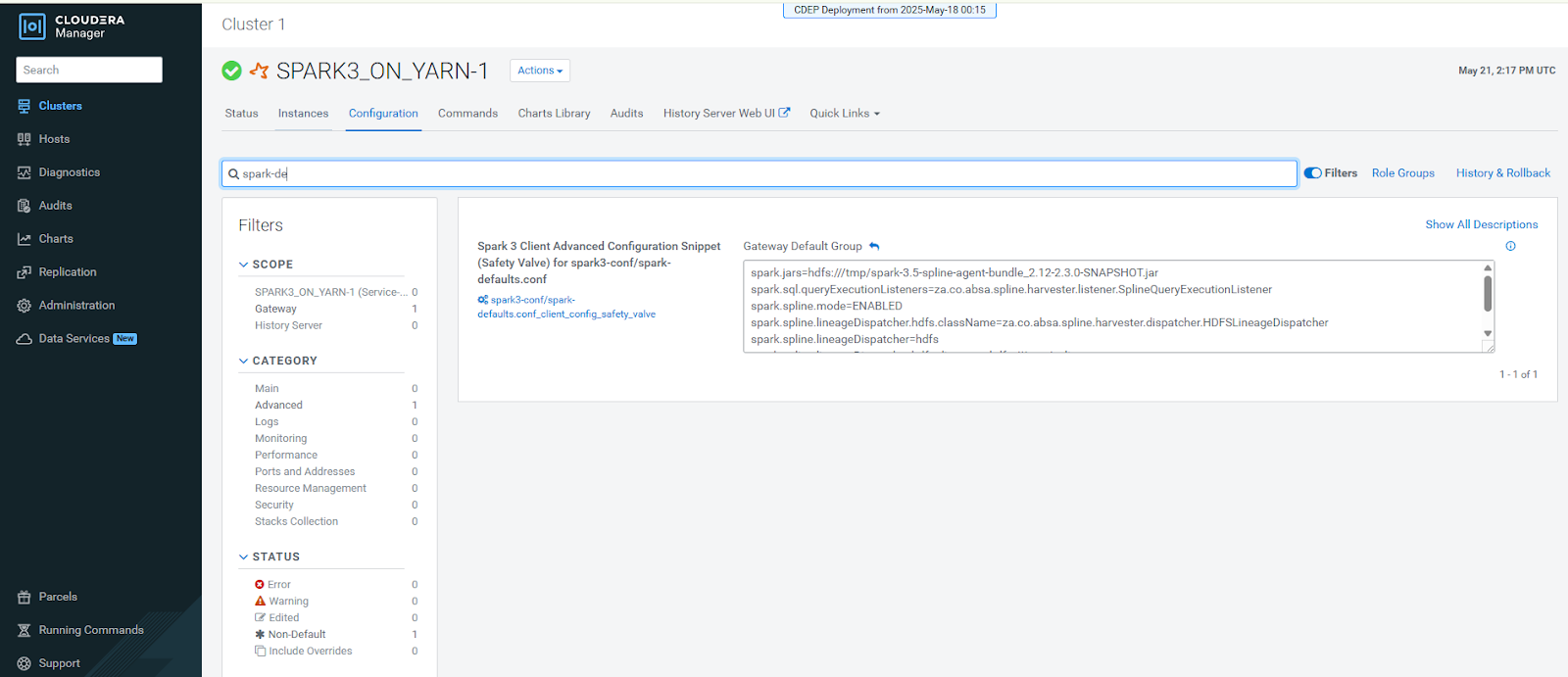
-
Create the HDFS Lineage Directory
Create the directory where lineage files will be written and set permissions:
hdfs dfs -mkdir /tmp/spline
                        hdfs dfs -chown hive /tmp/spline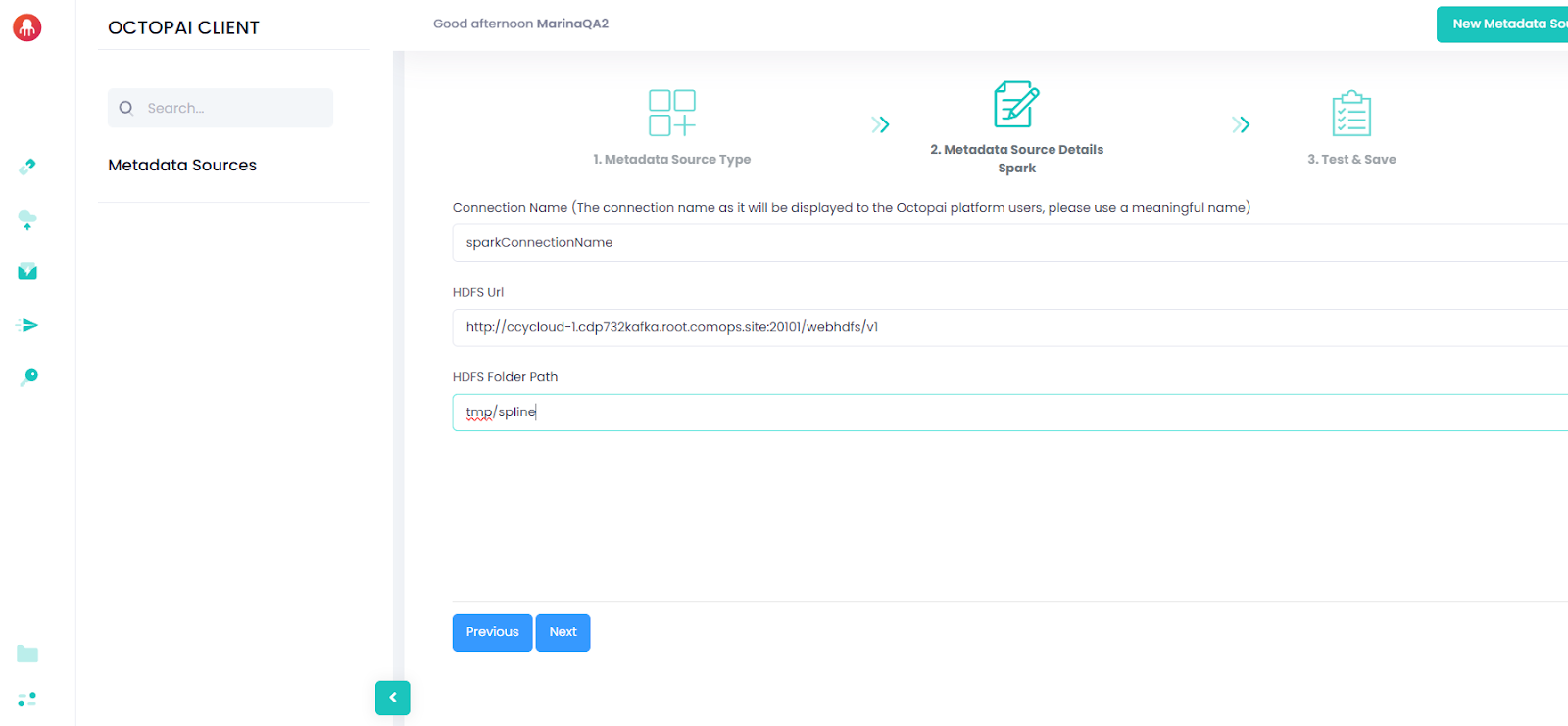
Post-Installation Checklist
- Spline Agent
jaris built and uploaded to HDFS - Spark cluster configuration is updated with Spline properties
- /tmp/spline folder is created and write-access is configured
- Spark cluster is restarted or the configuration is refreshed
- Test Spark jobs are producing lineage files in /tmp/spline
- For Kerberos-secured environments:
-
Kerberos authentication is validated on Windows.
-
Kerberos authentication is validated inside Linux (WSL).
-
WebHDFS delegation tokens are successfully generated.
-
The Cloudera Octopai Client service is running.
-
Important Notes
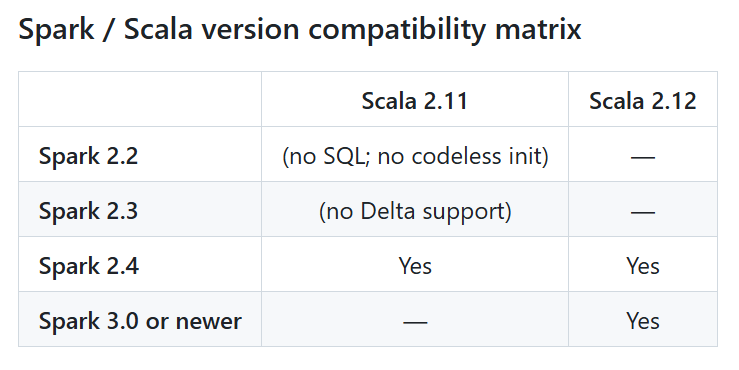
- Provide the SE with the Spark, Scala, and Java version details used in your
environment. Reach out to Cloudera support to
generate the appropriate Spline connector
jars. - Ensure the Spline Agent bundle matches your Spark and Scala versions.
- Only successful jobs with persistent outputs will generate lineage.
- If no lineage appears, verify:
- The job reads and writes to and from persistent sources
- The Spark job includes the correct configuration parameters. Check the Spark logs
- The
jarfile was correctly uploaded to HDFS and accessible
Appendix A. Sample krb5.ini Configuration:
This appendix provides a reference Kerberos configuration file example. Use this example to validate realm, KDC, and domain mappings. The actual values must be provided by your organization.
[libdefaults]
default_realm = ROOT.COMOPS.SITE
dns_lookup_realm = false
dns_lookup_kdc = false
ticket_lifetime = 24h
renew_lifetime = 7d
forwardable = true

[realms]
ROOT.COMOPS.SITE = {
  kdc = ccycloud-1.cdp.root.comops.site
  admin_server = ccycloud-1.cdp.root.comops.site
}

[domain_realm]
.root.comops.site = ROOT.COMOPS.SITE
root.comops.site = ROOT.COMOPS.SITE
On Windows, the file must be placed under C:\ProgramData\MIT\Kerberos5\krb5.ini
On Linux, the file must be placed under /etc/krb5.conf
Correct realm and domain mappings are required for successful Kerberos authentication and delegation token acquisition.
Appendix B. Kerberos Verification and Expected Results:
This appendix describes how to verify that the Kerberos authentication chain is functioning correctly on both Windows and Linux. These checks must be completed before the lineage can be written to HDFS in Kerberos-secured environments.
Windows Verification
Run the following command from a PowerShell window:
"C:\Program Files\MIT\Kerberos\bin\kinit.exe" -kt C:\Octopai\spark.keytab spark@ROOT.COMOPS.SITEExpected result: No output indicates successful authentication.
If an error occurs, verify the keytab, principal name, realm configuration, and network connectivity to the KDC.
Linux Verification (WSL Ubuntu)
Run the following commands from PowerShell:
wsl kinit -kt /mnt/c/Octopai/spark.keytab spark@ROOT.COMOPS.SITE
wsl klist
Expected result: The klist output should display a valid
Kerberos ticket, including fields such as Valid
starting, Expires, and
Service principal.
If no ticket is shown, verify that the krb5.conf file exists under
/etc, the keytab path is correct, and the Linux environment can
access the KDC.
After all Windows and Linux verifications are complete, start the Cloudera Octopai Client service:
Start-Service OctopaiClientCompleting these steps successfully verifies that Kerberos authentication and WebHDFS delegation token acquisition are configured correctly.
