Textual Files / Folder connector
Set up Cloudera Octopai Textual Files connector by configuring metadata sources and validating permissions.
Supported file types
The following file types are supported:
- Upload (Discovery Display): text file, CSV file, SQL file, log file, XML file, JSON file, bash file, output file, BTEQ file, BTQ file, control file, report file, Perl file, KornShell file, C# file, Siddhi file, Python file
- Fully Analyzed (All Modules Supported): SQL file, BTEQ file, BTQ file, control file, Siddhi file, Python file
Tool Permissions Prerequisites
Enable read permission for Cloudera Octopai Windows NT User to the folder (which contains the textual files).
Setting up Textual Files Metadata Source
Metadata Sources are set on the Cloudera Octopai Client
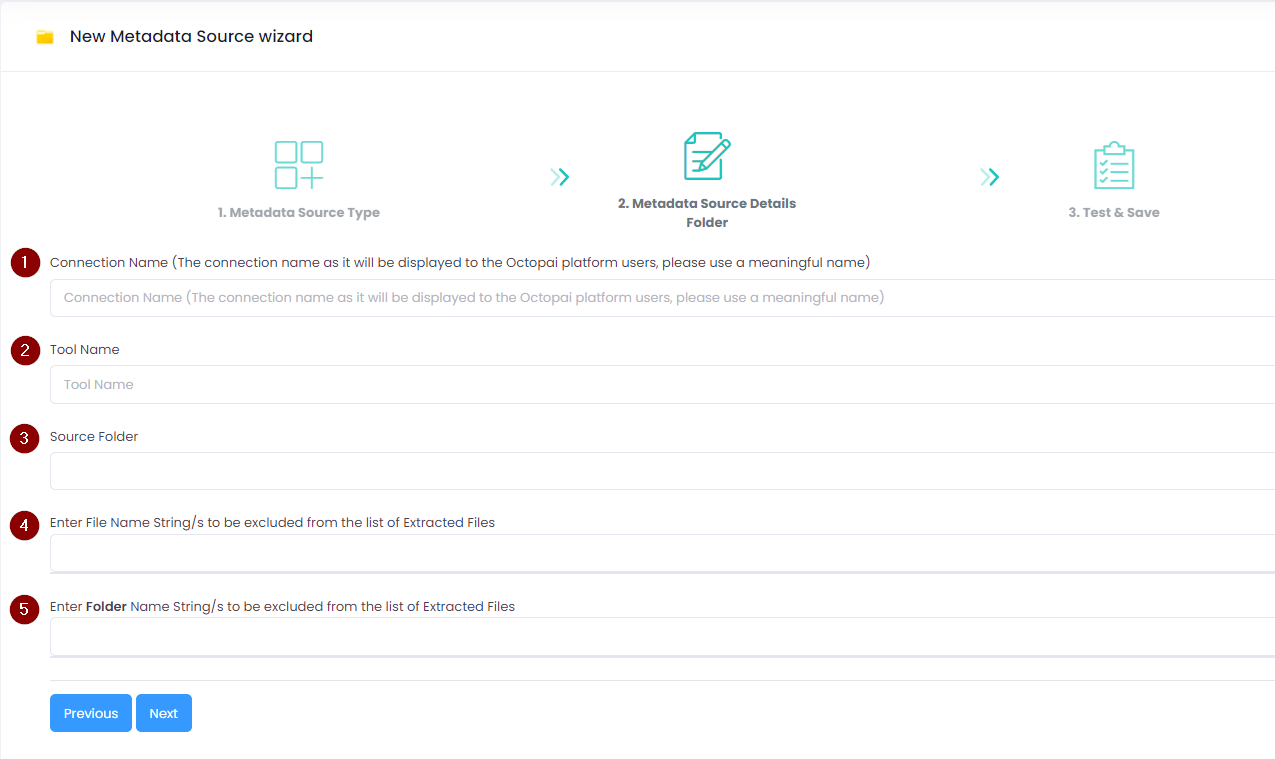
Legend:
- Connection Name: Provide a meaningful name for this connection to help you easily identify it later in the Cloudera Octopai application.
- Tool Name: Specify the tool you are using. For example, enter "Python" if you are uploading Python scripts.
- Source Folder: Click the blank field to select the folder containing the files you want to upload.
- Exclude Files or Strings: Enter file names, suffixes, strings, or patterns you want to exclude from the export.
- Exclude Folders: Specify folder names to exclude from the export if you have multiple subfolders.
