Trino Connector for Cloudera Data Lineage
Learn about Trino as a metadata source for Cloudera Data Lineage (formerly Octopai), including authentication options and extracted metadata.
Overview
The Trino connector connects Cloudera Data Lineage to a Trino coordinator and collects metadata for lineage and discovery. The connector extracts metadata and configuration properties only. It does not read, query, or export table data.
Prerequisites
Before configuring the connector, verify the following requirements.
Access requirements
Ensure you have the following:
- Read access to the Trino environment.
- Network connectivity from the Octopai Client to the Trino coordinator.
- Trino host, port, and authentication credentials.
Catalog properties access
All connector settings must be defined in Trino catalog property files, typically located in etc/catalog/.
If you do not have access to these files or do not know their location, contact your Trino administrator for the connection details.
Kerberos requirements (if applicable)
For Kerberos authentication, you must obtain the following from your Trino administrator:
- Kerberos principal
- Keytab file
- Path to the kinit executable (
KinitPath)
Define the KinitPath value in the kerberos.settings.json file.
Supported authentication methods
Cloudera Data Lineage supports the following Trino authentication types:
- LDAP (username and password)
- Kerberos (SPNEGO / Negotiate)
Connection parameters
The required connection parameters depend on your authentication method.
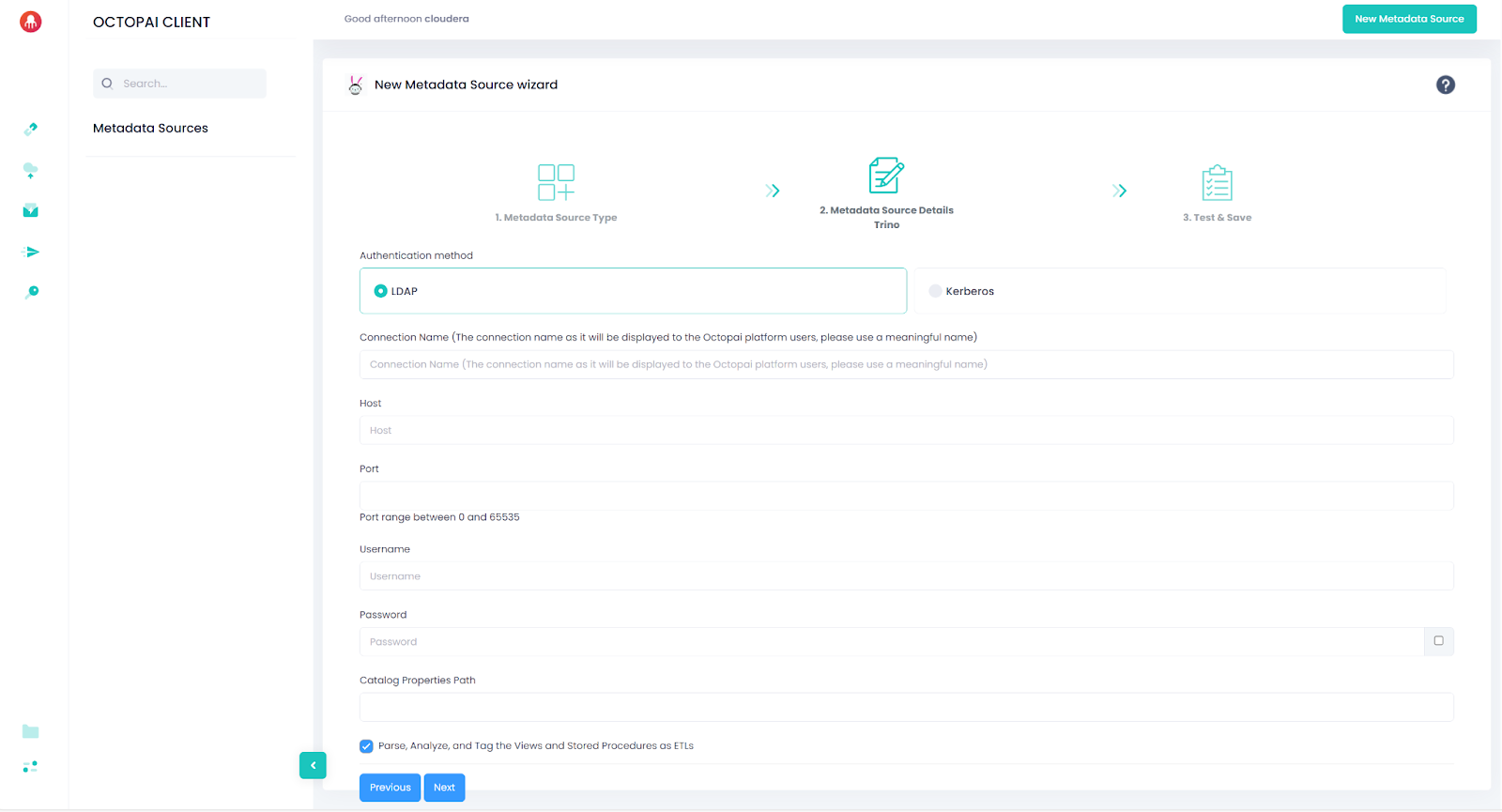
LDAP authentication
| Parameter | Description |
|---|---|
| Host | Trino coordinator hostname or IP (example: trino.example.com) |
| Port | Trino coordinator port (example: 443 for HTTPS) |
| Username | Trino user identity |
| Password | Trino user password |
| CatalogPropertiesPath | Path to directory containing Trino catalog properties files |
The extractor reads catalog property files and exports non-sensitive properties only. Passwords, tokens, and keys are filtered automatically.
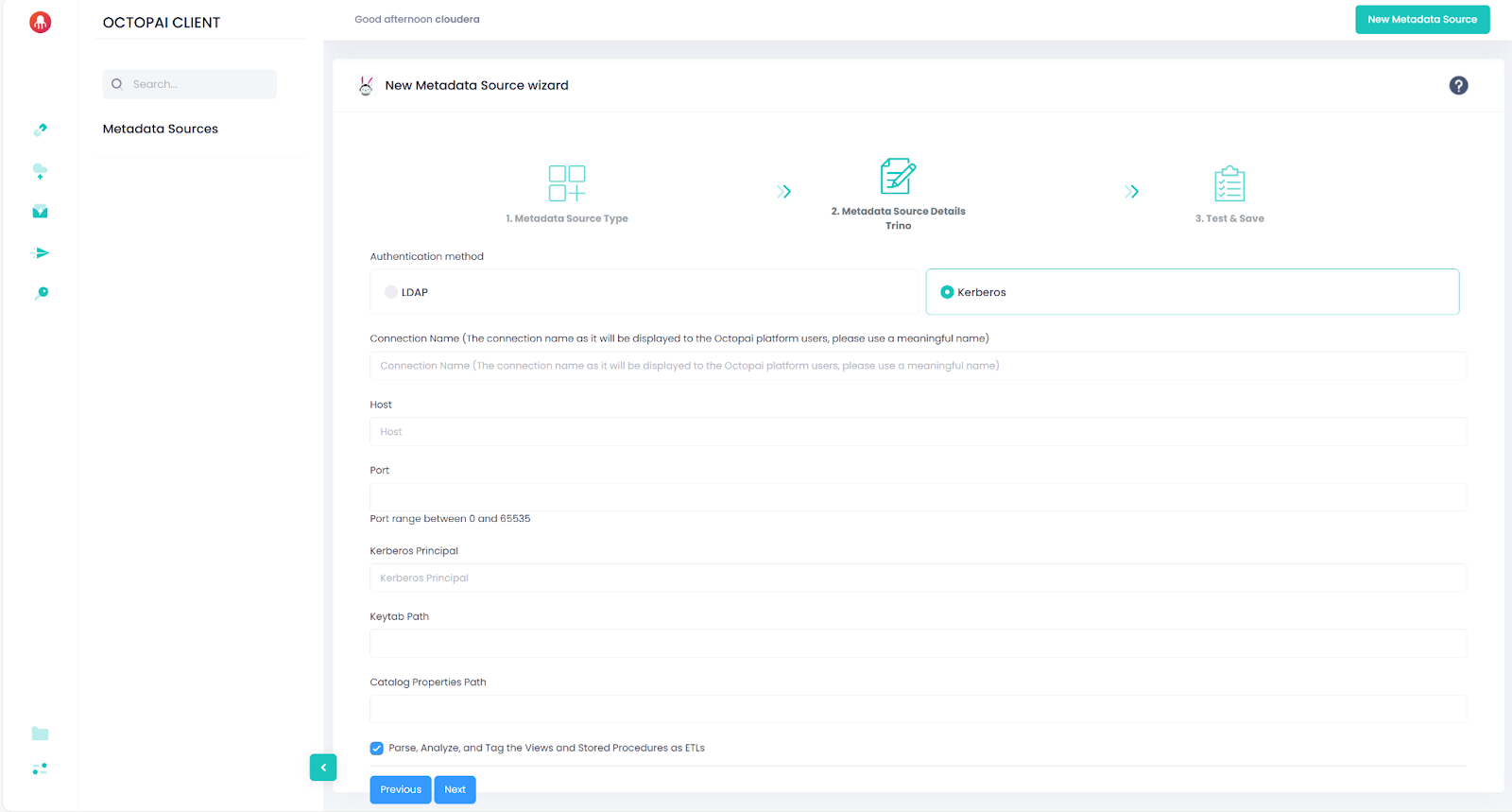
Kerberos authentication
| Parameter | Description |
|---|---|
| Host | Trino coordinator hostname or IP |
| Port | Trino coordinator port |
| KerberosPrincipal | Kerberos principal used to obtain the ticket |
| KeytabPath | Path to the keytab file |
| CatalogPropertiesPath | Path to directory containing Trino catalog properties files |
Kerberos ticket behavior
The connector attempts to use an existing Kerberos ticket from the cache. If the ticket is expired or invalid, the extractor runs the following command to obtain a new ticket before connecting:
kinit -k -t [***KEYTAB PATH***] [***KERBEROS PRINCIPAL***]Catalog property handling
The extractor scans catalog properties files and exports only non-sensitive configuration values. Sensitive keys are automatically removed, including:
- Passwords
- Tokens
- Encryption keys
- SSL credentials
- Cloud access credentials
If a catalog references a platform not supported by Cloudera Data Lineage, the corresponding objects appear as inferred objects in the lineage.
Supported connectors
Cloudera Data Lineage provides complete lineage only when Trino catalog properties use the required configuration formats listed in the following table.
| Platform | Connector Name | Required Configuration |
|---|---|---|
| SQL Server | sqlserver | jdbc:sqlserver://[***SERVER***]:1433;databaseName=[***DATABASE NAME***];encrypt=false;trustServerCertificate=true |
| Snowflake | snowflake | jdbc:snowflake://[***SERVER***]:443?db=[***DATABASE NAME***] |
| PostgreSQL | postgresql | jdbc:postgresql://[***SERVER***]:5432/[***DATABASE NAME***] |
| MySQL | mysql | jdbc:mysql://[***SERVER***]:3306?useSSL=true&requireSSL=true&verifyServerCertificate=false |
| Hive | hive | hive.metastore.uri=thrift://[***HOST***]:9083 |
| Google BigQuery | bigquery | bigquery.project-id=[***YOUR GCP PROJECT ID***] |
| Oracle | oracle | jdbc:oracle:thin:@[***HOST***]:[***PORT***]:[***SID***] |
| Redshift | redshift | jdbc:redshift://[***HOST***]:[***PORT***]/[***DATABASE***] |
| Iceberg (Hive) | iceberg | hive.metastore.uri=thrift://[***HOST***]:9083 |
| MariaDB | mariadb | jdbc:mariadb://[***HOST***]:[***PORT***] |
| Kafka | kafka | kafka.table-names, kafka.nodes, kafka.config.resources |
| MongoDB | mongodb | mongodb.connection-url=mongodb://[***USER***]:[***PASS***]@[***HOST***]:[***PORT***]/ |
| Delta Lake (Thrift) | delta_lake | hive.metastore.uri=thrift://[***HOST***]:9083 |
| Delta Lake (Glue) | delta_lake | hive.metastore=glue |
| Druid | druid | jdbc:avatica:remote:url=http://[***BROKER***]:[***PORT***]/druid/v2/sql/avatica/ |
Metadata extracted
The Octopai agent queries Trino system metadata and exports the following objects:
- Catalogs
-
From
system.metadata.catalogs:- Catalog name (the system catalog is excluded)
- Catalog properties
-
The extractor scans catalog properties files and exports non-sensitive properties only.
- Tables
-
From
system.jdbc.tables:- Catalog
- Schema
- Table name
- Table type
- Table comments
The following system schemas are excluded:
information_schema,jdbc,runtime,metadata. - Views
-
From
[***CATALOG***].information_schema.views:- Catalog
- Schema
- View name
- View definition
- Columns
-
From
[***CATALOG***].information_schema.columns:- Catalog
- Schema
- Table
- Column name
- Ordinal position
- Default value
- Nullable flag
- Data type
Results are ordered by schema, table, and ordinal position.
- Comments
-
From
system.metadata.table_comments:- Catalog
- Schema
- Table
- Comment text
Empty comments and system schemas are excluded.
Extraction output
The connector generates XML output files in the extractor temporary folder. Files are created for each extraction type:
- Catalogs
- Tables (per catalog)
- Views (per catalog)
- Columns (per catalog)
- Comments (per catalog)
- Catalog properties
Cloudera Data Lineage uses these files to build lineage and discovery maps.
