Universal Connector for ETLs
Use the Universal Connector Links CSV template to describe ETL processes, tasks, and column-level data flows so that Cloudera Octopai can show lineage for custom or unsupported ETL and orchestration tools.
The Cloudera Octopai platform supports data movement and transformation scenarios across many tools. The Universal Connector Links CSV template integrates metadata from custom or unsupported ETL and orchestration tools beyond native connectors. You can build a more complete view of your data ecosystem, with data lineage, discovery, and catalog content aligned and connected with the rest of your environment.
This guide explains the Universal Connector Links CSV structure. It complements database object metadata. When you also need tables and columns defined outside the ETL graph, see Universal Connector for Database Objects.
How to use the ETLs template file
- Download the template file: Cloudera Octopai Universal Connector Links
- Fill in the required fields using the table below.
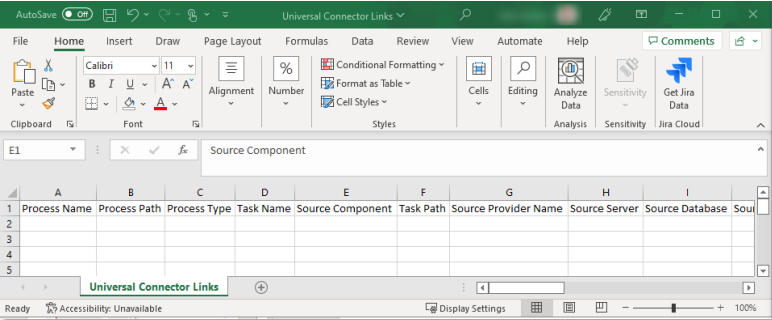
| Column Name | Description | Required |
|---|---|---|
| Process Name | Name of the process that wraps the task, for example “Workflow” in Informatica or “Package” in SSIS | No |
| Process Path | Path of the process – for example, the path where the SSIS package is stored, including the package name and suffix (aaa\bbb\ccc\Package Name.dtsx). | No |
| Process Type | The type of process – job, map, package, and so forth. | Yes |
| Process Description | Short process description to be identified clearly in the lineages. | No |
| Task Name | The task name – the atomic unit that holds the data flow within the process. | Yes |
| Task Path | The path of the task – the location of the atomic unit that runs the process (for example, aaa\bbb\ccc\Package Name\container\Task Name). | No |
| Source Provider Name | The type of database that the source object connects to (for example, Oracle or SQL Server). See Supported script parsing providers. | No |
| Source Component | The name of the logic component in the ETL tool. Example: for Informatica, the name of the aggregator in the map. When there is no component, enter the table name. | No |
| Source Server | Server name of the source object. | No |
| Source Database | Database name of the source object. | Yes |
| Source Schema | Schema name of the source object. | Yes |
| Source Object | Name of the source object. | Yes |
| Source Column | Column name in the source object. | Yes |
| Source Data Type | Data type of the column. | No |
| Source Precision | Precision of the column. | No |
| Source Scale | Scale of the column. | No |
| Source Object Type | Type of object – table, view, file. | Yes |
| Source Sql | The SQL query that retrieves the source data. Use this field when lineage is derived from a custom query rather than direct database object connections. | No |
| Target Provider Name | The type of database that the target object connects to (for example, Oracle or SQL Server). See Supported script parsing providers. | No |
| Target Component | Name of the logic component in the ETL tool. Example: for Informatica, the name of the aggregator in the map. When there is no component, enter the table name. | No |
| Target Server | Server name of the target object. | No |
| Target Database | Database name of the target object. | Yes |
| Target Schema | Schema name of the target object. | Yes |
| Target Object | Name of the target object. | Yes |
| Target Column | Column name in the target object. | Yes |
| Target Data Type | Data type of the column. | No |
| Target Precision | Precision of the column. | No |
| Target Scale | Scale of the column. | No |
| Target Object Type | The type of target object, such as Table, View, or Stored Procedure (SP). | Yes |
| Expression | Formula or transformation between source column and target column. | No |
| Link Type | DataFlow or ImpactAnalysis. | No (default = DataFlow) |
| Link Description | Documentation about the link. | No (default = empty string) |
Supported script parsing providers
Supported parsing providers for scripts:
DB2HIVEIMPALAMSSQLSYNAPSE(MSSQL)NETEZZAORACLEPOSTGRESQLREDSHIFTTERADATASNOWFLAKEVERTICABIGQUERYHANA
Example for ETL process on cross lineage
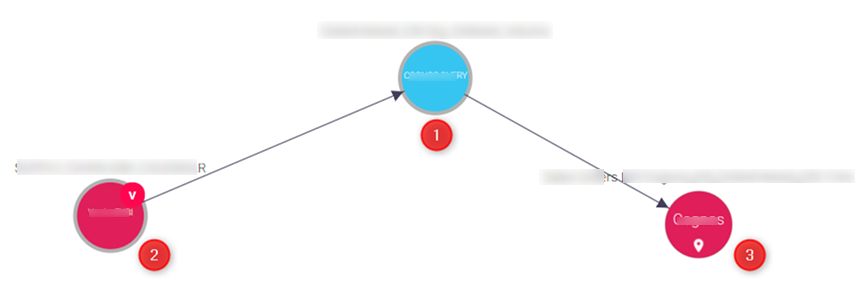
The Universal Connector links the source and the target for the task name as the main object.