Universal Connector for Reports
Use the Universal Connector Reports CSV template to describe reporting assets and their connections to data sources so that Cloudera Octopai can integrate metadata from reporting and BI tools beyond native connectors.
The Cloudera Octopai platform supports expansive analysis and visualization scenarios. The Universal Connector for Reporting Tools integrates metadata from a diverse range of systems that are not covered by native connectors (for example Tableau, Power BI, Cognos, MicroStrategy, Qlik, Looker, SSRS, and similar tools). You can build a more complete view of your data ecosystem, with data lineage, discovery, and catalog content aligned and connected with the rest of your environment.
This guide explains the Universal Connector Reports CSV structure.
How to use the Reports template file
- Download the template file: Universal Connector Reports
- Fill in the required fields in the template file using the information provided in the table below.
| Column Name | Description | Required |
|---|---|---|
| Model Name | The name of the model, such as the name of the package in Cognos, the RPD name in OBIEE, or the Universe name in Business Object. | Yes |
| Report Path | The unique path of the report, per ConnectionID. | Yes |
| Report Name | The name of the report. | Yes |
| Source Provider | The type of database that the report connects to. See Supported script parsing providers. | Yes |
| Source Layer Name | The name of the source layer or semantic object that contains the source table or column. | No |
| Source Server | The server name of the source object. | No |
| Source Schema | The schema name of the source object. | Yes |
| Source Db | The database name of the source object. | Yes |
| Source Table | The table name in the source object. | Yes |
| Source Column | The column name in the source object. | Yes |
| Source Data Type | The data type of the column. | No |
| Source Object Type | The type of source object, such as Table, View, or Stored Procedure (SP). | Yes |
| Source Precision | The precision of the column. | No |
| Source Scale | The scale of the column. | No |
| Source Sql | The SQL query that retrieves the report's source data. Use this field when lineage is derived from a custom query rather than direct database object connections. | No |
| Target Server | The server name of the target object. | No |
| Target Layer Name | The name of the component in the report, such as a table, cross-tab, chart, etc. | Yes |
| Target Schema | The schema name of the target object. | No |
| Target Db | The database name of the target object. | No |
| Target Table | The table name in the target object. | No |
| Target Column | The column name in the target object. | Yes |
| Target Data Type | The data type of the column. | No |
| Target Precision | The precision of the column. | No |
| Target Scale | The scale of the column. | No |
| Link Description | Documentation about the link. Default = Null. | No |
| Link Type | Data Flow or Impact Analysis. Default = Data Flow. | No |
| Expression | The formula or transformation between the source column and target column. | No |
Supported script parsing providers
Supported parsing providers for scripts:
DB2HIVEIMPALAMSSQLSYNAPSE(MSSQL)NETEZZAORACLEPOSTGRESQLREDSHIFTTERADATASNOWFLAKEVERTICABIGQUERYHANA
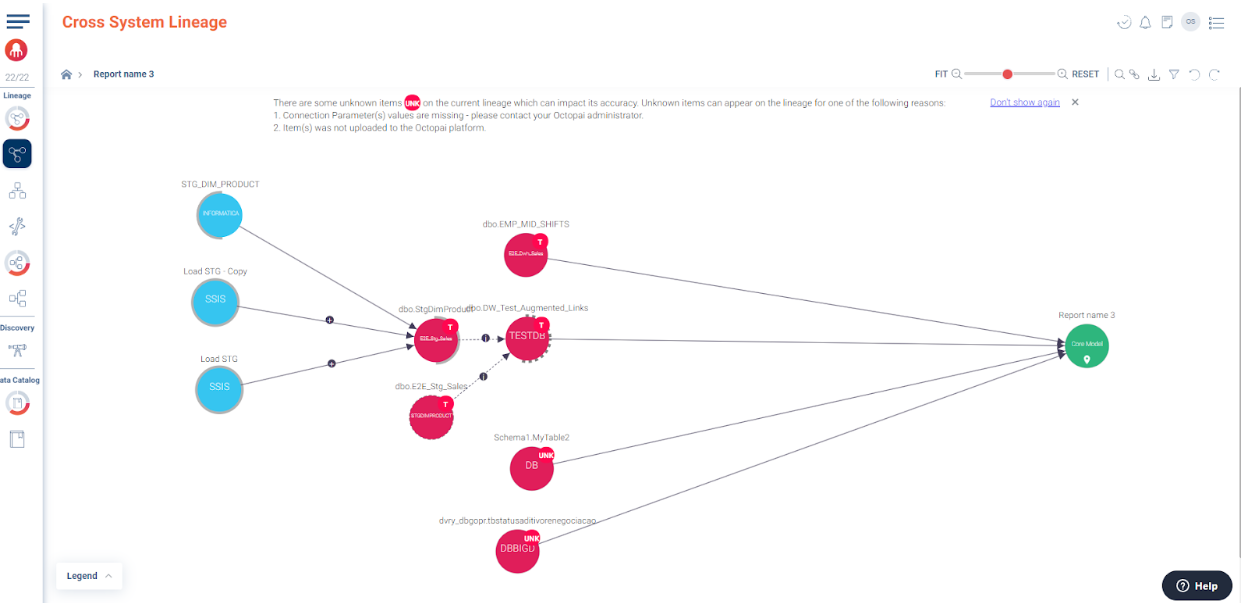
Example for report cross-system lineage
Example of a report cross-system lineage created as part of an upload of the Universal Connector: