Cloudera Data Lineage Knowledge Hub and Insight Dashboard
This guide explores the key product capabilities of Cloudera Data Lineage (formerly Octopai) Knowledge Hub, along with tips to maximize its usage.
Introduction
Cloudera Data Lineage Knowledge Hub is designed to empower data teams in managing and ensuring the integrity of their data assets. By seamlessly integrating data assets and data lineage, providing flexible search options, and offering a pre-defined dashboard for monitoring, collaboration, and auditing, Cloudera Data Lineage enables organizations to effectively manage their data, maintain compliance, and make informed decisions.
Asset Management and Data Lineage Integration
Cloudera Data Lineage Knowledge Hub seamlessly integrates data assets and data lineage, allowing users to navigate between them effortlessly. Key capabilities include:
- Data Lineage Integration: Cloudera Data Lineage Knowledge Hub provides full integration with the Cloudera Data Lineage platform, enabling users to easily navigate from a data asset to its data lineage and vice versa. This integration ensures a comprehensive view of data, making it easier to trace the origin, transformations, and dependencies of data assets.
- Utilization for Auditing: The Knowledge Hub's integration with data lineage allows for comprehensive auditing capabilities. Users can track the lineage of data assets, ensuring compliance with regulatory requirements and providing transparency for auditing purposes.
- Indication of Sensitive Data Assets: Cloudera Data Lineage Knowledge Hub allows for the identification and indication of sensitive data assets. With customizable attributes and tags, users can label and flag sensitive data, ensuring proper handling, access controls, and compliance with data privacy regulations.
- Fast Implementation: Cloudera Data Lineage Knowledge Hub is designed for rapid implementation, allowing data teams to quickly set up and start leveraging its capabilities. This enables organizations to accelerate their data management initiatives and realize value in a short timeframe.
Flexible Search and Custom Filters
Cloudera Data Lineage Knowledge Hub offers a flexible search functionality and custom filters, allowing users to quickly locate and narrow down specific data assets. Additional capabilities include:
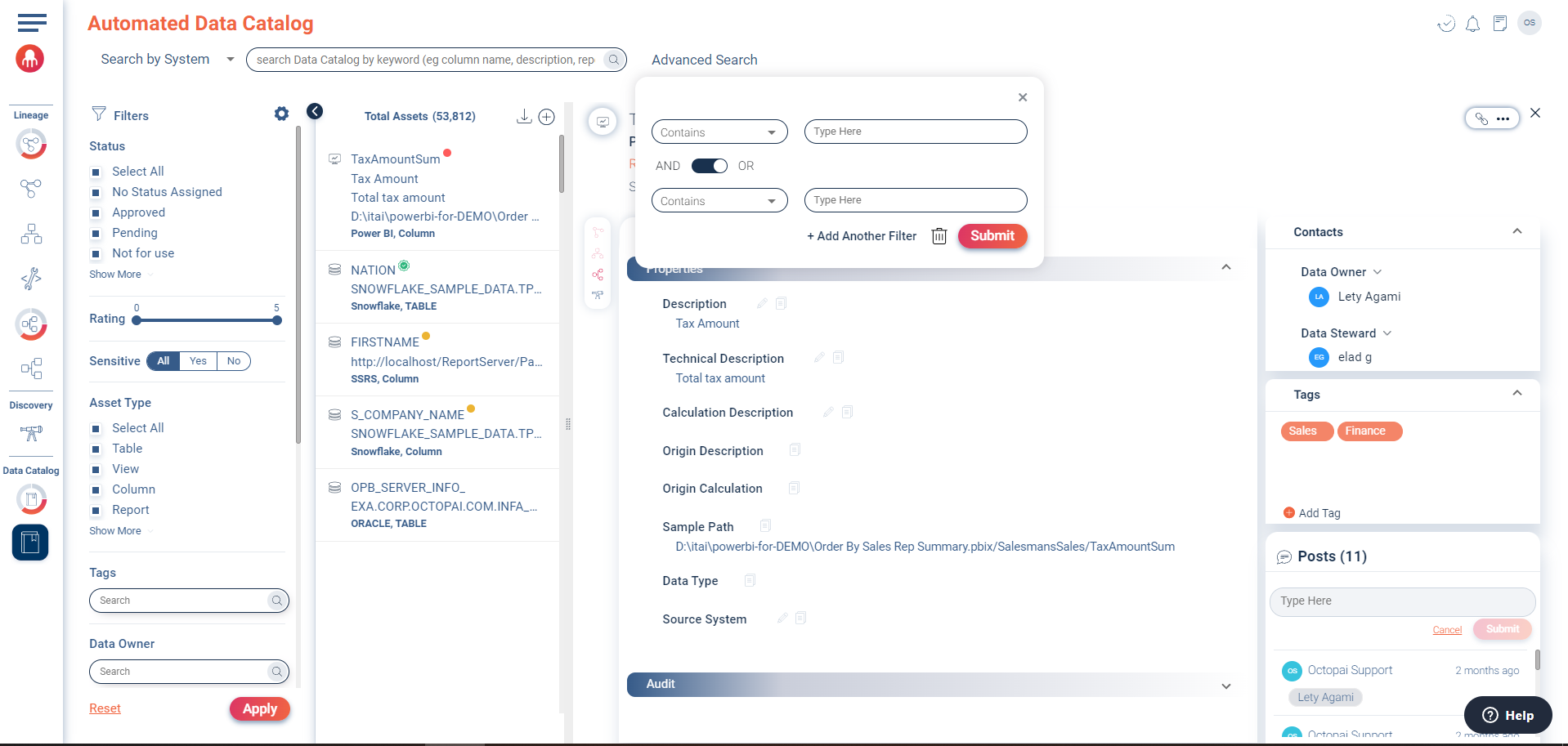
- Flexible Search: The Knowledge Hub provides a powerful search feature, enabling users to search for data assets using free text. This flexibility simplifies the process of finding relevant data assets based on specific keywords or phrases.
- Custom Filters: Users can create custom filters to refine search results further. This feature allows data teams to tailor their searches to specific criteria, such as asset types, data owners, tags, or sensitive data indicators, streamlining the discovery of relevant data assets.
Knowledge Hub - Insight Dashboard and Collaboration
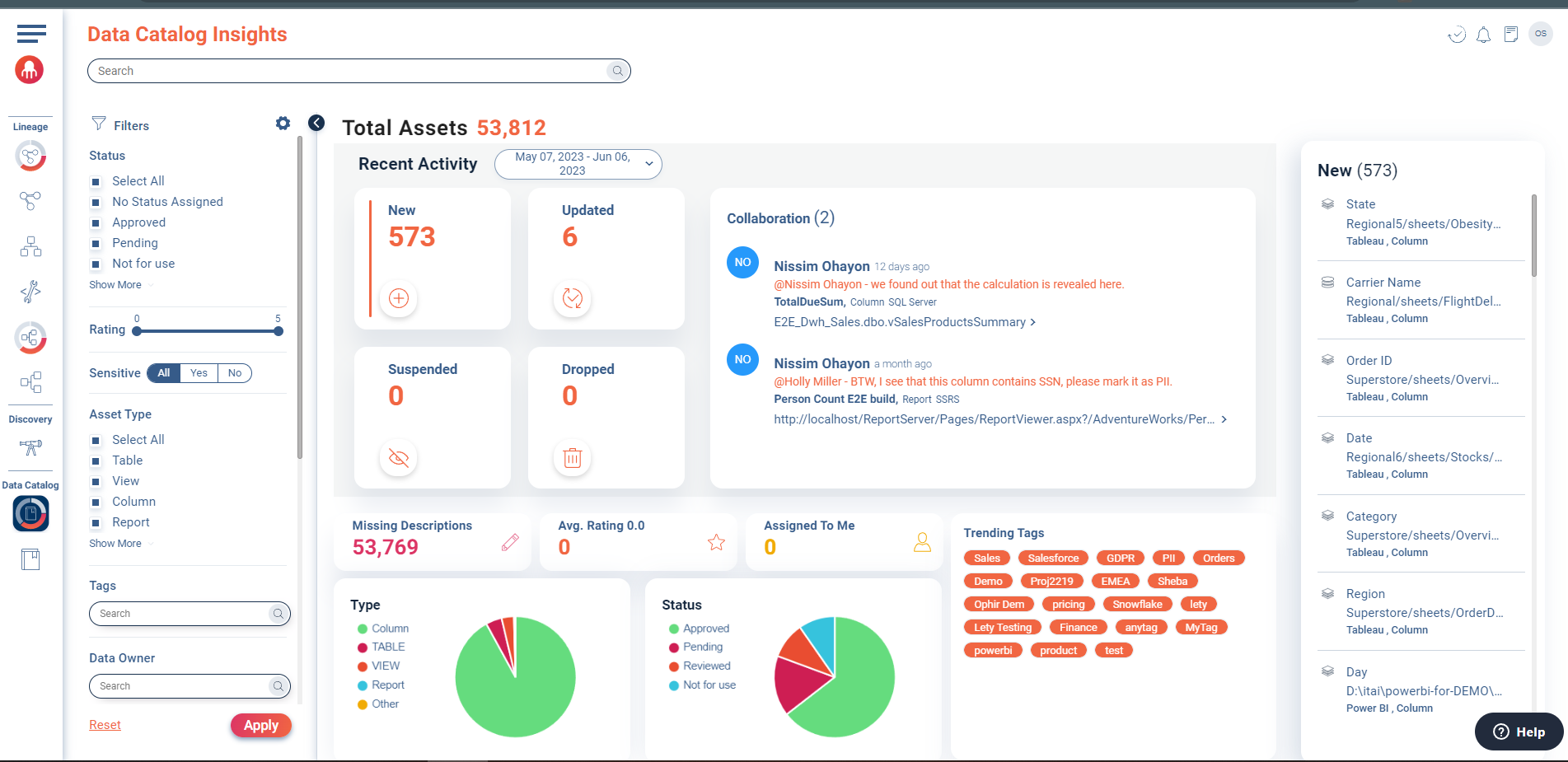
Cloudera Data Lineage Knowledge Hub offers a pre-defined dashboard that provides valuable insights into data assets and promotes collaboration among users. Key capabilities of the Knowledge Insight dashboard include:
- Monitoring and Reporting: The dashboard allows users to monitor the latest activities within the Knowledge Hub, providing real-time updates on asset modifications, user interactions, and overall data asset health. This helps users stay informed and make data-driven decisions based on current information.
- Collaboration and Governance: The Knowledge Hub facilitates collaboration among users, particularly between asset owners and data stewards. This collaboration ensures that data assets are managed, maintained, and governed by the responsible individuals, promoting data integrity, accuracy, and compliance.
Benefits
- Improved Data Discoverability: quickly search for specific data assets using keywords, tags, or other attributes. This saves time and effort by eliminating the need to manually browse through multiple systems or databases.
- Enhanced Data Governance: establish a consistent and standardized approach to data management. It provides a centralized location for defining and documenting data definitions, metadata, and data lineage. This ensures data governance practices are followed and promotes data quality and integrity.
- Increased Collaboration and Knowledge Sharing: collaborate within the Knowledge Hub by creating posts and mentioning other users. This promotes knowledge sharing, allows for discussions about data assets, and facilitates better decision-making based on shared insights.
- Improved Data Confidence: By providing comprehensive information about data assets, such as descriptions, ratings, and usage statistics, a Knowledge Hub enhances users' confidence in the data they are working with. It helps users understand the context and quality of the data, leading to more accurate analysis and decision-making.
- Time and Cost Savings: quickly locate and access the data they need, reducing the time spent searching for information. It also eliminates the need for manual documentation and maintenance of data assets, saving both time and resources.
- Regulatory Compliance: compliance with data protection and privacy regulations by providing visibility into sensitive data assets. It allows organizations to track data lineage and ensure proper data access controls are in place.
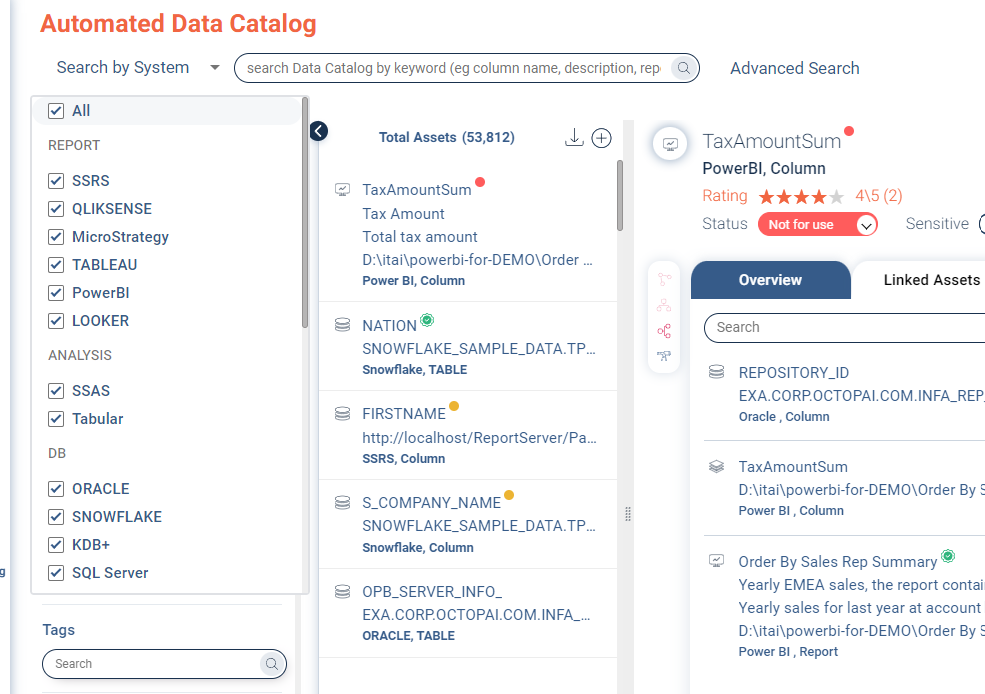
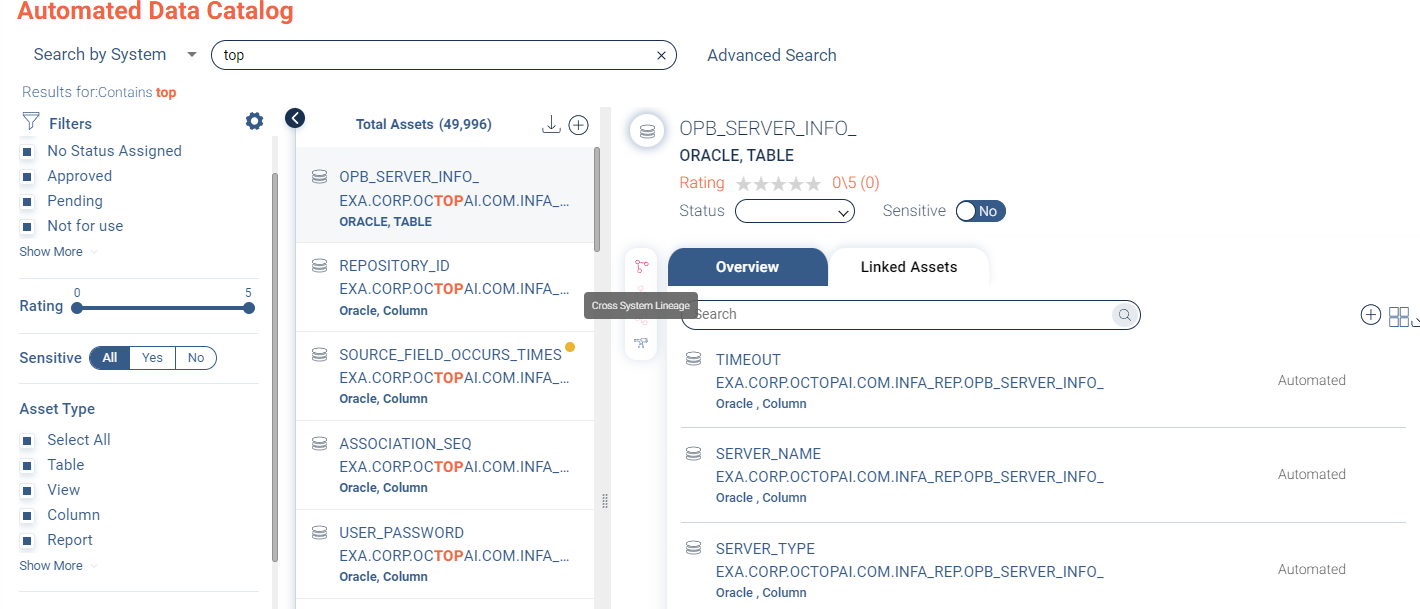
Main capabilities of the Knowledge Hub and how to utilize them
This guide will walk you through the key capabilities of the Knowledge Hub and how to utilize them.
1. Bulk Import
- The bulk import capability allows users to import assets into the Cloudera Data Lineage Knowledge Hub in large quantities.
- Users can provide existing documentation or data in bulk and have it added to the Knowledge Hub.
- Instead of manually entering each asset, users can provide a complete XLS file with the relevant asset details.
- The provided XLS file should follow a specific format or template provided by Cloudera Data Lineage.
- The bulk import process enables users to quickly populate the Knowledge Hub with a large number of assets.
- This capability provides customers with independence in updating and adding assets using external files.
2. Asset Management
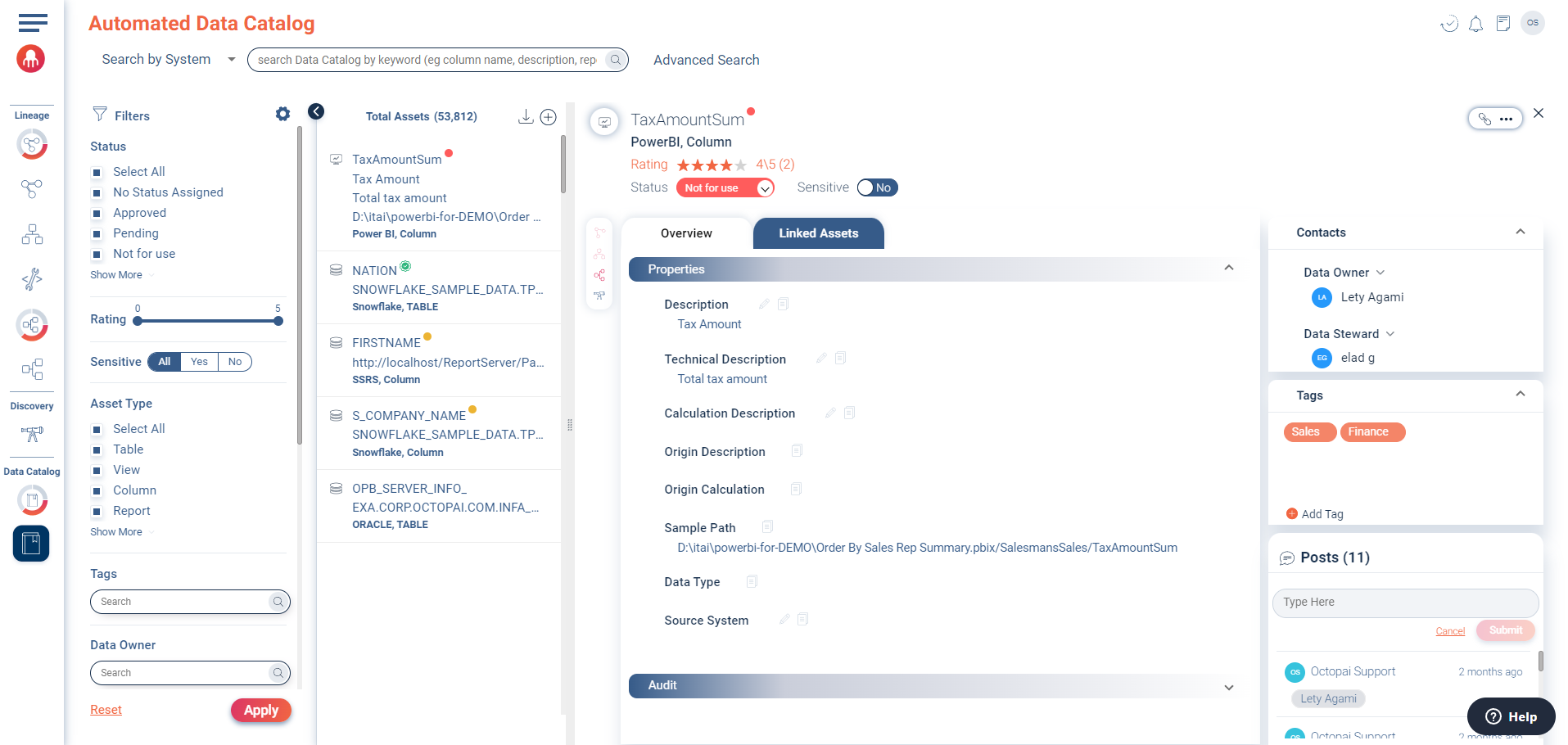
- Any item in the Knowledge Hub is considered an asset.
- Assets can be automatically created from metadata or manually created by users.
- Examples of assets include tables, columns, reports, processes, and more.
3. Editing Permissions
- Editing capabilities are based on user roles:
- Admin: Full editing privileges.
- Viewer: Read-only access.
4. Search Functionality
- The Knowledge Hub provides a search feature to find assets using free text.
- Admins, editors, and viewers can use the search functionality.
5. Rating
- Users can rate assets to indicate their quality.
- Average ratings are displayed in the asset's detail pane.
- Admins, editors, and viewers can rate assets.
6. Status
- Assets can be assigned different statuses, such as "Approved," "Pending," or "Not for use."
- Statuses are color-coded for easy identification.
- Admins and editors can manage asset statuses.
7. Sensitivity
- Assets can be assigned sensitivity levels to indicate how they can be used.
- Sensitivity options include "Yes" or "No."
- Admins and editors can manage asset sensitivity.
8. Descriptions
- Assets have short and full descriptions.
- Short descriptions provide a brief overview.
- Full descriptions offer detailed information.
- Admins and editors can manage asset descriptions.
9. Origin Description and Calculation
- Origin descriptions and calculations are analyzed from metadata.
- These attributes are non-editable.
10. Asset Type and Data Type
- Asset type represents the category of the asset (e.g., Knowledge Hub, Asset, Table, Column, Report).
- Data type represents the original data type as analyzed from metadata.
- These attributes are non-editable.
11. Sample Path
- Sample path shows the location of the asset.
- Aggregated assets have sample paths for different layers.
- Direct paths are shown for other asset types.
- This attribute is non-editable.
12. Ownership and Stewardship
- Data owner and data steward attributes help assign responsibility for assets.
- Admins and editors can select owners and stewards from a drop-down list.
13. Updates and Entry Date
- The last update attribute shows the date of the last modification to the asset.
- The entry date represents the initial appearance of the asset.
- These attributes are non-editable.
14. Tags
- Tags can be assigned to assets for better categorization and organization.
- Admins and editors can select existing tags or create new ones.
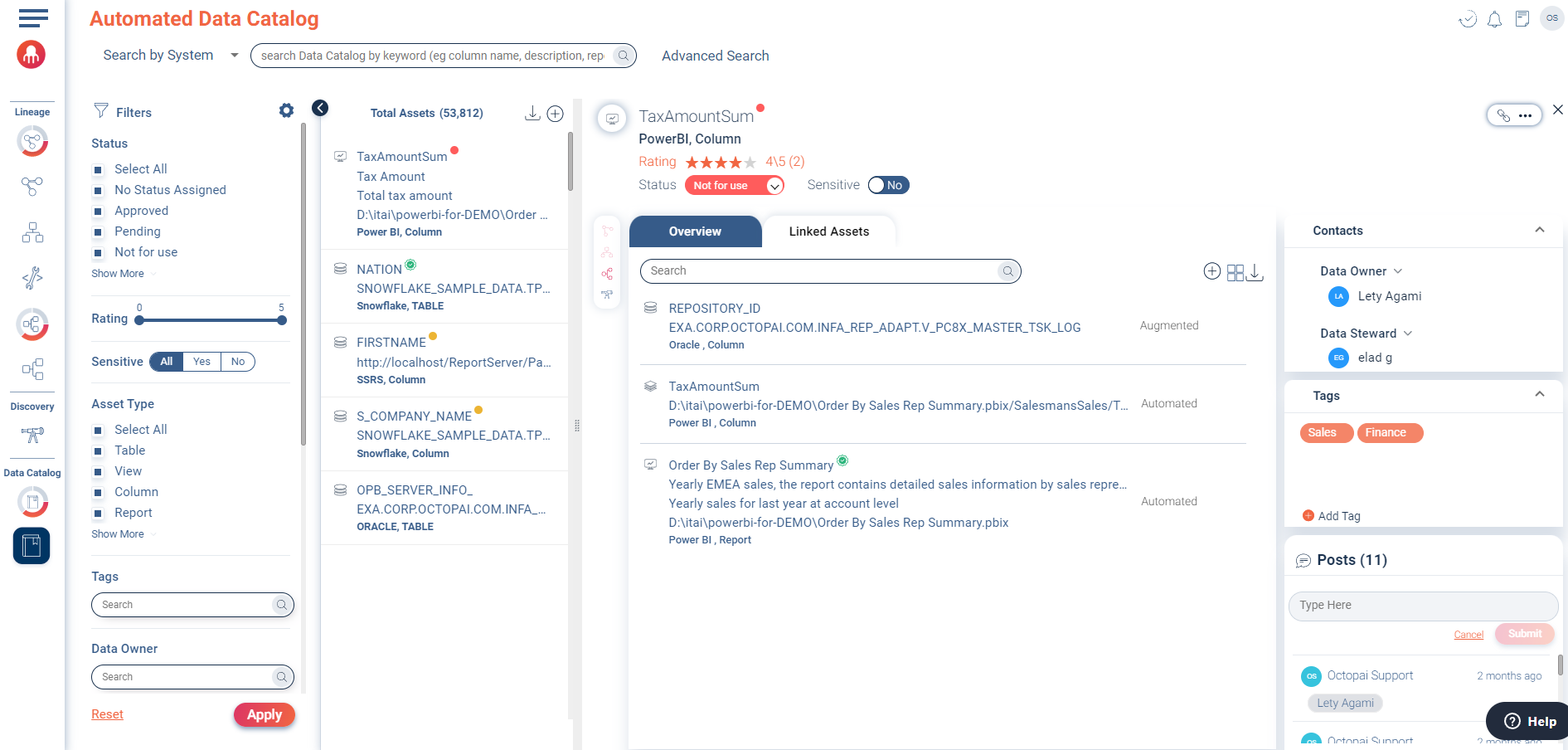
15. Linked Assets
- Linked assets can be automated or augmented.
- Automated links are created through analysis.
- Augmented links can be added or removed by users with appropriate permissions.
16. Suspension
- Assets can be suspended to prevent modification of their details.
- This feature is available to admins and editors.
17. Search Filters and Sorting
- Search filters allow users to locate specific data assets.
- Filters can be applied based on various attributes.
- Sorting options help organize search results.
18. Collaboration with Posts
- Users can collaborate by creating posts and mentioning other users.
- Mentioned users receive email notifications with relevant asset information.
- Posts are publicly available.
19. Lineage Integration
- Presentation and physical columns integrate with end-to-end column lineage.
- Reports, views, procedures, processes, and functions integrate with inner system and cross-system lineage.
- Tables integrate with cross-system lineage.
20. Search in Discovery
- Users can search for assets by name in the Discovery module.
21. Dashboard
- The Knowledge Hub provides a dashboard for insights and quick actions.
- Users can monitor the health of the Knowledge Hub and perform tasks efficiently.
22. Export Assets
- Users can export, update, and create assets using external files.
- Export functionality allows for future updates.
- Update and create capabilities are available in the Admin Console.
- Error handling and user-friendly input are supported.
23. Knowledge Hub with Technical Descriptions for Linked Assets
- Technical descriptions are now included in the Knowledge Hub for linked assets.
- The technical description can be viewed alongside the regular description.
- Excel download files include technical descriptions.
24. Grid Mode
- Grid mode include path and description columns.
- All linked assets columns are available.
- Filtering columns facilitate data exploration.
25. Mass Update
- The Data Catalog provides a mass update capability to efficiently update attributes of multiple assets at once.
- Users can utilize an Excel template to make bulk updates to attributes such as descriptions and tags.
- The template includes all relevant attributes, including custom attributes and technical descriptions.
- Only filled cells in the template will be used for updates, preventing unintended modifications.
- Tags can be entered as a comma-separated list or in separate columns.
- Custom attributes can be included as columns in the CSV file.
- Usernames are captured correctly for assets uploaded through the Excel template.
- Users receive notifications indicating the number of assets successfully updated and any errors encountered.
- An error output file is provided for assets that could not be updated, along with the reasons for failure.
Now that you have an overview of the capabilities of the Data Catalog, you can effectively manage and work with your data assets in Cloudera Data Lineage. Utilize the various features to search, organize, collaborate, and gain insights from your data catalog.
