Options for importing and syncing LDAP users and groups in Cloudera Data Explorer (Hue)
Configuring Data Explorer for Lightweight Directory Access Protocol (LDAP) enables you to import users and groups from a directory service, synchronize group membership manually or automatically at login, and authenticate users with LDAP.
| LDAP sync option | Description |
|---|---|
| Add/Sync LDAP user | Import and synchronize one user at a time |
| Sync LDAP users/groups | Synchronize user memberships in all groups |
| Add/Sync LDAP group | Import and synchronize all users in one group |
sync_groups_on_login |
Automatically synchronize group membership at login |
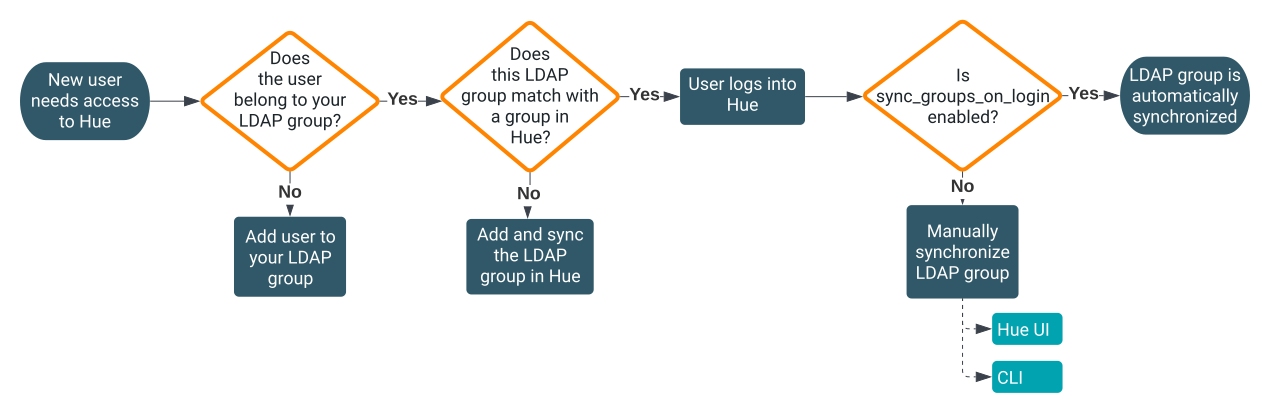
Importing a group from LDAP creates a group in Data Explorer. When you synchronize a group, Data Explorer checks the user's group membership in LDAP and synchronizes it to the corresponding group in Data Explorer. To synchronize an LDAP group with Data Explorer, the group must be imported in the Data Explorer database.
For example, if a user belongs to 10 LDAP groups, but only 5 groups are present in Data Explorer, then only these 5 groups are synced when new users are added to these groups. This mechanism helps to avoid including irrelevant group data in the Data Explorer database.
sync_groups_on_login option in the Hue Advanced Configuration Snippet. However,
this process can be burdensome if you have a large number of users logging in and authenticating
simultaneously or new users getting added to the LDAP group, as multiple synchronization requests
are triggered which could cause collisions on database writes. An alternative approach is to
synchronize users using the command line option, which you can script and automate as a cron job.
To manually synchronize LDAP groups having the newly added users that need to be added to Data Explorer, run the following command separately for each LDAP
group:$HUE_HOME/build/env/bin/hue import_ldap_group --import-members [***LDAP-GROUP-NAME***] --cm-managed