Understanding Cloudera Data Explorer (Hue) users and groups
There are two types of users in Data Explorer - superusers and general users referred to as users, each with specific privileges. These users can be a part of certain groups. Groups enable you to control which Data Explorer applications and features your users can view and access when they log into Data Explorer.
- Add and delete users
- Add and delete groups
- Assign permissions to groups
- Change a user into a superuser
- Import users and groups from an LDAP server
If a user is part of the superuser LDAP group in Data Explorer, then that user is also a part of the group of superusers in Data Explorer.
Users can only change their name, e-mail address, and password. They can log in to Data Explorer and run Data Explorer applications, subject to the permissions provided by the Data Explorer groups to which they belong. This is different from how Cloudera perceives the Data Explorer application when you submit a Hive or an Impala query from the Data Explorer user interface (UI). Data Explorer is a server between the users and the Cloudera services. Data Explorer is considered as a single ‘hue’ user by the other services in the Cloudera cluster.
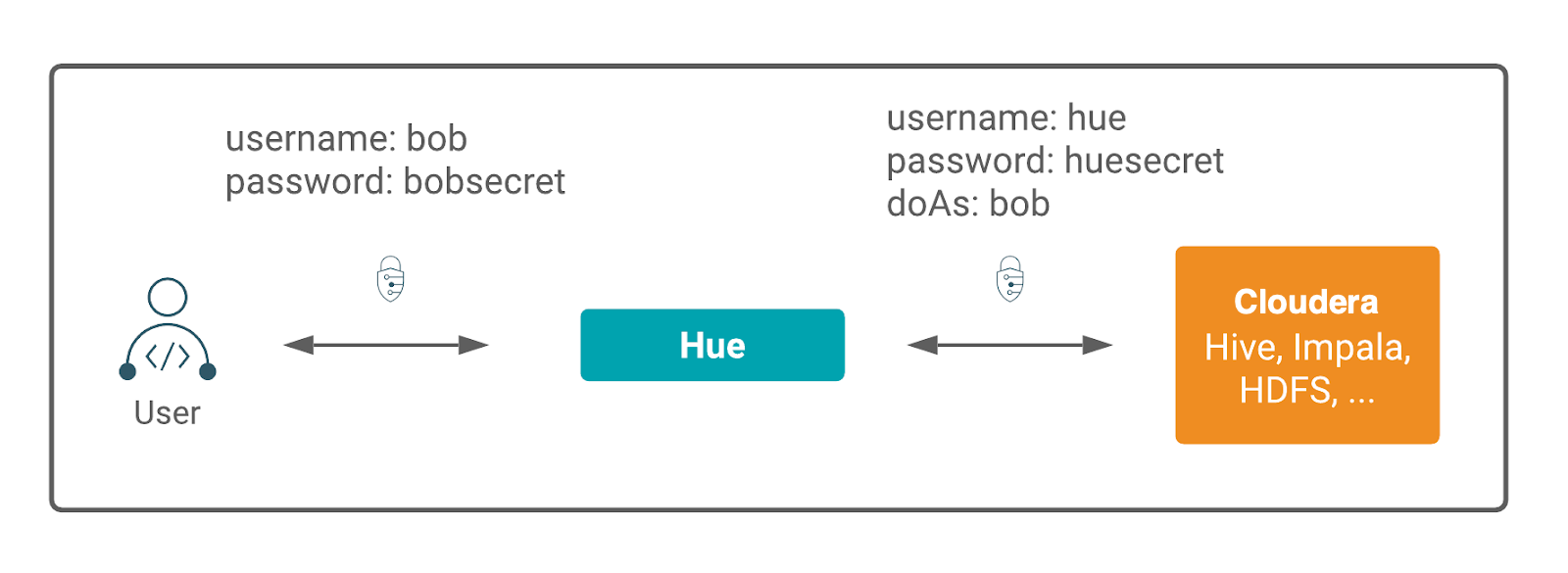
Data Explorer is a gateway to Cloudera cluster services and both have separate permissions. A Data Explorer superuser is not granted access to HDFS, Hive, and other Cloudera cluster services. Apache Ranger governs access to the Cloudera cluster services.
Data Explorer user permissions are at the application level only. For example, a Data Explorer superuser can filter Data Explorer user access to a Cloudera service but cannot authorize the use of its features. Users who log on to the Data Explorer UI must have permission to use Data Explorer and to each Cloudera service accessible within Data Explorer.
