Hive access authorization
As administrator, you need to understand that the Hive default authorization for running Hive queries is insecure and what you need to do to secure your data. You need to set up Apache Ranger.
To limit Apache Hive access to approved users, Cloudera recommends and supports only Ranger. Authorization is the process that checks user permissions to perform select operations, such as creating, reading, and writing data, as well as editing table metadata. Apache Ranger provides centralized authorization for all Cloudera Runtime Services.
You can set up Ranger to protect managed, ACID tables or external tables using a Hadoop SQL policy. You can protect external table data on the file system by using an HDFS policy in Ranger.
Preloaded Ranger Policies
In Ranger, preloaded Hive policies are available by default. Users covered
by these policies can perform Hive operations. All users need to use the default database,
perform basic operations such as listing database names, and query the information schema.
To provide this access, preloaded default database tables columns and
information_schema database policies are enabled for group public (all
users). Keeping these policies enabled for group public is recommended. For example, if the
default database tables columns policy is disabled preventing use of
the default database, the following error appears:
hive> USE default;
Error: Error while compiling statement: FAILED: HiveAccessControlException
Permission denied: user [hive] does not have [USE] privilege on [default]
Apache Ranger policy authorization
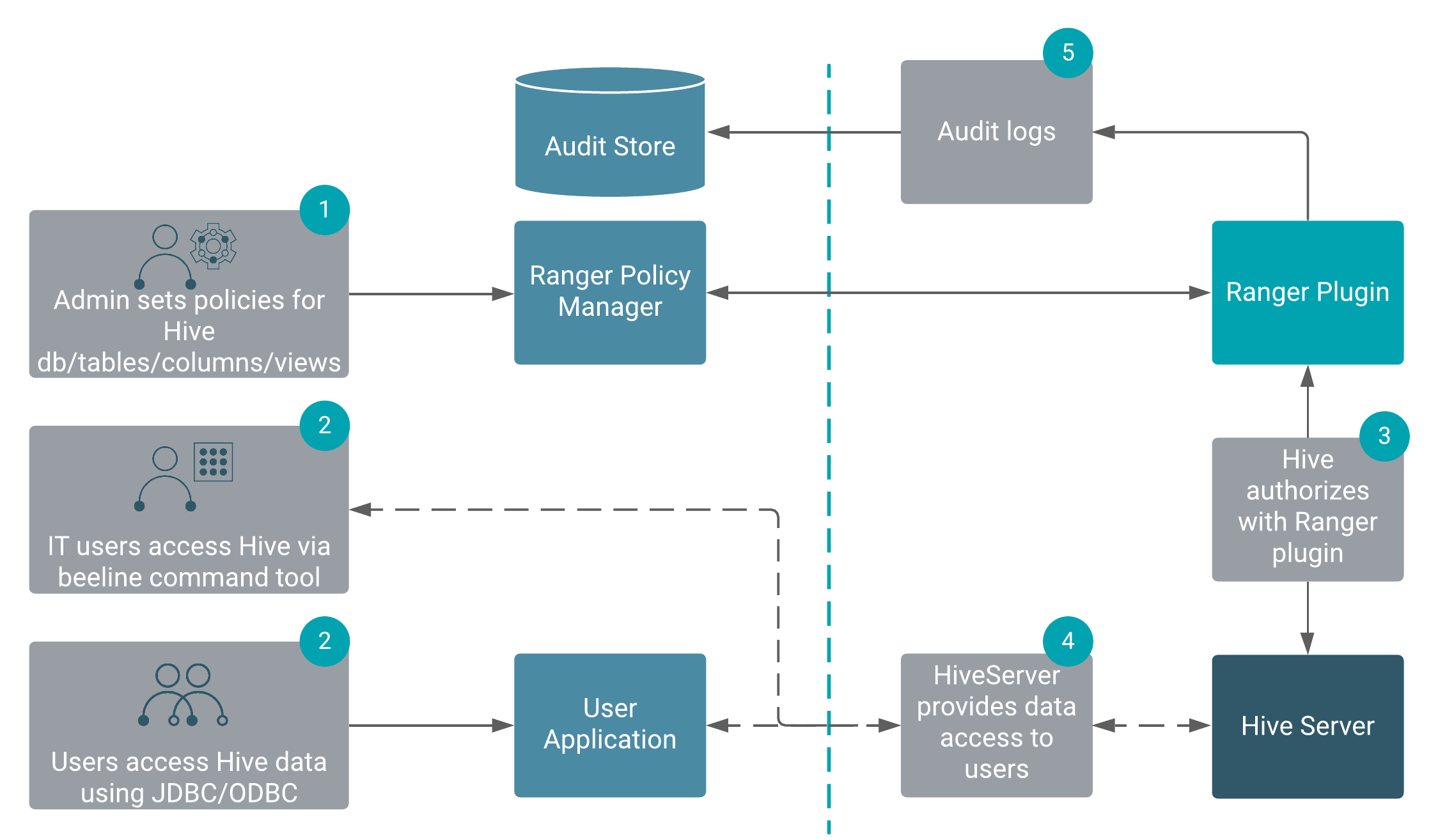
Apache Ranger provides centralized policy management for authorization and auditing of all Cloudera Runtime services, including Hive. All Cloudera Runtime services are installed with a Ranger plugin used to intercept authorization requests for that service, as shown in the following illustration.
The following table compares authorization models:
|
Authorization model |
Secure? |
Fine-grained authorization (column, row level) |
Privilege management using GRANT/REVOKE statements |
Centralized management GUI |
|---|---|---|---|---|
|
Apache Ranger |
Secure |
Yes |
Yes |
Yes |
|
Hive default |
Not secure. No restriction on which users can run GRANT statements |
Yes |
Yes |
No |
When you run grant/revoke commands and Apache Ranger is enabled, a Ranger policy is created/removed.
Prerequisites for Ranger-Hive Integration
When setting up a Hive service in the Ranger Admin UI, you may encounter a
ClassNotFoundException error when clicking the Test
Connection button. This issue occurs because a key dependency, the Hive on
Tez gateway role, is not installed on the Ranger Admin host. The missing role prevents
Ranger from successfully creating and validating the Hive repository.
To avoid this error, you must install the Hive on Tez gateway role on the Ranger Admin host before creating the Hive service. This ensures all necessary dependencies are in place for Ranger to communicate properly with the Hive service.
ERROR org.apache.ranger.services.hive.client.HiveClient: Unable to Connect to Hive
org.apache.ranger.plugin.client.HadoopException: initConnection: Meta info is not proper.So unable to initiate connection to hive thrift server instance.
...
Caused by: java.lang.ClassNotFoundException: com.codahale.metrics.Metric