Providing fine-grained access to namespaces using Ranger
Provide administrator, operator, or monitor role access for a user or a group at
namespace level. Enable the Ranger service for Cloudera Lakehouse Optimizer, and then
create the Ranger policies to provide the fine-grained access to a user or group.
Namespace-level permissions supersede universal permissions. You can assign the
namespace administrator permissions to one or more groups, and then assign the required
Ranger policies to those groups. For example, if clo_user1 group is
assigned the all-database Ranger policy, the users within that
group have access to all the Cloudera Lakehouse Optimizer policies unless a
specific user receives an explicit deny permission.
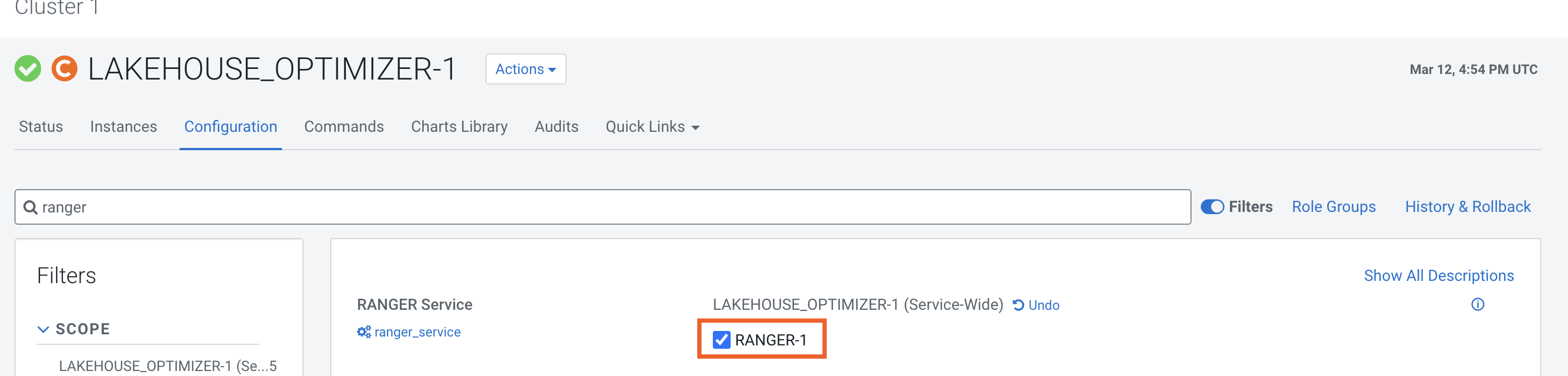
Verify whether the Ranger service is enabled for Lakehouse Optimizer.
Go to the Cloudera Manager > Clusters > [***CLOUDERA LAKEHOUSE
OPTIMIZER***] > Configuration tab.
Search for Ranger.
The Ranger field must be selected as shown in the
following image:
The CLO SERVICE (cm_clo) resource is
displayed in Ranger as shown in the following image:
You can create Ranger policies to provide fine-grained
access to groups and users based on your requirements.
Create the required Ranger policy in Ranger.
Go to Cloudera Manager > Clusters > Ranger > Ranger Admin Web UI.
The Ranger UI is displayed in a new tab.
Go to cm_clo > Add New Policy.
Enter the following details in the Create Policy wizard:
Enter a unique Policy
Name.
Optionally, enter a
Description.
Select one or more names from the CLO
Namespace Name list.
In the Allow Conditions section,
select the Group,
User, or both, and then select the
Permissions.
Deny permissions to a specific group or user in the
Deny Conditions section as described in
the Allow Conditions instruction step.
Click Save.
Cloudera Lakehouse Optimizer checks the permissions before it runs a Cloudera Lakehouse Optimizer policy.