Configuring Hive Metastore as a REST Catalog for Ozone storage

To share Iceberg tables on Cloudera Object Store (powered by Apache Ozone) through the S3 Gateway and vended credentials, enable Cloudera Iceberg REST Catalog in Hive Metastore and point it at your Ozone Object Manager and S3 Gateway. Only tables whose storage locations use s3a:// paths are shareable; tables registered with ofs:// locations only cannot be shared this way.

This procedure applies to Cloudera on premises deployments where the Hive Metastore stores Iceberg metadata on Cloudera Object Store (powered by Apache Ozone) (ofs://) on a Kerberized cluster.

Ensure that your Cloudera Runtime is of 7.3.2.20000 version or later.

  1. Log in to Cloudera Manager and go to Clusters > HDFS-1 > Configuration and search for HDFS Cluster-wide Advanced Configuration Snippet (Safety Valve) for core-site.xml.
  2. Add the Ozone Object Manager (OM) service and file system properties so that HDFS clients can resolve ofs:// paths:
    <property><name>ozone.om.service.ids</name><value>[***OZONE_OM_SERVICE_ID***]</value></property>
    <property><name>ozone.om.nodes.[***OZONE_OM_SERVICE_ID***]</name><value>om1,om2,om3</value></property>
    <property><name>ozone.om.address.[***OZONE_OM_SERVICE_ID***].om1</name><value>[***OM1_HOST***]:9862</value></property>
    <property><name>ozone.om.address.[***OZONE_OM_SERVICE_ID***].om2</name><value>[***OM2_HOST***]:9862</value></property>
    <property><name>ozone.om.address.[***OZONE_OM_SERVICE_ID***].om3</name><value>[***OM3_HOST***]:9862</value></property>
    <property><name>fs.ofs.impl</name><value>org.apache.hadoop.fs.ozone.RootedOzoneFileSystem</value></property>
    <property><name>fs.AbstractFileSystem.ofs.impl</name><value>org.apache.hadoop.fs.ozone.RootedOzoneFs</value></property>
  3. Click Save Changes, and then run Actions > Deploy Client Configuration and restart the affected services.
  4. Log in to Cloudera Manager and click Clusters > Hive Metastore > Configuration.
  5. Search for Enable REST Catalog Service and enable it to set up the REST Catalog Service in Hive Metastore.
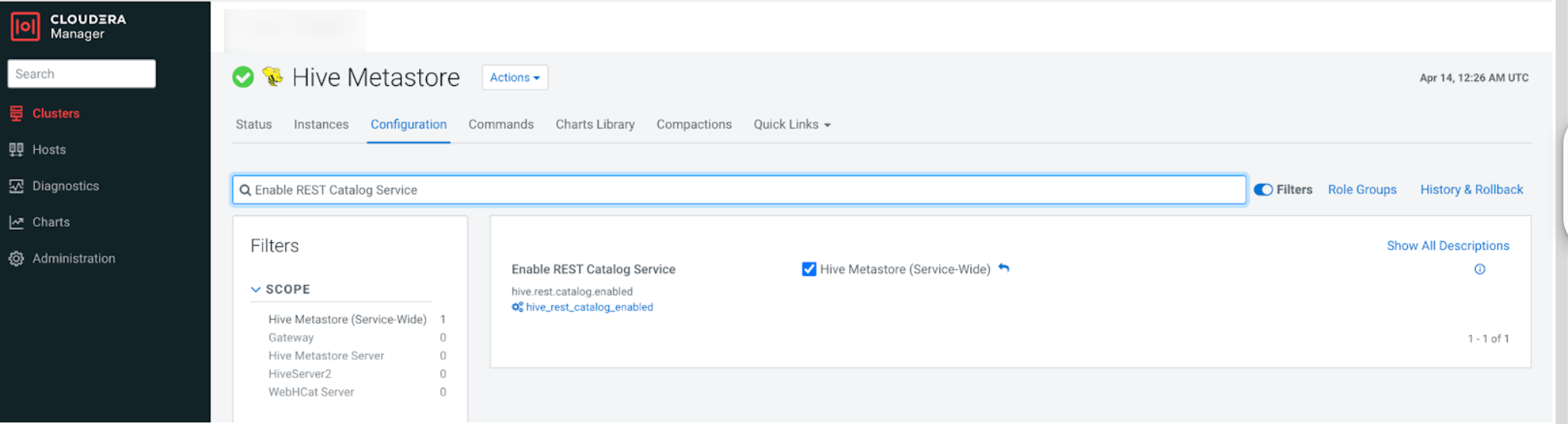
  6. Go to Clusters > HIVE-1 > Configuration and search for Hive Service Advanced Configuration Snippet (Safety Valve) for hive-site.xml.
  7. Add the REST Catalog, Ozone data sharing, and Knox IDBroker credential-vending properties:
    <property><name>hive.rest.catalog.enabled</name><value>true</value></property>
    <property><name>hive.metastore.catalog.ozone.enabled</name><value>true</value></property>
    <property><name>hive.metastore.catalog.ozone.om.address</name><value>[***OZONE_OM_SERVICE_ID***]</value></property>
    <property><name>hive.metastore.catalog.ozone.s3.gateway</name><value>https://[***OZONE_S3_GATEWAY_HOST***]:9879</value></property>
    <property><name>rest.catalog.env.cloud.provider</name><value>ozone</value></property>
    <property><name>hive.metastore.catalog.idbroker.url</name><value>https://[***KNOX_IDBROKER_HOST***]:8444/gateway</value></property>

    If clients read or write tables using s3a:// locations instead of ofs://, also add the following properties on both the HIVE and HIVE_ON_TEZ services:

    <property><name>fs.s3a.endpoint</name><value>https://[***OZONE_S3_GATEWAY_HOST***]:9879</value></property>
    <property><name>fs.s3a.bucket.probe</name><value>0</value></property>
    <property><name>fs.s3a.path.style.access</name><value>true</value></property>
    <property><name>fs.s3a.change.detection.mode</name><value>none</value></property>
    <property><name>fs.s3a.change.detection.version.required</name><value>false</value></property>
  8. Click Save Changes, and then run Actions > Deploy Client Configuration and restart the Hive Metastore service.

Continue with Installing the Knox IDBroker.
