Provisioning Iceberg Replication Data Hub
Before you replicate Iceberg tables between Data Lakes, you must deploy a source Data Hub in the source Data Lake and target Data Hub in the target Data Lake. You can use CDP CLI or Cloudera Management Console to provision the source and target Iceberg Replication Data Hub.
- Compute resources for Iceberg replication.
- Source and target data locations.
- Access control on source and target data.
- Iceberg replication policy metadata management.
-
Complete the following prerequisites:
-
The admin server port 2288 must be open on the Data Hub. To verify
whether the port is open and available, perform the following
steps:
- Get the security group ID of the Data Lake on the tab. For example,
sg-0015f2ed3f497520ed. - Go to the AWS management console and select the required region.
- Go to the tab.
- Search for the security group by ID for the group ID obtained in Step 1.
- Add an inbound rule.
Figure 1. Inbound rule example 
- Get the security group ID of the Data Lake on the tab. For example,
-
The Cloudera Manager port 7183 must be open on the Data Hub. To verify
whether the port is open and available, perform the following
steps:
- Get the security group ID of the Data Lake on the tab. For example,
sg-0015f2ed3f497520ed. - Go to the AWS management console and select the required region.
- Go to the tab.
- Search for the security group by ID for the group ID obtained in Step 1.
- Add an inbound rule.
Figure 2. Inbound rule example 
- Get the security group ID of the Data Lake on the tab. For example,
-
The admin server port 2288 must be open on the Data Hub. To verify
whether the port is open and available, perform the following
steps:
-
Select a method to create an Iceberg Replication Data Hub.
CDP CLI: The following sample CDP CLI command creates a Data Hub in an AWS environment:
cdp datahub create-aws-cluster \--cluster-name [*** DATAHUB NAME ***] \--environment-name [***ENVIRONMENT NAME ***] \--cluster-template-name "dmx-iceberg-replication-7.3.2" \--instance-groups nodeCount=1,instanceGroupName=compute,instanceGroupType=CORE,instanceType=r5d.2xlarge,rootVolumeSize=200,attachedVolumeConfiguration=\[\{volumeSize=300,volumeCount=1,volumeType=ephemeral\}\],recoveryMode=MANUAL,volumeEncryption=\{enableEncryption=true\} nodeCount=0,instanceGroupName=gateway,instanceGroupType=CORE,instanceType=m5.2xlarge,rootVolumeSize=200,attachedVolumeConfiguration=\[\{volumeSize=100,volumeCount=1,volumeType=gp3\}\],recoveryMode=MANUAL,volumeEncryption=\{enableEncryption=true\} nodeCount=1,instanceGroupName=master,instanceGroupType=GATEWAY,instanceType=m5.4xlarge,rootVolumeSize=300,attachedVolumeConfiguration=\[\{volumeSize=100,volumeCount=1,volumeType=gp3\}\],recoveryMode=MANUAL,volumeEncryption=\{enableEncryption=true\} nodeCount=3,instanceGroupName=worker,instanceGroupType=CORE,instanceType=r5d.2xlarge,rootVolumeSize=200,attachedVolumeConfiguration=\[\{volumeSize=100,volumeCount=1,volumeType=gp3\}\],recoveryMode=MANUAL,volumeEncryption=\{enableEncryption=true\} \--subnet-id [*** SUBNET ID ***]Cloudera Management Console- Verify that the required AWS environment is available and healthy. For more information about registering an AWS environment, see Register an AWS environment.
- Go to the page.
- Click Create Data Hub.
Figure 3. Data Hub Clusters page 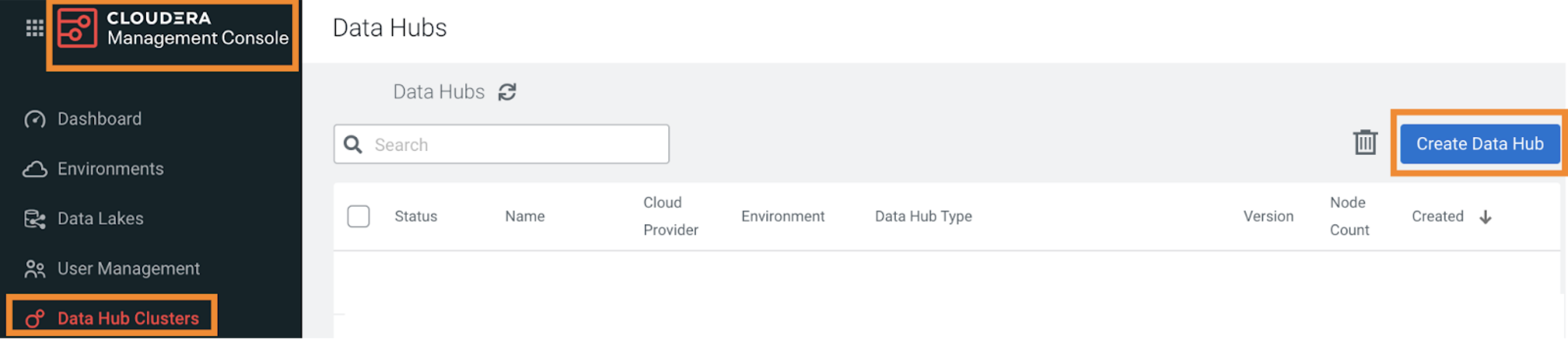
- Perform the following steps on the Provision Data
Hub page:
- Select the required environment from the Selected Environment with running Data Lake list.
- Select 7.3.2 Iceberg Replication Service for AWS from the Cluster Definition list in the Services section.
- Enter a unique Cluster Name in the
General Settings section.
The cluster name must be at least five characters long. It must start with a lowercase letter, end with an alphanumeric character, and must have only lowercase alphanumeric characters and hyphens.
- Click Provision Cluster.
The Data Hub is displayed on the Data Hub Clusters page. The Data Hub name is the same as the cluster name.
