Authenticating Cloudera Data Explorer (Hue) users with SAML
Data Explorer supports SAML (Security Assertion Markup Language) for Single Sign-on (SSO) authentication.
The SAML 2.0 Web Browser SSO profile has three components:
- User Agent - Browser that represents you, the user, seeking resources.
- Service Provider (SP) - Service (Data Explorer) that sends authentication requests to SAML.
- Identity Provider (IdP) - SAML service that authenticates users.
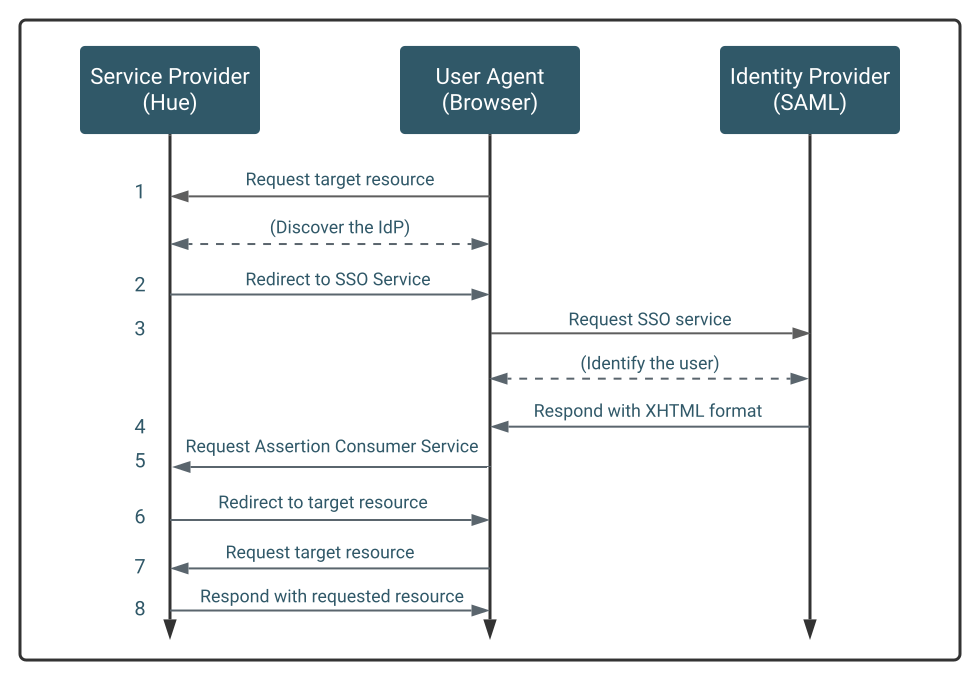
The Service Provider (Data Explorer) and the identity provider use a metadata file to confirm each other's identity. Data Explorer stores metadata from the SAML server, and the identity provider stores metadata from the Data Explorer server.
In Cloudera Data Warehouse, SSO with SAML is automatically configured. You need not configure anything manually.
