Install Ranger Key Management System (KMS) in a federated deployment to isolate
encryption key lifecycles within a dedicated security cluster separated from the data
cluster.
Application and data processing occur in a data cluster. The data cluster stores and
processes actual datasets but does not directly manage encryption keys. Instead, a
separately managed security cluster with the Ranger KMS service installed handles
the key lifecycle operations, for example, generation, rotation, and storage. This
separation of tasks enhances security by isolating the administration of the data
cluster from the security cluster. Additionally, this architecture provides the
following benefits:
Improved scaling, which enables you to migrate to a shared cluster of
horizontally scaled Ranger KMS instances.
Isolation of service handling keys, which ensures that the keys are
accessible only by the security team.
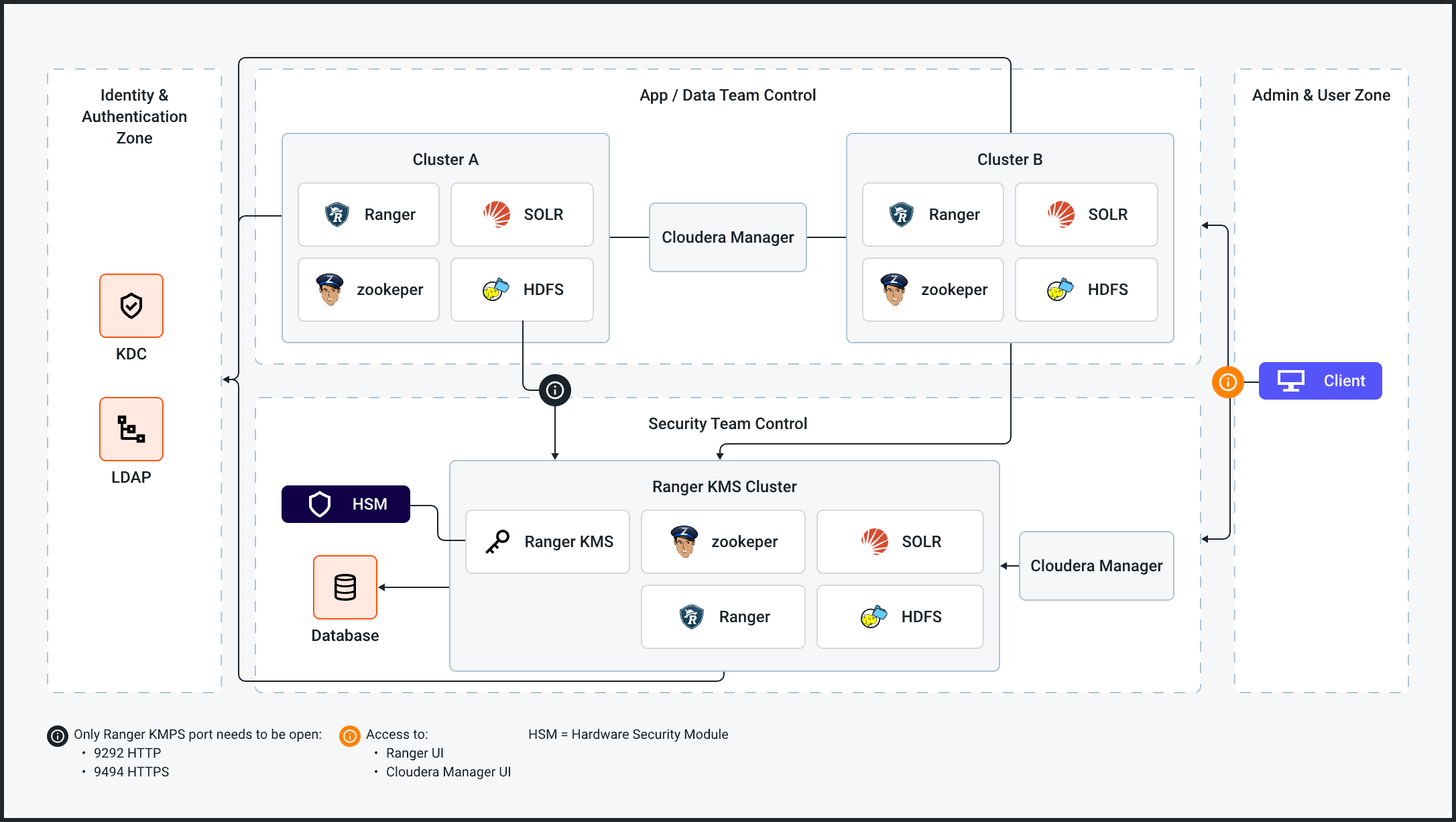
Ranger KMS can be deployed in a federated cluster for key management. The following
diagram shows the architecture of a federated deployment:Figure 1. Federated deployment architecture
At least the following services are required for data clusters:
Ranger
Solr
ZooKeeper
HDFS
At least the following services are required for the federated Ranger KMS
cluster:
Ranger KMS
Ranger
Solr
ZooKeeper
HDFS – HDFS is required in the security cluster to capture audit activities
related to Ranger KMS.
Verify that the following requirements are met:
The cluster in which Cloudera Manager and the
Ranger service are installed must be running.
Kerberos must be enabled in your cluster.
TLS/SSL must be enabled in your cluster.
A Ranger KMS database must have been created as the underlying
keyStore mechanism. This database must be separate from the Ranger
database.
You must have securely recorded the following backing key store
database access credentials, as you will need them during the
installation steps:
The database name.
The database hostname.
The user name and password that have full administrative
privileges to the backing key store database.
Data clusters and the security cluster must be in the same Kerberos
realm.
Data clusters and the security cluster must use the same Ranger Usersync
configuration for syncing users. Ensure that the AD/LDAP-related
configuration properties have the same values set in both the data and
security clusters. For more information, refer to Ranger
Usersync.
Data clusters and the security cluster must have the same users at the Unix
level.
You must configure HA for Ranger KMS. For more information, refer to
Configure High Availability for Ranger KMS with DB.
Add a Ranger KMS service.
For instructions, refer to Installing the Ranger KMS
service.
Optional: Restart the stale services and redeploy the client configuration.
For instructions, refer to Restarting the stale services and redeploying
the client configuration.
Configure data clusters.
Data clusters must have access to Ranger KMS running on the security cluster.
To do so, perform the following steps:
Go to Cloudera Manager > Core Settings > Configuration > Cluster-wide Advanced Configuration Snippet (Safety
Valve) for core-site.xml.