Replication Manager in Cloudera Base on premises
Cloudera Base on premises Replication Manager is a service in Cloudera Manager. You can create replication policies in this service to replicate data across data centers for various use cases which include disaster recovery scenarios, running hybrid workloads, migrating data to/from cloud, or a generic backup/restore scenario. You can also create HDFS, HBase, or Ozone snapshot policies to take snapshots of HDFS directories, HBase tables, or Ozone buckets respectively.
Requirements and operational constraints
The following requirements and operational constraints apply to Replication Manager in Cloudera Base on-premises:
- Replication Manager can replicate between services only if the source service or the
target service is managed by the local Cloudera Manager. In the on-premises to on-premises
replication scenarios, you create the replication policy in the target Cloudera
Manager.
You cannot create replication policies between two non-local services, services on separate peer clusters, or between cloud and a peer cluster service. In these scenarios, you must create the policies on the Cloudera Manager instance that manages either the source or the target service.
- Replication Manager requires a valid license. To understand more about Cloudera license requirements, see Managing Licenses.
- The minimum required role is
Replication AdministratororFull Administrator. - The source cluster and target cluster must be supported by Replication Manager. For more information about supported clusters and supported replication scenarios by Replication Manager, see Support matrix for Replication Manager on Cloudera Base on premises.
- The Cloudera Base on premises and Cloudera Manager versions of the target cluster must match or be higher than the version of the source cluster.
- In Cloudera Base on premises 7.3.1 CHF1 and higher versions using Cloudera Manager 7.13.1.100 and higher versions, you can use the source and target clusters that support FIPS in Replication Manager. For more information about the replication policies that support the FIPS clusters, see the FIPS clusters section in Support matrix for Replication Manager on Cloudera Base on premises.
- The
hdfsuser must have access to all the Hive datasets, including all the operations. Otherwise, Hive import fails during the replication process. To provide access, perform the following steps:- Log in to Ranger Admin UI.
- Go to the tab, and provide
hdfsuser permission to the all-database, table, column policy name.
Figure 1. Access tab in the Ranger Admin UI 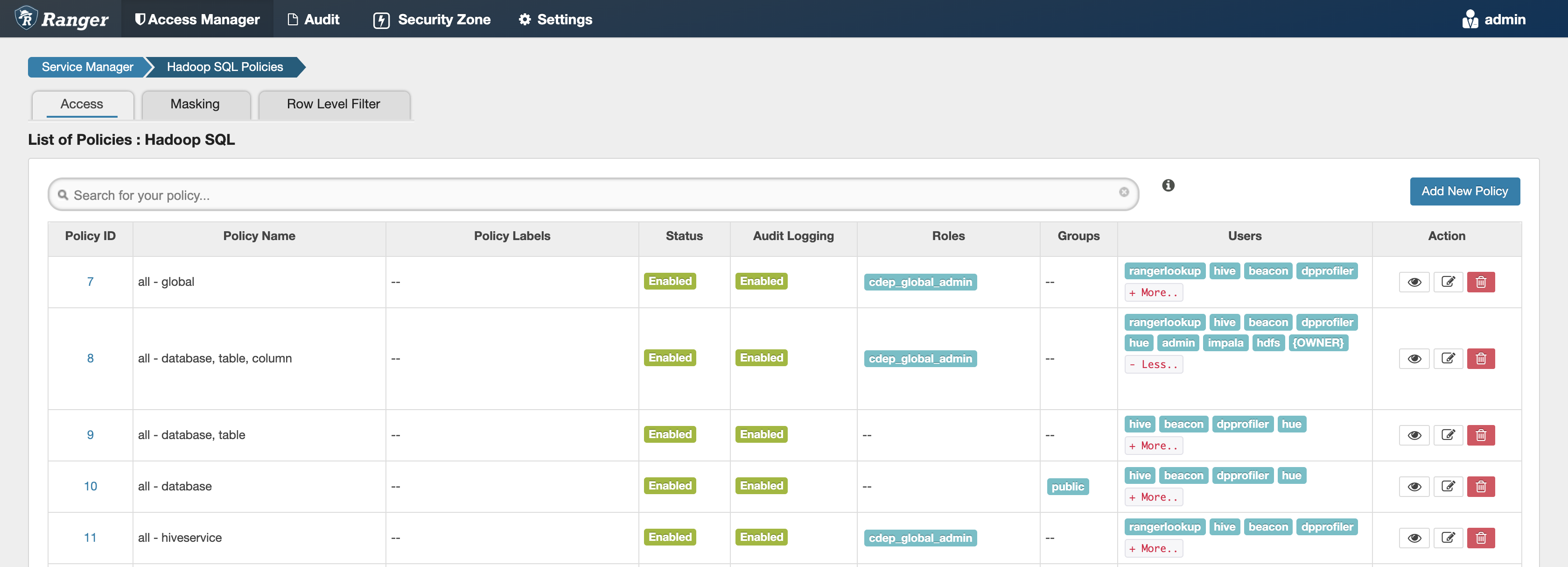
Cloudera Manager key functionalities that Replication Manager can use
- Selecting the datasets that are critical for your business operations.
- Monitoring and tracking the progress of your snapshots and replication jobs through a central console and easily identify issues or files that failed to be transferred.
- Issuing alerts when a snapshot or replication job fails or is aborted so that the problem can be diagnosed quickly.
You can also perform a dry run of the replication policy to verify the
configuration and to understand the cost of the overall operation before copying the entire
dataset.
Replication Manager replication policies
-
Atlas replication policies
Replicates the metadata and data lineage of all the Hive external tables, Iceberg tables, and any other Atlas supported entities between Cloudera Base on premises 7.1.9 SP1 clusters using Cloudera Manager 7.11.3 CHF7 or higher. During an Atlas replication policy run, Replication Manager exports the Atlas metadata and data lineage to a staging directory in the target cluster, and then imports into the target cluster. You can enter the required staging directory during the replication policy creation process.
You can use Atlas replication policies in the following use cases:
- Disaster recovery scenarios. You can back up the Atlas metadata and data lineage periodically, and restore it to a different cluster as required.
- High availability scenarios.
-
HDFS replication policies
Replicates data and metadata from CDH5.10 and higher clusters to Cloudera Base on premises 7.0.3 and higher clusters.
You can use HDFS replication policies in the following use cases:- Copying data from legacy on-premises systems to Amazon S3, Microsoft ADLS Gen2 (ABFS), and GCP, or from cloud buckets to on-premise systems.
- Replicating required data to another cluster to run load-intensive workflows on it to optimize the primary cluster performance.
- Deploying a complete backup-restore solution for your enterprise.
-
Hive external table replication policies
Replicates HDFS, Hive external tables (without manual translation of Hive datasets to HDFS datasets, or vice versa), Hive metastore data, Impala metadata (catalog server metadata) associated with Impala tables registered in the Hive metastore, Impala data, and Sentry permissions to Ranger from CDH 5.10 and higher clusters to Cloudera Base on premises 7.0.3 and higher clusters. In this instance, applications that depend on external table definitions stored in Hive, operate on both replica and source clusters as the table definitions are updated.
You can use these replication policies in the following use cases:
- Backing up legacy data for future use or archiving cold data.
- Replicating or moving data to cloud clusters to run analytics.
- Implementing a complete backup and disaster recovery solution.
-
Hive ACID table replication policies
Replicates HDFS, Hive managed (ACID) data and metadata between Cloudera Base on premises 7.1.8 and higher clusters using Cloudera Manager 7.7.1 or higher versions.
You can use these replication policies in the following use cases:- Replicating non-sensitive data to cloud deployments to use as a backup.
- Migrating data to another cluster to run load-intensive workflows.
- Using failover functionality to promote the disaster recovery cluster to primary status, ensuring uninterrupted data ingestion.
-
Iceberg replication policies
Replicates Iceberg tables between Cloudera Base on premises 7.1.9 or higher clusters using Cloudera Manager 7.11.3 or higher versions. In Cloudera Base on premises 7.3.2 using Cloudera Manager 7.13.2, Iceberg replication policies can also replicate Iceberg tables stored on Ozone between Cloudera Base on premises clusters.
Iceberg replication policies can replicate the following components:
- Metadata and catalog from the source cluster Hive Metastore (HMS) to target cluster HMS.
- Data files in the HDFS storage system and Ozone storage system from the source to the target cluster. The Iceberg replication policy can replicate only between HDFS storage systems or between Ozone storage systems.
- All the snapshots from the source cluster by default. This allows you to run time travel queries on the target cluster.
You can use Iceberg replication policies in the following use cases:- Implementing disaster recovery by replicating Iceberg tables between on-premises clusters.
- Implementing passive disaster recovery with planned failover and incremental replication at regular intervals between two similar systems. For example, between an HDFS to another HDFS system.
-
Ozone replication policies
Replicates data in Ozone buckets between Cloudera Base on premises 7.1.8 clusters or higher using Cloudera Manager 7.7.1 or higher versions.
Supports data replication between the following buckets:- FSO buckets in source and target clusters using the OFS protocol.
- Legacy buckets in source and target clusters using the OFS protocol.
- OBS buckets in source and target clusters that support S3A filesystem using the S3A scheme or replication protocol.
You can use these policies in the following use cases:- Replicating or migrating the required Ozone data to another cluster to run load-intensive workloads
- Backing up data
- Implementing backup and restore workflows
-
Ranger replication policies
Migrates the Ranger policies and roles for HDFS, Hive, and HBase services between Kerberos-enabled Cloudera Base on premises 7.1.9 or higher clusters using Cloudera Manager 7.11.3. These policies can also migrate Ranger audit logs in HDFS.
You can use Ranger replication policies in the following use cases:- When Ranger is used for file system-level access control for HDFS and Hive and you want to copy the Ranger policies to another cluster for backup purposes.
- When you want to move or replicate Ranger policies for Hive (SQL) or HBase data to another cluster for disaster recovery purposes.
-
HDFS, HBase, and Ozone snapshot policies
The HDFS, HBase, or Ozone snapshot policies take regular point-in-time snapshots of HDFS directories, HBase tables, or Ozone buckets respectively.
Snapshots act as a backup, and you can restore an HDFS directory, HBase table, or Ozone bucket to a previous version or to another location on the same HDFS, HBase, or Ozone service as necessary. Snapshots are also used by HDFS, Hive, and Ozone replication policies. The first replication policy run replicates all data and metadata from the chosen directories. The subsequent replication policy runs leverage snapshot-diffs to replicate the changed data.
