Registering clusters
Clusters Register clusters automatically by deploying and starting the CMA Agent on the source cluster, eliminating manual registration workflows within the CMA Master UI.
This workflow is for engineers who register clusters, scan workloads, use collections, and run migration guides.
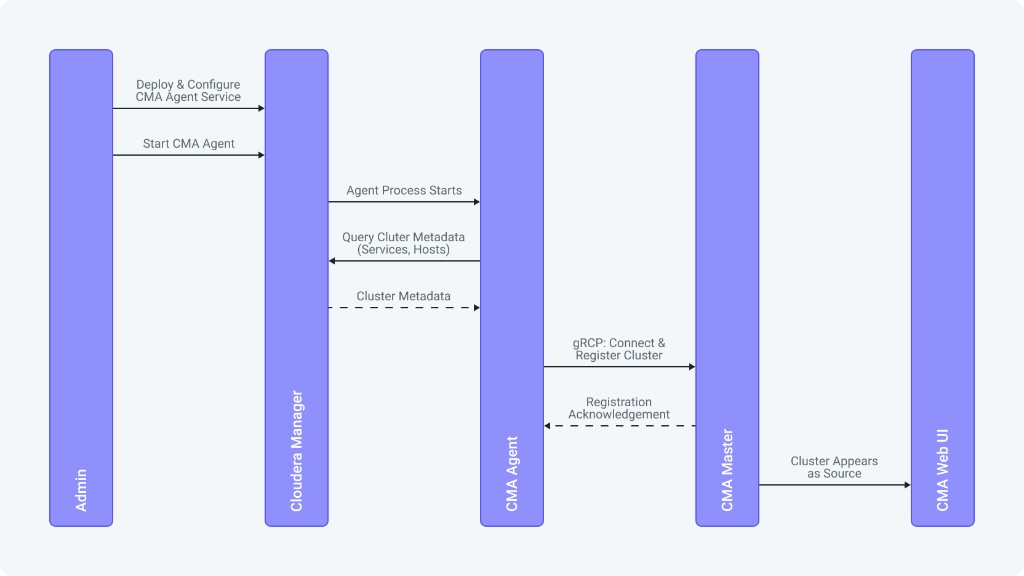
Cloudera Migration Assistant uses an agent-based auto-discovery model. When the CMA Agent starts on a cluster, the CMA Agent performs the following actions:
-
Connects to the local Cloudera Manager using the configured credentials.
-
Discovers the cluster services, hosts, and metadata.
-
Establishes an outbound gRPC connection to the CMA Master.
-
Registers the cluster with the CMA Master, including discovered metadata.
-
Surfaces the cluster automatically on the Clusters page in the CMA Master UI as a source, ready for scanning.
-
The CMA parcel must be distributed and activated on the cluster.
-
CMA Master must be running and reachable from the source cluster network.
-
Cloudera Manager administrator credentials must be available.
The source cluster is displayed on the Clusters page in the CMA Master UI. Click the cluster name to review details and services.
Scan workloads on the registered source cluster. For instructions, see Scanning clusters.
