Recommendations for scaling Cloudera Data Engineering deployments
Your business might experience a sudden increase or drop in demand, due to which your Cloudera Data Engineering deployment needs to autoscale. You can scale your Cloudera Data Engineering deployment by either adding new instances of a Cloudera Data Engineering Service or Virtual Cluster, or by adding additional resources to the existing ones.
- Vertically – More resources are provisioned within the same instance of a Cloudera Data Engineering Service or Virtual Cluster.
- Horizontally – New instances of Cloudera Data Engineering Service or Virtual Cluster are provisioned.
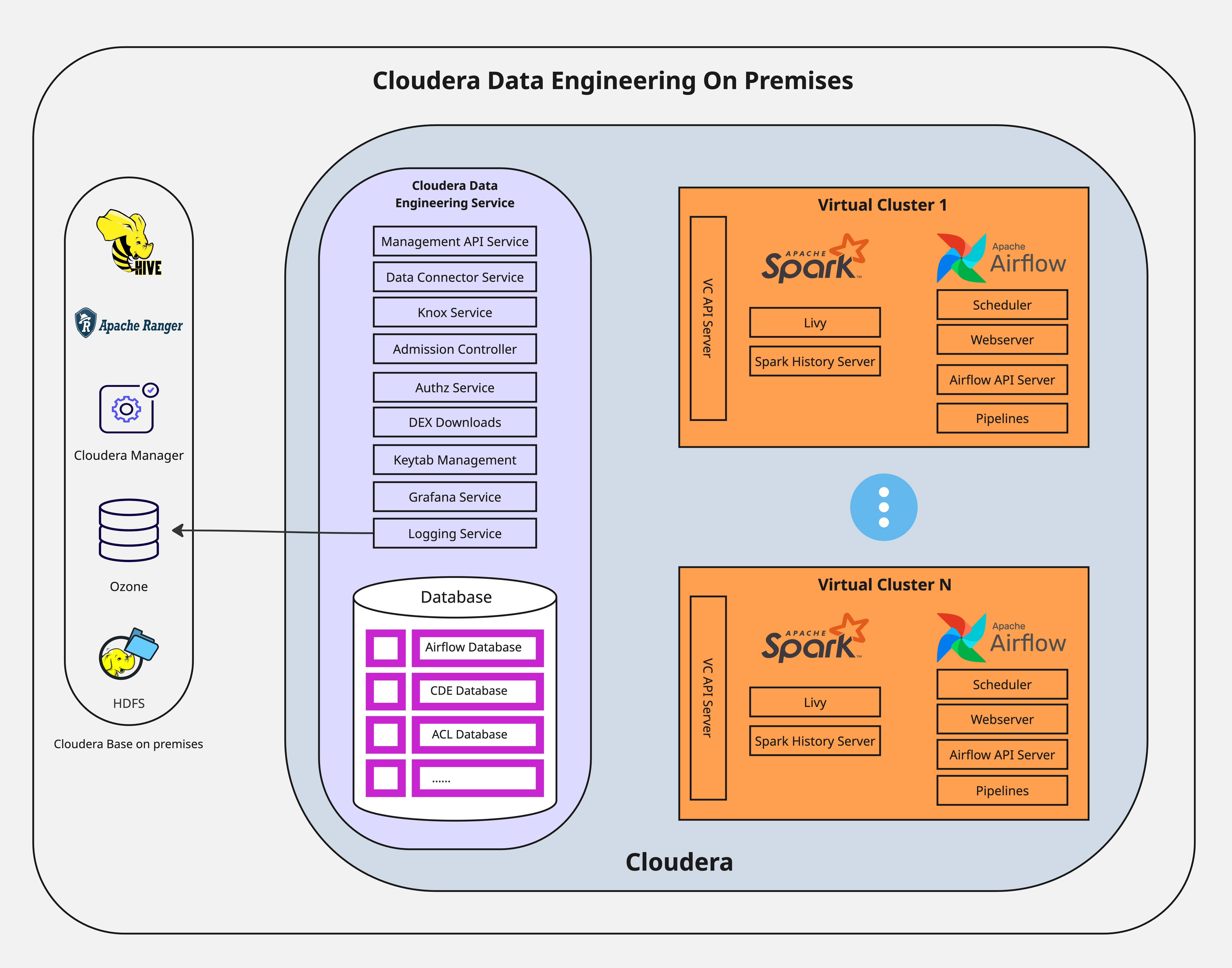
Virtual Clusters provide isolated, auto-scaling compute capacity to run Spark and Airflow jobs. You can use Virtual Clusters to isolate individual teams or lines of business by using user-based Access Control Lists (ACLs).
Cluster-wide pod limits
Every Cloudera Data Engineering on premises deployment operates on a Kubernetes cluster that has a global capacity. The total number of pods, including Spark drivers, executors, and all platform services, is limited by the platform Kubernetes Admission Controller. This limit is shared by all the services running on the platform, not just Cloudera Data Engineering. When you reach this limit, the Admission Controller rejects new pod creation requests, and the Jobs fail to start. The following error is displayed in the logs:
failed calling webhook admission-controller.k8tz.ioFor more accurate assessment and guidance based on your system specification, reach out to Cloudera Support.
Spark workload scaling
Vertical scaling for a single job
Vertical scaling involves allocating a large number of resources, specifically executors, to a single large Spark job. By default, Cloudera Data Engineering Spark jobs are enabled with dynamic resource allocation. You can specify the following parameters that define the boundaries of scaling:
- Initial executor count
- Minimum executor count
- Maximum executor count
If all these values are set to the same value, the Spark job will run with static allocation. For more information, see the Apache Spark documentation - Dynamic Allocation.
The actual scaling achieved by a single job depends on the complexity of its application logic and the dynamics of the system workload. For more accurate assessment and guidance based on your system specification, reach out to Cloudera support.
Horizontal scaling for concurrent jobs
Horizontal scaling involves running a large number of smaller Spark jobs simultaneously. This scaling pattern is not limited by cluster resources but by the API Server. The default and recommended simultaneous job submission limit for Spark jobs is 60 per Virtual Cluster. Concurrency of actively running jobs can also exceed 60.
- Failure of all the Jobs that were in the process of being submitted.
- Orphaned Spark driver pods stuck in the initializing state indefinitely, requiring manual administrative cleanup.
- Significant delays in the Cloudera Data Engineering UI and API caused by high concurrency even before a crash. jobs appearing to skip the Running state, and the Spark History Server becoming unavailable.
Logging and shuffle data
For additional information on logging and shuffle configurations, see General guidelines.
Spark workload stability and longevity
Cloudera Data Engineering on premises does not provide fault tolerance for the Spark driver pod. If the node hosting the driver pod fails or the pod is otherwise restarted, the job fails and will not automatically recover.
Cloudera recommends implementing state management for long duration jobs at the application, such as checkpointing to allow recovery from a specific point in time.
Virtual Cluster scaling
Each Cloudera Data Engineering Virtual Cluster consumes a fixed amount of platform resources for its own infrastructure pods, such as the job submission service, Airflow services, API servers, before any Cloudera Data Engineering jobs are run. A single Virtual Cluster infrastructure makes a baseline resource request of approximately 12 cores and 32 GB of memory. For more information about hardware requirements, see Additional resource requirements for Cloudera Data Engineering for ECS or Cloudera Data Engineering hardware requirements for OCP.
The maximum number of Virtual Clusters is not a fixed number but is constrained by the available hardware. In an on premises environment with limited resources, the fixed cost per Virtual Cluster is a significant factor.
No limit on resource files in job runs
As on premises, no limit exists for referencing a resource file in job runs in Cloudera Data Engineering on premises, you can reference the same resource file multiple times within a single job run.
