Rolling back Virtual Warehouse from upgrade failure
A Virtual Warehouse in Cloudera Data Warehouse can be restored to its pre-upgrade operational state if a Virtual Warehouse upgrade fails. This rollback mechanism eliminates the risk of cluster downtime and prevents manual recreation delays. This feature is available only for Hive and Impala Virtual Warehouses.
Enabling Rollback feature
The Rollback feature is enabled by default. If it is not enabled, perform the
following actions:
- Log in to the Data Warehouse service as DWAdmin.
- Go to the page.
- To enable the Rollback feature, select the Backup Virtual Warehouse namespaces before an upgrade option.
- Click Update.
Rollback prerequisites and limitations
Before attempting a rollback, verify that your environment meets the following requirements:
- Enabled pre-upgrade backups — Ensure that the Backup Virtual Warehouse namespaces before an upgrade feature is enabled in your server configuration.
- Post-upgrade Virtual Warehouse error state — Verify that the Virtual Warehouse displays an error status.
- Failed upgrade scenario — Ensure that the current error was triggered specifically by a failed upgrade, not by a rebuild or alternate task.
- No server crashes — Ensure that the Cloudera Data Warehouse server did not crash at any point during the upgrade process.
- Healthy pre-upgrade state — Confirm that the Virtual Warehouse was healthy before the upgrade began, as rollback is not able to restore it back to healthy state if it was already in an error state.
Rolling back a failed upgrade
- Log in to the Cloudera Data Warehouse service as DWAdmin.
- Locate the Virtual Warehouse that is currently displaying the error status.
- Review if the upgrade error matches any Known issues. If it is not a Known issue, click
the Rollback Upgrade button inside the confirmation modal to
proceed.
Figure 1. Failed Virtual Warehouse upgrade with rollback option 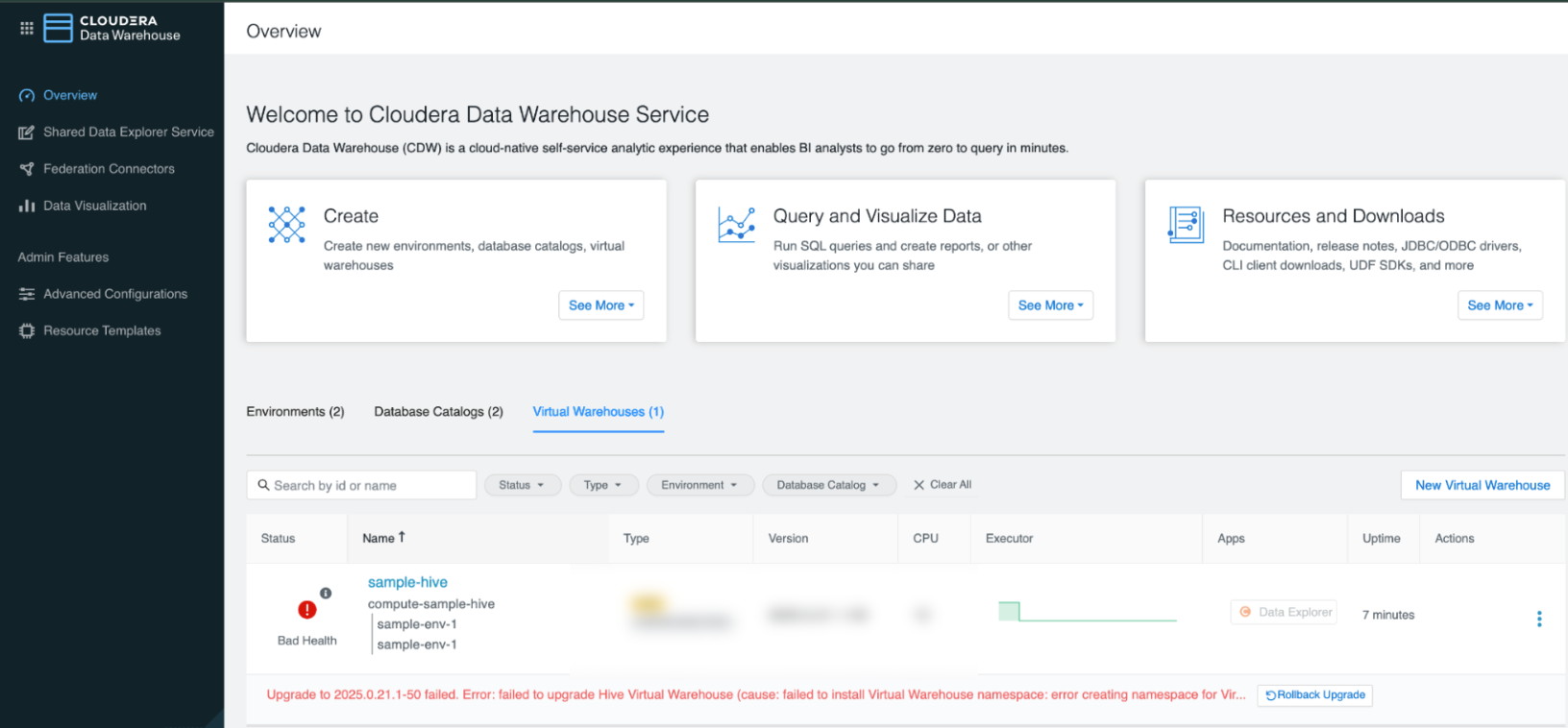
- Click Rollback Upgrade.
The Virtual Warehouse transitions to a RollingBack status. Monitor the UI until it reverts to its pre-upgrade version, configuration, and previous stable state that is either Running or Stopped.
