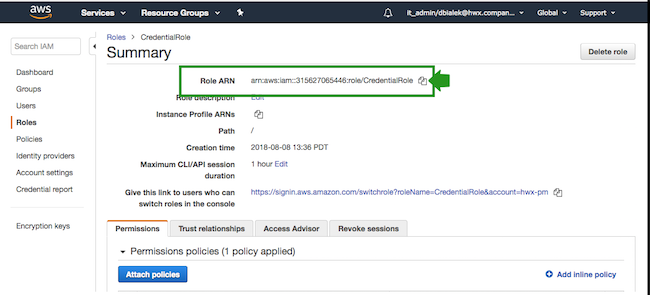
Create a role-based credential referencing the IAM role created earlier. This can be
done from the Cloudera web interface or CDP CLI.
These steps assume that you have the ARN of the IAM role that you created in an
earlier step. You can obtain the IAM Role ARN from the Roles tab of the IAM console
on AWS by selecting a role and clicking on your IAM role to display its summary and
then copying the Role ARN:
Select Shared Resources > Credentials from the navigation pane.
Click Create Credential.
Select AWS to access credential options for Amazon Web
Services.
Provide the following information:
Table 1. Information required for AWS credentials
Parameter
Description
Select Credential Type
Select Role Based (default value).
Name
Enter a name for your credential.
Description
Enter a description. (optional)
Enable Permission
Verification
Click the Enable Permission
Verification button if you want Cloudera to
check permissions for your credential. CDP will verify that
you have the required permissions for your
environment.
IAM Role ARN
Paste the IAM Role ARN corresponding to the CredentialRole that you
created earlier. For example,
arn:aws:iam::315627065446:role/CredentialRole
is a valid IAM Role ARN.
Click Create.
Your credential should now be displayed in the
Credentials pane.