The minimal setup recommended for production includes two GCS buckets (for storing logs) and
four service accounts. Additionally, you can create a third bucket for storing FreeIPA backup
data separately. If the third bucket is not provided, FreeIPA backup data is stored in the
Logs bucket.
You must create service accounts described in Table 1:
The Service account name column lists all the
service accounts that need to be created. You may choose different service account names.
The ones provided here follow the same terminology used by the Cloudera web interface and
CDP CLI, making it easier to understand where to provide them to Cloudera.
The Required IAM roles column explains what IAM role each
service account needs for the item listed in the Scope
column. For example, the Logger service account requires
that you create a custom role with storage.buckets.get and
storage.objects.create permissions. Next, go to the Logs bucket permissions and add the Logger service account as a member with the custom role that
you created earlier.
Table 1. GCP cloud storage service accounts
Service account name
Description
Required IAM roles
Scope
Logger
This service account will be assigned to all the workload instances in Cloudera.
Cloudera will use it to:
Write telemetry logs to the Logs bucket.
Write FreeIPA backups to the Backups bucket or, if
there is no designated bucket provided for backups, write to the Logs bucket.
A custom role with the following permissions:
storage.buckets.get
storage.objects.create
If you want to use a bucket path (gs://<bucket>/<path>)
instead of a bucket (gs://<bucket>) for the Logs or Backups
bucket, you musts also assign the storage.objects.list permission.
Logs bucket
and
Backups bucket (if
created)
Other service account for data access by users
Depending on your requirements, you may want to create a set of service accounts
for data access by different user groups.
For example, you may want to have one service account to assign to data science
users and another service account for data engineering users.
Depending on your requirements, you must assign a custom role or a predefined role
from Cloud Storage roles > Predefined roles on
the bucket used for data storage.
Data storage bucket
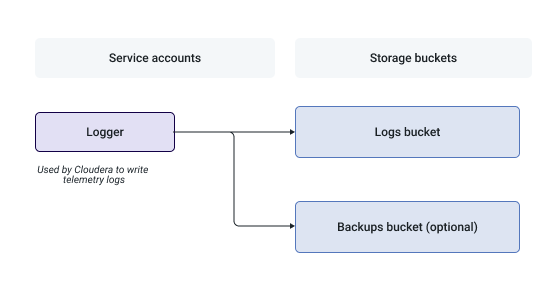
The following diagram illustrates the relationships between the Logger service accounts and buckets:Figure 1. Relationship between Logger service accounts and buckets
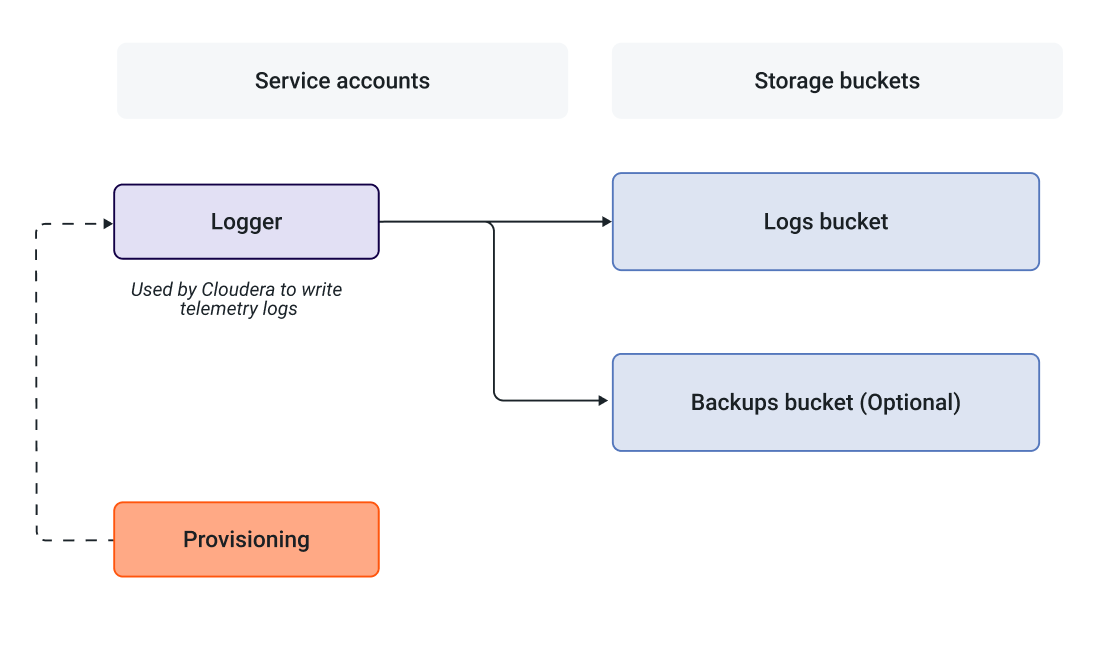
In addition, the Cloudera provisioning credentials’ service account (that you create as part of
Create provisioning service account and generate access
key) must have the Service Account User role to access the Logger service account:Figure 2. Relationship beetween Logger service accounts and buckets with Cloudera
provisioning