Hybrid Domain Name Resolution Architecture
Learn more about the Hybrid Domain Name Resolution architecture.
The following diagram shows the DNS resolution strategy for a hybrid environment, connecting the On-Premises network (company.prem) and the Cloud network (company.cloud).
The design ensures that resources in either environment can discover and communicate with each other using their local domain names, while also retaining the ability to resolve external internet addresses.
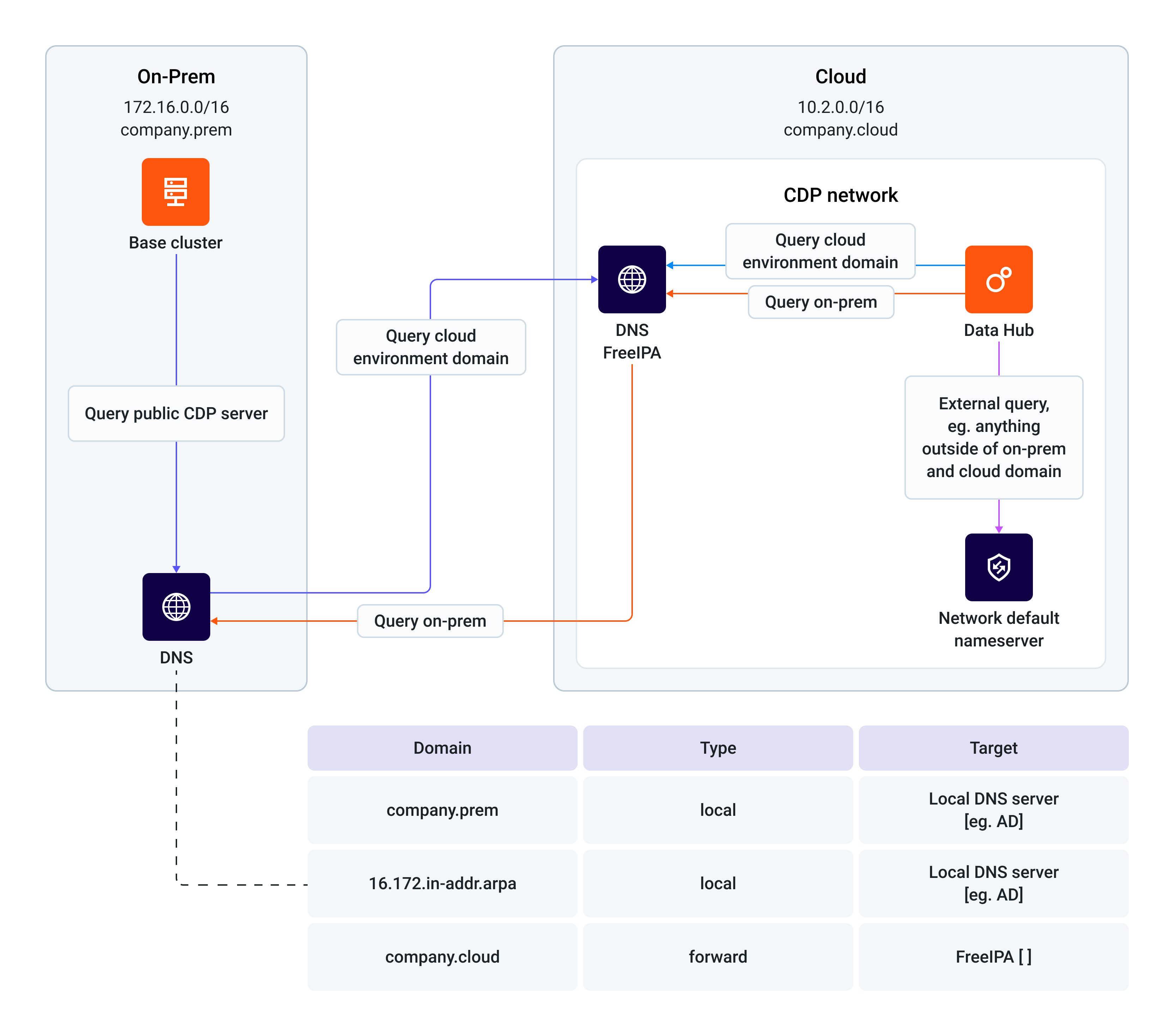
The table in the diagram details the core forwarding rules configured on the
on-premises DNS server that enable this hybrid connectivity with the following domains:
- company.prem (local): The server is authoritative for this domain.
- 16.172.in-addr.arpa (local): The server is authoritative for the on-premises reverse DNS lookup zone.
- company.cloud (forward): All queries for this domain are forwarded to the FreeIPA server’s load balancer.
Architecture Overview
Learn more about the Hybrid Domain Name Resolution architecture.
The architecture includes two primary environments, each with its own DNS server that collaborates to provide seamless name resolution.
The customer’s on-premises corporate DNS server will contain records that delegate
forward DNS resolution to the public cloud FreeIPA DNS service for all public cloud node
zones.
- On-Premises Environment (company.prem)
- Network: 172.16.0.0/16
- Components:
- Base Cluster: A collection of services and workloads that need to communicate with both on-premises and cloud resources.
- Local DNS Server: The primary DNS for the on-premises environment (for example, Active Directory). It is the authority for the company.prem domain and the 16.172.in-addr.arpa reverse lookup zone.
- Cloud Environment (company.cloud)
- Network: 10.2.0.0/16
- Components:
- FreeIPA: The central DNS server for the public cloud environment. It is the authority for the company.cloud domain and acts as the primary resolver for all cloud-based services.
- Data Hubs: A collection of services and workloads running in the public cloud that need to communicate with FreeIPA and with the on-premises environment.
- Network Default Nameserver: The public or provider-supplied DNS resolver used for all external internet queries.
DNS Resolution Flows
Learn more about the three primary query scenarios.
On-Prem-to-Cloud (Blue Arrow)
The on-prem-to-cloud flow that allows on-premise applications to resolve cloud resources
consists of the following steps:
- The Base Cluster needs to resolve an address in the cloud (for example, datahub.company.cloud).
- It sends the query to its local On-premise DNS server.
- The On-premise DNS has a conditional forwarding rule (as shown in the configuration table) for the company.cloud domain.
- The query is forwarded to the FreeIPA server in the cloud.
- FreeIPA resolves the name and returns the IP address to the On-premise DNS server, which then sends it to the Base Cluster.
Cloud-to-On-Prem (Orange Arrows)
The cloud-to-on-prem flow that allows cloud applications to resolve on-premises resources
consists of the following steps:
- A cloud application (such as Data Hub) needs to resolve an address on-premises (for example, basecluster.company.prem).
- The cloud application sends the query to its local resolver, the FreeIPA.
- FreeIPA has a forwarding rule configured to send all queries for company.prem to the On-premise DNS server.
- The On-premise DNS resolves the name and returns the IP address to FreeIPA, which then sends it to the Data Hub.
Cloud-to-External (Purple Arrow)
The cloud-to-external flow that allows cloud applications to resolve public internet addresses
consists of the following steps:
- A cloud application (or FreeIPA itself) needs to resolve an external address (for example, google.com).
- It sends the query to FreeIPA.
- FreeIPA determines that the domain is not local (company.cloud) and not part of any specific forwarding rule (company.prem).
- It forwards the query to the Network Default Nameserver.
- The Network Default Nameserver resolves the public address and returns the result.
