Agent task management
Agent task management sequences in workflow processes define how agents dynamically plan, run, and track multi-stage projects when task planning is enabled.
Agents are programmed to use the built-in tools proactively when navigating complex, multi-stage projects in the following sequence:
- Task creation — Before starting a run, the Agent plans the workflow by creating distinct tasks for each required step.
- Task
in progress
—
The Agent
updates
a task status to
in_progressbefore running that specific step. - Task
completion
—
The Agent marks
the
task as
completedupon finishing the step.
For single-step or simple requests, the Agent skips this task planning sequence entirely and provides a direct response.
Agents are instructed not to distinguish between the completion of a to-do and the overall request. While task completion is a necessary log for planning and coordination, the final delivery of the solution remains a separate and concluding phase of the workflow.
UI visibility and tracking
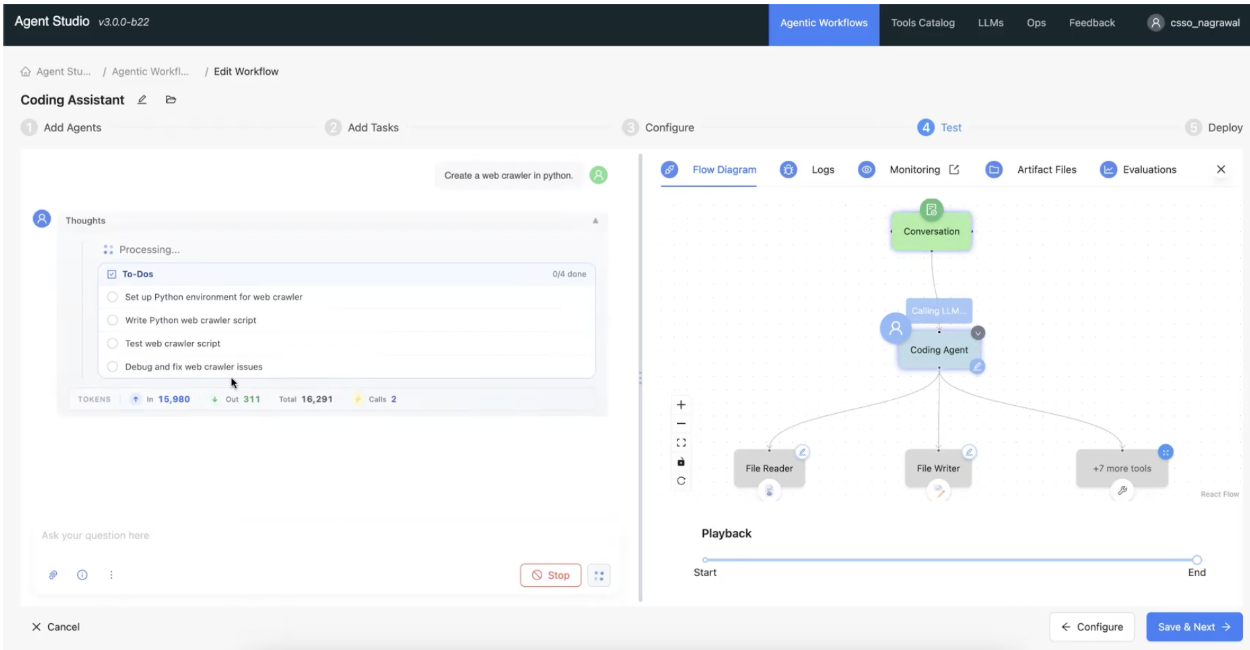
During a workflow process, a dedicated To-Dos card within each agent panel is displayed to monitor progress using the following tracking elements:
- Progress tracking
— A
completion
counter displays
the
ratio of finished
tasks relative to the total number of generated tasks.
for
example,
2/5
          done
. - Task
status indicators
— The card lists
each
generated
step
with a visual icon representing its current
operational state:
- ⚪ Pending
- 🔄 In progress (highlighted in blue)
- ✅ Completed (shown with strikethrough)
Figure 1. Real-time task tracking in Agent Studio