Custom Lineage Connector for ETLs
Use the Custom Lineage Connector (formerly Universal Connector) Links CSV template to describe ETL processes, tasks, and column-level data flows so that Cloudera Data Lineage (formerly Octopai) can show lineage for custom or unsupported ETL and orchestration tools.
The Cloudera Data Lineage platform supports data movement and transformation scenarios across many tools. The Custom Lineage Connector Links CSV template integrates metadata from custom or unsupported ETL and orchestration tools beyond native connectors. You can build a more complete view of your data ecosystem, with data lineage, discovery, and catalog content aligned and connected with the rest of your environment.
This guide explains the Custom Lineage Connector Links CSV structure. It complements database object metadata. When you also need tables and columns defined outside the ETL graph, see Custom Lineage Connector for Database Objects.
How ETL objects are consolidated (object identity)
An ETL object is uniquely identified by the combination of its name fields: Process Name, Process Path, Task Name, and Task Path. Rows that share the same values in all these fields are consolidated into a single object. If any of these fields differ between rows (for example, a different Process Path), Cloudera Data Lineage treats them as separate objects.
To show rows as separate objects, use different values in one or more of these fields.
To consolidate rows into a single object while keeping the same Task Name, use one of the following approaches:
- Populate only Task Name and leave Process Path and the other name fields blank. All rows merge into one object. The path is not visible for that object.
- Use the same Process Path across all rows with the same Task Name. All rows merge into one object while keeping a Process Path populated. Use this approach when a visible path matters.
How to use the ETLs template file
- Download the template file: Cloudera Data Lineage Custom Lineage Connector Links
- Fill in the required fields using the table below.
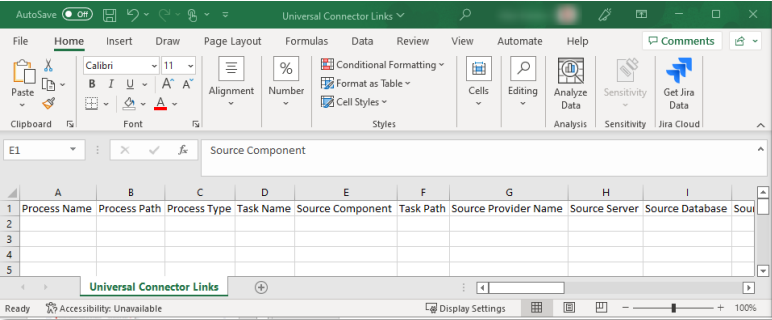
| Column Name | Description | Required |
|---|---|---|
| Process Name | Name of the process that wraps the task, for example “Workflow” in Informatica or “Package” in SSIS. This field is part of the object's identity; differing values create separate objects. | No |
| Process Path | Path of the process – for example, the path where the SSIS package is stored, including the package name and suffix (aaa\bbb\ccc\Package Name.dtsx). This field is part of the object's identity; differing values create separate objects. | No |
| Process Type | The type of process – job, map, package, and so forth. | Yes |
| Process Description | Short process description to be identified clearly in the lineages. | No |
| Task Name | The task name – the atomic unit that holds the data flow within the process. This field is part of the object's identity; differing values create separate objects. | Yes |
| Task Path | The path of the task – the location of the atomic unit that runs the process (for example, aaa\bbb\ccc\Package Name\container\Task Name). This field is part of the object's identity; differing values create separate objects. | No |
| Source Provider | The type of database that the source object connects to (for example, Oracle or SQL Server). See Supported script parsing providers. | Yes (required when Source Sql is populated) |
| Source Component | The name of the logic component in the ETL tool. Example: for Informatica, the name of the aggregator in the map. When there is no component, enter the table name. | No |
| Source Server | Server name of the source object. | No |
| Source Database | Database name of the source object. | Yes (optional when Source Sql is populated and specifies the
database) |
| Source Schema | Schema name of the source object. | Yes (optional when Source Sql is populated and specifies the
schema) |
| Source Object | Name of the source object. Leave empty when Source Sql is populated; any value
entered is ignored. |
Yes (leave empty when Source Sql is populated) |
| Source Column | When Source Sql is populated, the column name parsed from the source SQL that
maps to the target column on the same row, and can be left empty. Otherwise, the column name in the source
object. |
Yes (optional when Source Sql is populated) |
| Source Data Type | Data type of the column. | No |
| Source Precision | Precision of the column. | No |
| Source Scale | Scale of the column. | No |
| Source Type | Type of source object, such as Table or View. Optional when you use a source
SQL script; use this field only to distinguish components that share the same name.
Required when Source Sql is not populated. |
Yes (optional when Source Sql is populated) |
| Source Sql | The SQL query that retrieves the source data. When populated, Cloudera Data Lineage parses the script regardless of values in other source fields. If the script specifies schema, database, or server explicitly, those values take precedence. Otherwise, populated template columns are required and used. | No |
| Target Provider | The type of database that the target object connects to (for example, Oracle or SQL Server). See Supported script parsing providers. | Yes (required when Source Sql is populated) |
| Target Component | Name of the logic component in the ETL tool. Example: for Informatica, the name of the aggregator in the map. When there is no component, enter the table name. | No |
| Target Server | Server name of the target object. | No |
| Target Database | Database name of the target object. | Yes |
| Target Schema | Schema name of the target object. | Yes |
| Target Object | Name of the target object. | Yes |
| Target Column | Column name in the target object. | Yes |
| Target Data Type | Data type of the column. | No |
| Target Precision | Precision of the column. | No |
| Target Scale | Scale of the column. | No |
| Target Type | The type of target object, such as Table, View, or Stored Procedure (SP). | Yes |
| Expression | Formula or transformation between source column and target column. | No |
| Link Type | DataFlow or ImpactAnalysis. | No (default = DataFlow) |
| Link Description | Documentation about the link. | No (default = empty string) |
Troubleshoot
Match the symptom to a cause and resolution.
| Symptom | Cause | Resolution |
|---|---|---|
| One logical ETL object appears as multiple or duplicate objects | Process Name, Process Path, Task Name, and Task Path are not identical across rows that should consolidate. A differing Process Path or Task Path is the most common cause. | Verify that all four fields match across those rows. To merge rows into one object, see How ETL objects are consolidated (object identity). |
Supported script parsing providers
Supported parsing providers for scripts:
DB2HIVEIMPALAMSSQLSYNAPSE(MSSQL)NETEZZAORACLEPOSTGRESQLREDSHIFTTERADATASNOWFLAKEVERTICABIGQUERYHANA
Example for ETL process on cross-system lineage
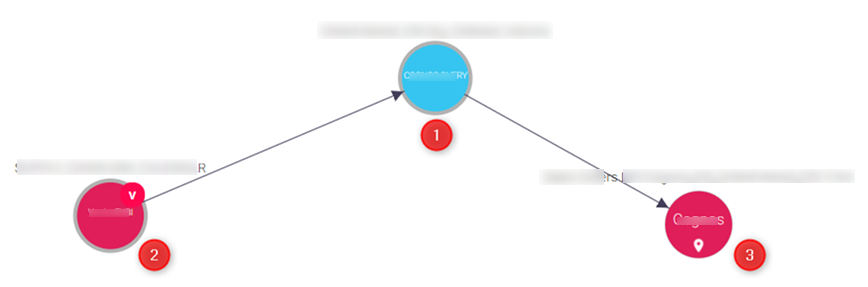
The Custom Lineage Connector links the source and the target for the task name as the main object.