Custom Lineage Connector for Reports
Use the Custom Lineage Connector (formerly Universal Connector) Reports CSV template to describe reporting assets and their connections to data sources so that Cloudera Data Lineage (formerly Octopai) can integrate metadata from reporting and BI tools beyond native connectors.
The Cloudera Data Lineage platform supports expansive analysis and visualization scenarios. The Custom Lineage Connector for Reporting Tools integrates metadata from a diverse range of systems that are not covered by native connectors (for example Tableau, Power BI, Cognos, MicroStrategy, Qlik, Looker, SSRS, and similar tools). You can build a more complete view of your data ecosystem, with data lineage, discovery, and catalog content aligned and connected with the rest of your environment.
This guide explains the Custom Lineage Connector Reports CSV structure.
How to use the Reports template file
- Download the template file: Custom Lineage Connector Reports
- Fill in the required fields in the template file using the information provided in the table below.
| Column Name | Description | Required |
|---|---|---|
| Model Name | The name of the model, such as the name of the package in Cognos, the RPD name in OBIEE, or the Universe name in Business Object. | Yes |
| Report Path | The unique path of the report, per ConnectionID. | Yes |
| Report Name | The name of the report. | Yes |
| Source Provider | The type of database that the report connects to. See Supported script parsing providers. | Yes (required when Source Sql is populated) |
| Source Layer Name | The name of the source layer or semantic object that contains the source object or column. | No |
| Source Server | The server name of the source object. | No |
| Source Schema | The schema name of the source object. | Yes (optional when Source Sql is populated and specifies the
schema) |
| Source Db | The database name of the source object. | Yes (optional when Source Sql is populated and specifies the
database) |
| Source Object | The name of the source object. Leave empty when Source Sql is populated; any
value entered is ignored. |
Yes (leave empty when Source Sql is populated) |
| Source Column | When Source Sql is populated, the column name parsed from the source SQL that
maps to the target column on the same row, and can be left empty. Otherwise, the column name in the source
object. |
Yes (optional when Source Sql is populated) |
| Source Data Type | The data type of the column. | No |
| Source Type | The type of source object, such as Table, View, or Stored Procedure (SP).
Optional when you use a source SQL script; use this field only to distinguish
components that share the same name. Required when Source Sql is not populated. |
Yes (optional when Source Sql is populated) |
| Source Precision | The precision of the column. | No |
| Source Scale | The scale of the column. | No |
| Source Sql | The SQL query that retrieves the report's source data. When populated, Cloudera Data Lineage parses the script regardless of values in other source fields. If the script specifies schema, database, or server explicitly, those values take precedence. Otherwise, populated template columns are required and used. | No |
| Target Server | The server name of the target object. | No |
| Target Layer Name | The name of the component in the report, such as a table, cross-tab, chart, etc. | Yes |
| Target Schema | The schema name of the target object. | No |
| Target Db | The database name of the target object. | No |
| Target Table | The table name in the target object. | No |
| Target Column | The column name in the target object. | Yes |
| Target Data Type | The data type of the column. | No |
| Target Precision | The precision of the column. | No |
| Target Scale | The scale of the column. | No |
| Link Description | Documentation about the link. Default = Null. | No |
| Link Type | Data Flow or Impact Analysis. Default = Data Flow. | No |
| Expression | The formula or transformation between the source column and target column. | No |
Supported script parsing providers
Supported parsing providers for scripts:
DB2HIVEIMPALAMSSQLSYNAPSE(MSSQL)NETEZZAORACLEPOSTGRESQLREDSHIFTTERADATASNOWFLAKEVERTICABIGQUERYHANA
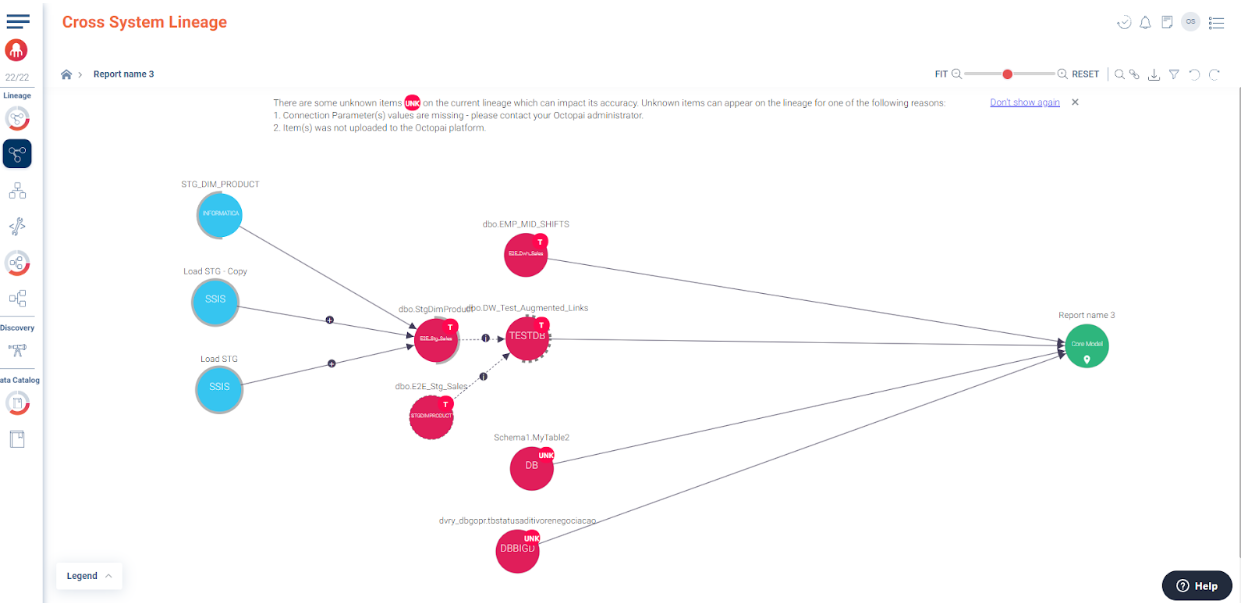
Example for report cross-system lineage
Example of a report cross-system lineage created as part of an upload of the Custom Lineage Connector: