Microsoft Fabric Lakehouse [Technical Preview]
The Cloudera Data Lineage (formerly Octopai) Microsoft Fabric Lakehouse connector is used to integrate Microsoft Fabric Lakehouse environments into the Cloudera Data Lineage platform, enabling centralized metadata management and comprehensive data lineage.
Overview
Before you set up the Microsoft Fabric Lakehouse connector, ensure that you have the following requirements:
- Microsoft Entra application credentials: a registered service principal with a tenant ID, application (client) ID, and client secret. See Application registration (service principal).
- Microsoft ODBC Driver 18 for SQL Server: installed on the Windows machine that hosts the Cloudera Octopai Client for SQL endpoint connectivity. See SQL access (ODBC).
- Microsoft Fabric API permissions: application API
permissions assigned to the service principal, including
Lakehouse.Read.Alland related scopes. See Required application permissions. - Fabric workspace permissions: the Contributor role assigned to the service principal on the target workspace. See Workspace permissions.
- OneLake access: required for extracting metadata from Lakehouse files, folders, and file shortcuts through the Microsoft OneLake Distributed File System (DFS) endpoint.
- Shortcut access: required when the Lakehouse contains shortcuts* to another workspace or to external storage.
Microsoft Fabric Lakehouse metadata extraction uses both the Lakehouse SQL endpoint and OneLake APIs. The SQL endpoint is used for Delta tables, columns, schemas, views, stored procedures, and functions. OneLake access is used for files, folders, and file shortcuts.
Application registration (service principal)
- In the Azure portal, open , and select New registration.
- Provide a name for the application, and select Accounts in this organizational directory only.
- Select Register.
- From the application overview page, record the Directory (tenant) ID and Application (client) ID.
- Create a Client secret under .
- Microsoft Fabric REST API access
- SQL endpoint access through ODBC using Microsoft Entra authentication
- Tenant ID
- Application (client) ID
- Client Secret Value
SQL access (ODBC)
Microsoft Fabric Lakehouse metadata extraction requires SQL connectivity through the Lakehouse SQL endpoint. Install Microsoft ODBC Driver 18 for SQL Server on the Windows machine that hosts the Octopai Client. For Windows, see Download ODBC Driver for SQL Server.
Identity prerequisites
A Microsoft Entra application registration (service principal) is required and is used for:
- API authentication
- SQL connectivity through the Lakehouse SQL endpoint
- Access to Fabric workspace items through Microsoft Fabric APIs
- Access to Lakehouse files and folders through OneLake APIs
Tenant settings (Fabric admin portal)
Use the Fabric admin portal to enable the settings required by the connector:
- Open Microsoft Fabric.
- Select Settings, and then select Admin portal.
- Open Tenant settings.
- Find and enable the Service principals can call Fabric public APIs option.
- Find and enable the Allow apps to access Fabric items option.
- Find and enable the Users can access data stored in OneLake with apps external to Fabric option.
Workspace permissions
Assign the service principal to the target workspace with the Contributor role. Contributor access is required for complete metadata extraction coverage, including:
- Stored procedures
- Views
- Functions
- Tables
- Columns
- Schemas
The Viewer role is not sufficient for full metadata extraction because it may not expose stored procedures, views, and functions.
Required application permissions
The application requires the following Microsoft Fabric API permissions:
Lakehouse.Read.AllWorkspace.Read.AllSQLEndpoint.Read.AllItem.Read.All
Network requirements
The extraction environment must allow outbound network access from the Windows machine that hosts the Cloudera Data Lineage platform to the following endpoints:
api.fabric.microsoft.com
*.fabric.microsoft.com
*.datawarehouse.fabric.microsoft.com
onelake.dfs.fabric.microsoft.com
login.microsoftonline.com
Setting up Lakehouse (Microsoft Fabric) metadata source
Metadata sources are set on the Octopai Client.
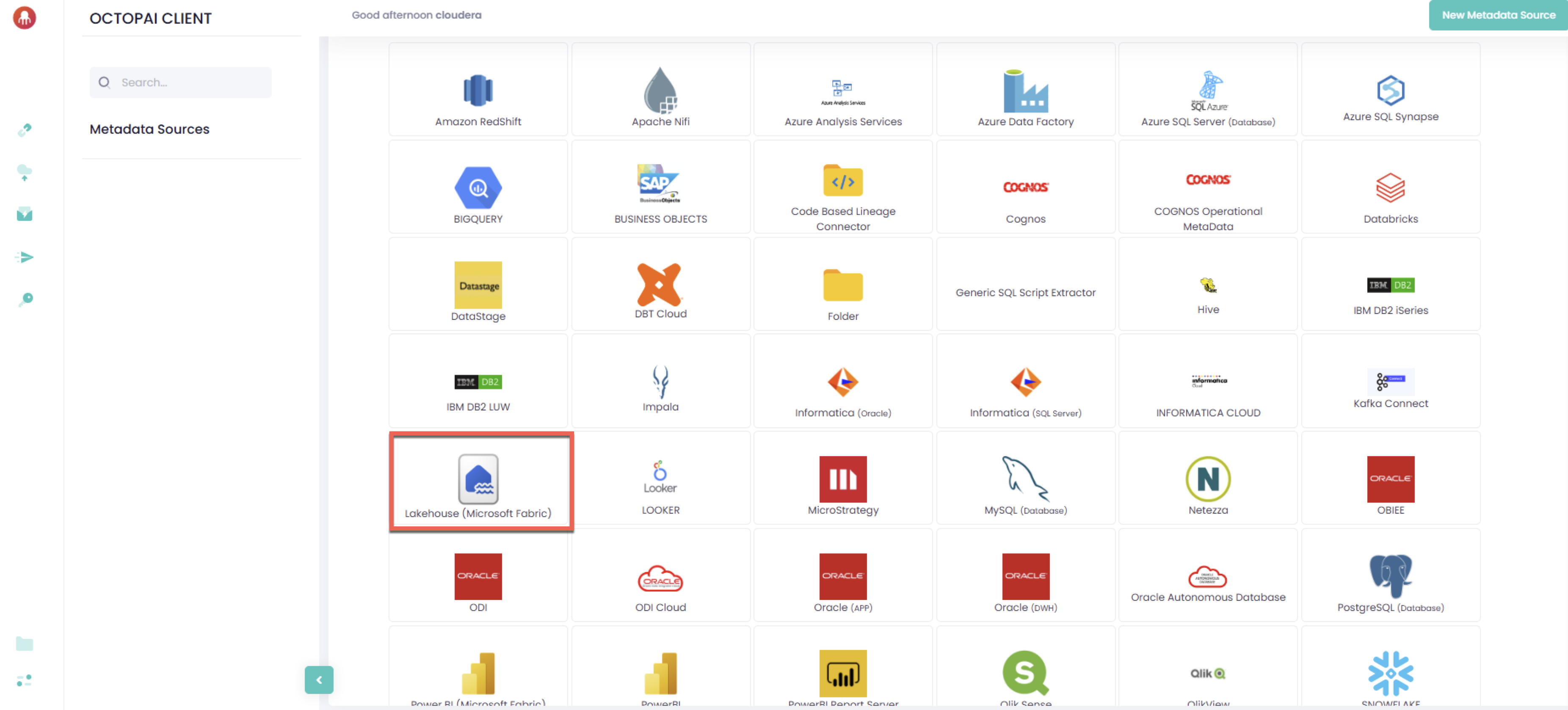
- From the Octopai Client, click the
Lakehouse (Microsoft Fabric) connector.
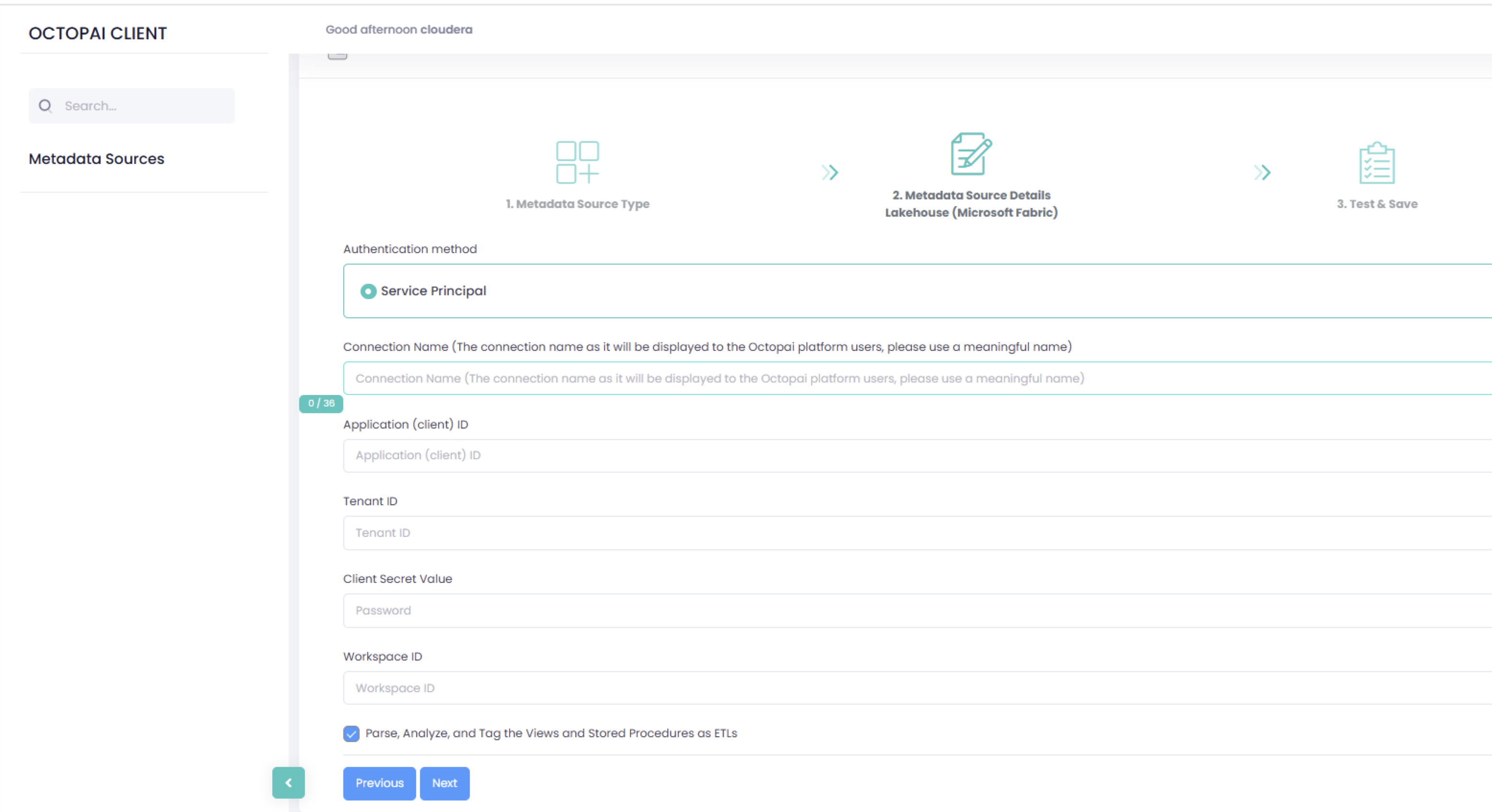
- In the New Metadata Source wizard, select the Service
Principal authentication method and enter the following details:
- Connection Name: Enter a meaningful name. The name is displayed to Cloudera Data Lineage platform users.
- Application (client) ID
- Tenant ID
- Client Secret Value
- Workspace ID
- Parse, Analyze, and Tag the Views and Stored Procedures as ETLs: (optional) Select this option when you want Cloudera Data Lineage to treat views and stored procedures as ETL objects during analysis.