Microsoft Fabric SQL Database [Technical Preview]
The Cloudera Data Lineage (formerly Octopai) Microsoft Fabric SQL Database connector requires a Microsoft Entra service principal, Fabric admin tenant settings, Fabric API permissions, ODBC connectivity, Contributor workspace access, and the SQL Database (Microsoft Fabric) metadata source wizard.
Overview
Before you set up the Microsoft Fabric SQL Database connector, ensure that you have the following:
-
Microsoft Entra application credentials: a registered service principal with a tenant ID, application (client) ID, and client secret. See Application registration (service principal).
-
Microsoft ODBC Driver 18 for SQL Server: installed on the Windows machine that hosts the Cloudera Data Lineage platform for SQL endpoint connectivity. See SQL access (ODBC).
-
Fabric admin tenant settings: settings that allow the service principal to call Fabric public APIs and access Fabric items. See Tenant settings (Fabric admin portal).
-
Fabric workspace permissions: the Contributor role assigned to the service principal on the target workspace. See Workspace permissions.
-
Microsoft Fabric API permissions: application API permissions assigned to the service principal, including
SQLDatabase.Read.Alland related scopes. See Required application permissions.
Application registration (service principal)
- In the Azure portal, open , and select New registration.
- Give the application a name, and select Accounts in this organizational directory only.
- Select Register.
- From the application overview, record the Directory (tenant) ID and Application (client) ID.
- Create a Client secret under .
The Cloudera Data Lineage Microsoft Fabric SQL Database connector authenticates using a Microsoft Entra service principal. The service principal is used for:
- Microsoft Fabric REST API access
- SQL endpoint access through ODBC using Microsoft Entra authentication
You must record the following values for configuration in Cloudera Data Lineage:
- Tenant ID
- Application (client) ID
- Client Secret Value
SQL access (ODBC)
Microsoft Fabric SQL Database metadata extraction requires SQL connectivity through the SQL endpoint. Install Microsoft ODBC Driver 18 for SQL Server on the Windows machine that hosts the Cloudera Data Lineage platform.
For Windows, see Download ODBC Driver for SQL Server.
Tenant settings (Fabric admin portal)
Use the Fabric admin portal to enable the settings required by the connector:
- Open Microsoft Fabric.
- Select Settings, and then select Admin portal.
- Open Tenant settings.
- Find and enable Service principals can call Fabric public APIs.
- Find and enable Allow apps to access Fabric items.
Workspace permissions
Assign the service principal to the target workspace with the Contributor role. Contributor access is required for complete metadata extraction coverage, including:
- Stored procedures
- Views
- Functions
- Tables
- Columns
- Schemas
The Viewer role is not sufficient for full metadata extraction because it may not expose stored procedures, views, and functions.
Required application permissions
The application requires the following Microsoft Fabric API permissions:
SQLDatabase.Read.AllSQLEndpoint.Read.AllWorkspace.Read.AllItem.Read.All
Metadata access requirements
Ensure that the service principal can access the following SQL metadata sources:
-
INFORMATION_SCHEMA: returns metadata only for objects visible to the current user. Limited permissions can result in missing objects. -
System views (
sys.*): requiresSELECTpermission or equivalent metadata visibility. Used for extracting views, stored procedures, and functions, including:sys.objectssys.sql_modulessys.schemas
Network requirements
The extraction environment must allow outbound HTTPS access over port 443 to the following endpoints for authentication and Microsoft Fabric API interaction:
api.fabric.microsoft.com*.fabric.microsoft.comlogin.microsoftonline.com
Setting up SQL Database (Microsoft Fabric) metadata source
Configure the metadata source on the Octopai Client. In the New Metadata Source wizard, on Metadata Source Type, select SQL Database (Microsoft Fabric).
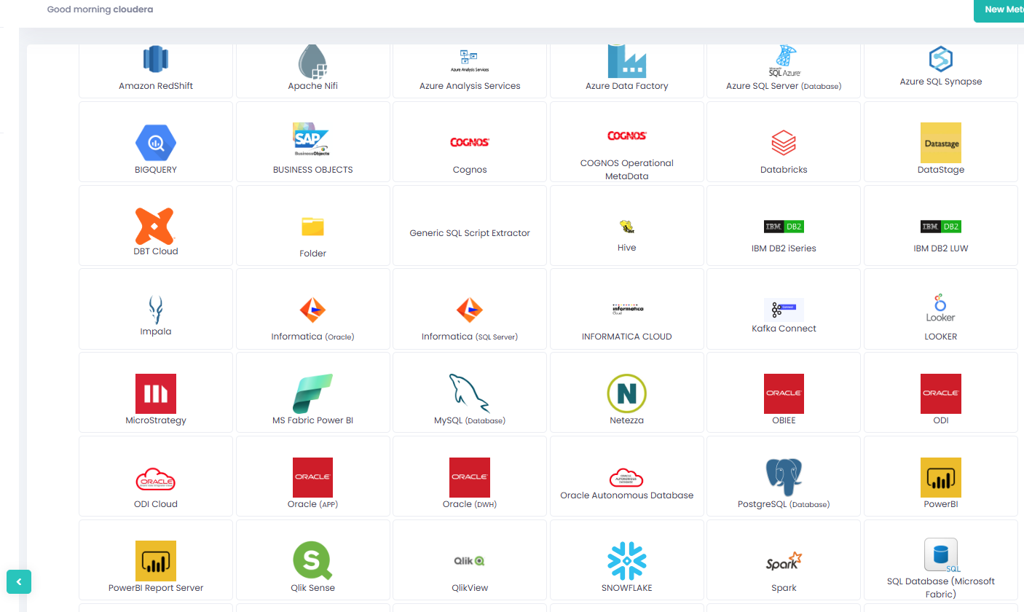
On Metadata Source Details, select Service Principal, and enter the following:
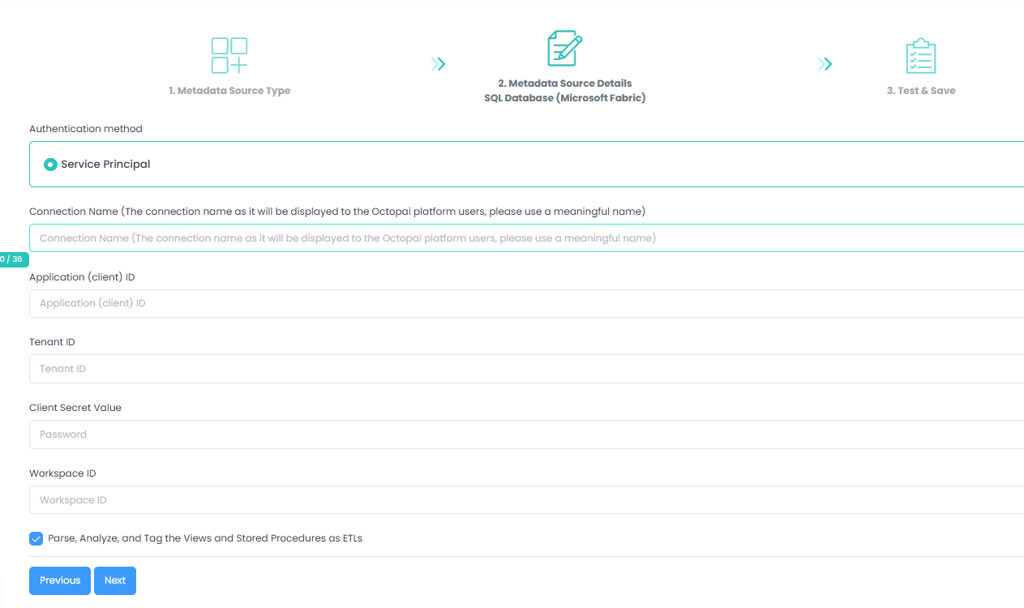
- Connection Name: Enter a meaningful name. The name is displayed to Cloudera Data Lineage platform users.
- Application (client) ID
- Tenant ID
- Client Secret Value
- Workspace ID
-
Parse, Analyze, and Tag the Views and Stored Procedures as ETLs: optional. Select this option when you want Cloudera Data Lineage to treat views and stored procedures as ETL objects during analysis.
