Configuring the Livy server
Configure Livy user access control and verify the Livy server on Cloudera.
Livy is a proxy service for Apache Spark. It accepts session and statement requests from clients, launches Spark applications on the cluster, and returns results over HTTP.
Livy supports user impersonation and access control so that multiple users can run isolated Spark sessions on a shared cluster. The following graphic shows how clients, Livy, and Spark interact:
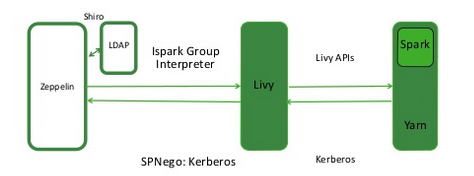
The following sections describe optional configuration steps.
Configure Livy user access control
You can use the livy.server.access-control.enabled property to
configure Livy user access.
When this property is set to false, only the session owner and the
superuser can access (both view and modify) a given session. Users cannot access
sessions that belong to other users. ACLs are disabled, and any user can send any
request to Livy.
When this property is set to true, ACLs are enabled, and the following
properties are used to control user access:
livy.server.access-control.allowed-users– A comma-separated list of users who are allowed to access Livy.livy.server.access-control.view-users– A comma-separated list of users with permission to view other users' infomation, such as submitted session state and statement results.livy.server.access-control.modify-users– A comma-separated list of users with permission to modify the sessions of other users, such as submitting statements and deleting the session.
Apply configuration changes
After you change Livy configuration in Cloudera Manager, restart the Livy service so that the new settings take effect. If you use a notebook client that caches interpreter settings, restart or refresh that client according to its documentation.
Verify that the Livy server is running
To verify that the Livy server is running, access the Livy web UI in a browser window. The default port is 8998:
http://<livy-hostname>:8998/
