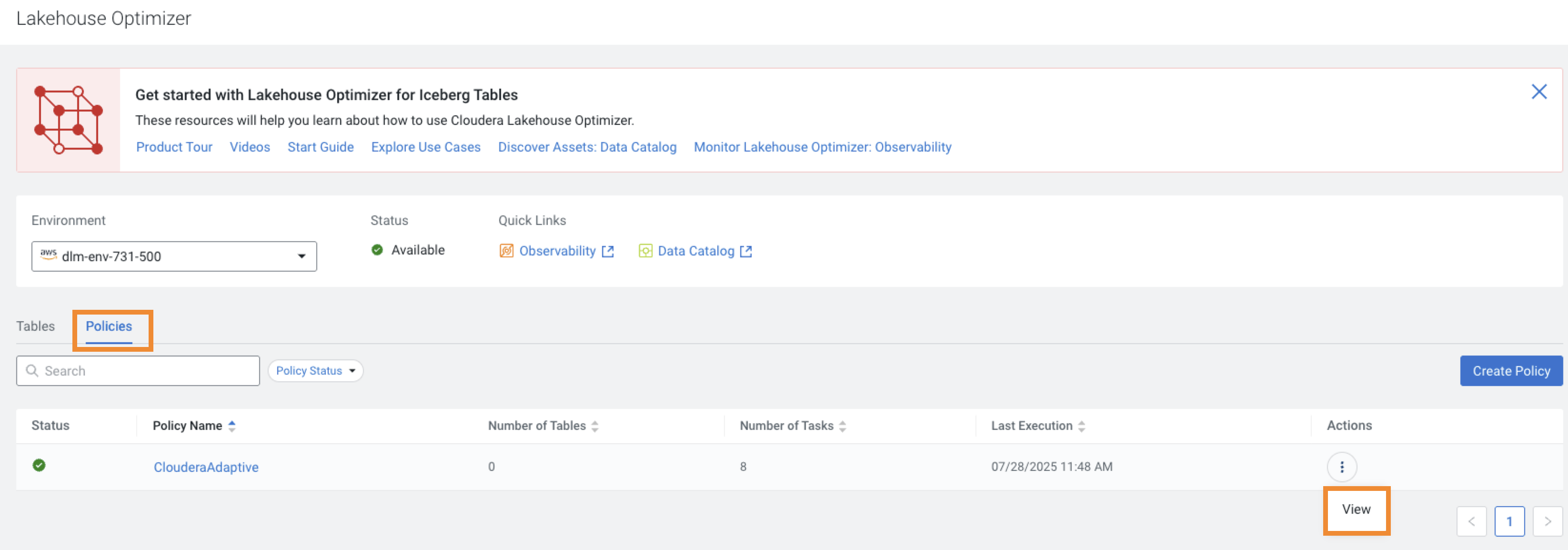
The Policies tab shows the list of existing policies for the chosen
environment. You can search for a policy, or filter the policies based on the Policy
Status.
The following image shows the Policies tab on the Lakehouse
Optimize page:
When you open the Policies tab for the first time, before you create a
policy, the default policy named ClouderaAdaptive appears. Lakehouse
Optimizer uses the default policy as a template to create the policies.
The Policies tab shows the following details:
The current Status icon for the table maintenance activity of the tables
associated with the policy.
The Number of Tables that are associated with the policy.
The Number of Tasks or maintenance tasks that ran as a result of policy
evaluation on the associated tables.
The Last Execution or the last policy run timestamp.
The icon for
each policy shows the actions menu. Select the View action to see the
policy details on the View Policy page.
 icon for
each policy shows the actions menu. Select the View action to see the
policy details on the View Policy page.
icon for
each policy shows the actions menu. Select the View action to see the
policy details on the View Policy page.